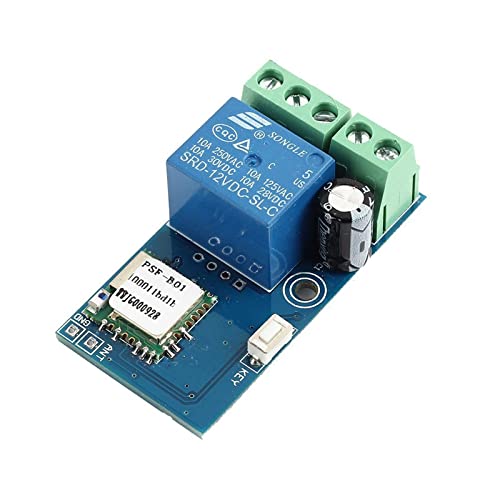
WHDTS WiFi Switch Relay Momentary Inching & Self-Locking Relay Delay Switch Module Smart Home Remote Control DC 12V Compatible with iOS Andriod 2G/3G/4G Network

Product Description
WHDTS WiFi Switch Relay Momentary Inching & Self-Locking Relay Delay Switch Module Smart Home Remote Control DC 12V Compatible with iOS Andriod 2G/3G/4G Network
<b>Wanna Control Your Home Thousands of Miles Away?</br>Wanna Control Your Appliances With Only One Cellphone?</br></br>This WiFi Relay Switch Module Born for It.</b> It is designed to provide you with a seamless control over your home equipment. It supports Both <b>Self-locking Relay Mode</b> And <b>Inching Relay Mode.</br>Self-locking Relay:</b> It latches like a toggle switch. Press the button on "eWeLink" APP, relay switch module will keep on. Press the button again, relay switch module will be off.</br><b>Inching Relay:</b> It's Momentary like a pushbutton switch. Press the button on "eWeLink" APP, relay switch module will keep on for 0.5s and then off automatically. </br><b>Note:</b> The relay switch module can switch between these two modes (method as shown in <b>User Manual</b>).</br></br><b>Features:</b></br>1.Remote Control Added Devices Through APP</br>2.Status Tracking. Home appliances' status will be fed back into your APP timely.</br>3.Supports ①Scheduled Timing ②Countdown Timer ③Loop Timing ④Grouping Function ⑤Smart Scene ⑥Share Control ⑦ Numerous WIFI Switches W/ One Account.</br></br><b>Using Steps:</b></br> ①Power ON the Module Device, ②Download eWeLink APP (requires 2.4 GHz wifi signal for device), ③Connect the APP to Same WIFI that Connected Module, ④Add Devices (hold down pairing button for >6 seconds, release, flashing light = pairing mode), ⑤Setup Work Mode, ⑥Done.</br>For Specific Instruction & Operation Steps, please download <b>User Manual</b> on the Product Page Named <b>"Technical Specification" </b>Section (<b>Due To Character Limit).</br></br>Parameters:</b></br>Work Voltage&Current: DC12V; 250mA</br>Load Voltage&Current: AC0-250V or DC0~30V; 10A/Channel(MAX)</br>Output Type: Mechanical switch output(Cannot Output Voltage!)</br>Control Mode: WIFI/2G/3G/4G; WIFI standard: 2.4GHz</br>Work Modes: Self-locking Mode (Default) & Inching mode</br></br><b>After-sale Service:</b></br>Any issues, please feel free to <b>Contact Us</b> for help.
Technical Specifications
You might also like
4 Channel WIFI Momentary Inching Relay Self-lock Switch Module,DIY WIFI Garage Door Controller (5-32V)
inShareplus 12V LED Strip Power Supply 2A 24W, Wall Mounted 12V Switching Power Supply, 110V to 12 Power Supply for LED Strip Light with 5.5/2.1 DC Female Barrel Connector to Screw Adapter

MHCOZY WiFi Wireless Smart Switch Relay Module for Smart Home 5V 5V/12V,Ba applied to access control, turn on PC, garage door (5v)
MHCOZY WiFi Wireless Smart Switch Relay Module for Smart Home 5V 5V/12V,Ba applied to access control, turn on PC, garage door (2CH WIFI Inching Relay)
Sonoff Basic Smart Remote Control Wifi Switch Compatible with Alexa DIY Your Home via Iphone Android App (Sonoff 4Pack)
Sonoff WiFi Switch Pack of 6 Wireless Remote Control Electrical for Household Appliances Compatible with Alexa DIY Your Home via Iphone Android App

PEMENOL 12V WiFi Relay Switch Module Wireless Inching & Self-Locking WiFi Smart Relay Switch for DIY Smart Home Turn on PC Garage Door Compatible with iOS Android 2G/3G/4G Network

SunFounder WiFi Relay USB DC 5V Relay Module Smart Home Wireless Switch Controller with APP, Ba Applied to Access Control, Turn on PC, Garage Door,Learning Program
YEMIUGO 12V WiFi Relay Switch Module Inching & Self-Locking Switch Module High Powe 15A APP Smart Relay Delay Switch Module for DIY Smart Home Compatible with Alexa Google Nest
WiFi Momentary Inching Relay Self-Locking Switch Module, AC 90-264V WiFi Relay Switch Module Tuya APP Remote Control Switch Relay Module, Compatible with Alexa Echo Google Home