
VAVA 8-in-1 USB C Hub with 1 Gbps Ethernet Port, 100W Pd Charging Port, 4K HDMI Port, SD/TF Card Reader, USB 3.0 Port for MacBook & USB C Laptops
Product Description
VAVA 8-in-1 USB C Hub with 1 Gbps Ethernet Port, 100W Pd Charging Port, 4K HDMI Port, SD/TF Card Reader, USB 3.0 Port for MacBook & USB C Laptops
- 4K HDMI: give your computer The screen space, power and clarity of Ultra HD, with 4K UHD at 30 Hz or 2K at 60 Hz
- Gigabit Ethernet: connects to wired networks with speed and endurance where wireless connectivity is inconsistent and allows for larger downloads without interruption
- Ultra-fast Memory card reader: works with SD, SDHC, and SDXC — helping you quickly transfer high-resolution photos and videos to your Mac
- Type C PD charging: up to 100W of power is shared between all dock-connected USB-C devices and adjusted based on needs
- Ports galore: features dual USB 3.0 Ports to plug printer, or HDD with fast data transfer; one USB 2.0 designed for 2.4G wireless mouse without signal interference
<b>VAVA - Smart Made Simple</b><br><br> <b>Get Stuff Done with VAVA 8-in-1 USB C Hub</b><br> While the latest MacBook Pro and Type-C devices come with no USB port, the VAVA Type-C Hub <br>brings 2 x USB3.0 Ports, 1 x USB2.0 port, 1 x Ethernet port, 1 x 4K HDMI Port, 1 x SD Card Reader, <br>1 x TF Card Reader, 1 x Type-C PD Charging Port to be supplementary for more possibilities. <br><br> <b>Fully Compatibility</b><br> VAVA USB adapter is compatible with almost all the main version laptops in market, like Apple<br> Macbook Air (2018), Apple MacBook/ Pro (2016 / 2017/2018), Apple iMac / iMac Pro (21.5 in & 27 in). <br>Google ChromeBook Pixel, Dell, HP, Dell, Asus, HP, Lenovo and more laptops based on USB Type-C <br>Protocol (USB 3.1 & PD 3.0 & DP 1.2). Note: VAVA USB C hubs do not support iPad Pro 2018. <br><br> <b>PD Power Delivery </b><br> Power is shared between all dock-connected USB-C devices and adjusted based on needs. <br> The hub delivers about 49W for charging a connected laptop and 11W for powering the hub <br>when connected to a 60W power input. Delivers about 29W for charging the connected laptop <br>and 11W for powering the hub when connected to a 40W power input. <br><br> <b>4K Video Adapter</b> <br> simply connect with the HDMI port and you can enjoy Ultra HD (4K) @ 30Hz or Full HD (1080p) @ 60Hz with <br>high definition instantly. 4K capable display and HDMI 2.0 cable are required to achieve 3840x2160 resolution. <br><br> <b>Truly plug and play</b><br> Simply connect the hub to your Type-C laptop, USB devices or SD/TF cards with the included USB cable; <br>No additional drivers are required. <br><br> <b>Warranty</b> <br> Industry-leading 30 days worry free return and 18-month warranty & extra 12-month warranty at <br>VAVA’s website. Easy-to-reach support: warranty card/ website support/Amazon email. <br><br> <b>For better Usage</b><br> The hub can supports multiple flash drives, but can only support one external hard drive at a time due to the power requirements. <br> To avoid mutual Interference between USB 3.0 and 2.4GHz WiFi, we suggest to use the USB 2.0 port while multi-devices connected simultaneously .<br> Under full using, the max working temperature of this hub may up to 55°C, which may feel hot to touch, but should not result in any worry (The chips can work at 161.6°F /75°C). <br><br>
Technical Specifications
You might also like
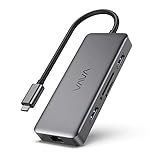
VAVA USB C Hub, 8-in-1 USB C Adapter with 4K HDMI,1Gbps RJ45 Ethernet Port, USB 3.0, SD/TF Card Reader,100W PD Charging Port for MacBook/Pro/Air and Type C Windows Laptops
—

USB C Wall Charger, Nekteck 72W USB Wall Charger with 4 USB Ports, One 60W Type C Power Delivery Port for Type C Laptops,MacBook Pro, iPad Pro 2018, and 3 Ports for Galaxy S10/S9, iPad, Pixel and More
—

Cable Matters USB C to DisplayPort Cable (USB-C to DisplayPort Cable/USB C to DP Cable) Supporting 4K 60Hz Black 6 Feet - Thunderbolt 3 Port Compatible for MacBook Pro, Dell XPS 13/15 and More
—
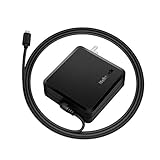
USB C Charger, Nekteck 90W Type C Wall Charger USB-IF Certified with Power Delivery,Foldable Plug, Built-in 6ft Cable for MacBook Pro/Air 2018, Google Pixel 3/2/ XL, PixelBook, Galaxy S10 S9, Nintendo
—

Anker PowerLine II USB-C to C 2.0 Cable (6ft) USB-IF Certified, Power Delivery PD Charging for Apple MacBook, Huawei Matebook, iPad Pro 2018, Chromebook, Pixel, Switch, and More Type-C Devices/Laptops
—

Baby Towel and Washcloth Set-Baby Bath Towel and Washcloth -Hooded Towel and Washcloth-Organic Bamboo Fiber Hooded Baby Towel for Boys, Girls, Kids, Toddlers, Newborn Bath Present(35 by 35in)
—

Syntech USB C to USB Adapter [2-Pack], Thunderbolt 3 to USB 3.0 Adapter Compatible MacBook Pro 2018/2017, MacBook Air 2018, Pixel 3, Dell XPS, and More Type-C Devices
—

Anker USB Type-C with Power Delivery 60W USB Wall Charger, PowerPort Speed 1 for MacBook Pro/Air 2018, iPad Pro 2018, HTC 10, Nexus 5X/6P, LG G6, Pixel C/3/2/XL, MateBook, HP Spectre, Moto Z and More
—
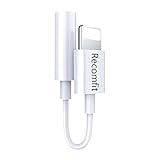
ZMI USB PD Backup Battery & Hub for MacBook 2015/MacBook Pro 2016 or later/Pixelbook/Nintendo Switch/Pixel/iPhone 8 Fast Charge External Battery Pack Portable Charger Powerbank for iPhone/iPad/Samsung
—
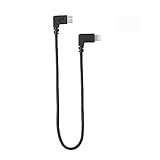
DJI Spark OTG Cable to Micro USB for Phone Controller Data Line Right Angle Nylon Adapter Cable Compatible for DJI Spark Mavic Pro Mavic 2 Pro Zoom Accessorie
—