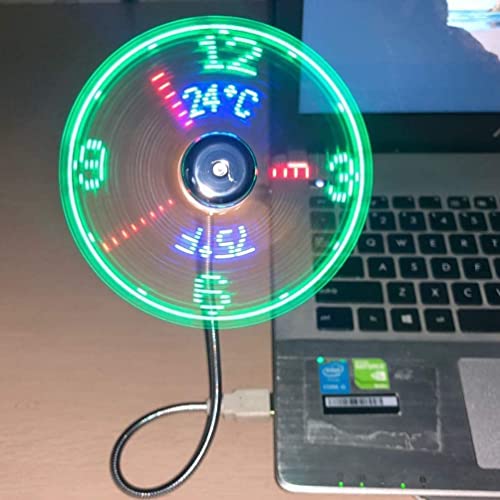
BREIS New USB Clock Fan with Real Time Clock and Temperature Display Function,Silver,1 Year Warranty

Product Description
BREIS New USB Clock Fan with Real Time Clock and Temperature Display Function,Silver,1 Year Warranty
- PVC soft fan blades are safe to use and the gooseneck is flexibly bent. Gently adjust the flexible neck to the position you need to keep cool in any position.
- Ideal for desktops and laptops, simply plug in any USB port on your laptop or PC without installing a driver.
- Gently adjust the flexible neck to positon the cool breeze anywhere you wish.
- The Temperature clock fan is a USB fan with a special blade that creates an LED clock face!
<p><b>Features:</b></p><p>1. Gently adjust the flexible neck to position the cool breeze any where you wish.</p><p>2. Super compact & lightweight.</p><p>3. USB port powered, no external power supply needed.</p><p>4. Durable soft fan blades for safe usage.</p><p> 5. No dirve, plug and play.</p><p>6. Convenient On/Off switch.</p><p>7. The clock keeps time when switched off and seting the time is easy too.</p><p></p><p><b>Setting the time:</b></p><p>1. Plug into a USB port and press the ON/OFF switch to turn fan on and to activate the clock display.</p><p>2. Press and hold the ON/OFF button until minute hand starts blinking.</p><p>3. Setting the hour hand:continue to hold ON/OFF button to set the hour hand.The clock will spin clockwise fast,release the button just before the correct hour.</p><p>4. Setting the minute hand:After the hour is set,the minute hand will flash,Click the ON/OFF button to move the minute hand forward to the correct time.</p><p>5. Leave for 6 seconds and the time is set.</p><p></p><p></p><p><b>NOTE:</b></p><p>1. Keep your hair,face and eyes away from the rotating fan blades.</p><p>2. In order to protect your USB port form damage,be careful not to press hard to the USB connector when adjusting the flexible neck.</p><p>3. When the fan is moving keep children under 3 years away from the product.</p><p>4. Please turn off the fan when you do not use it.</p><p>5.Give it a break after 4-5 hours working.It will prolong the service life.</p><p></p><p><b>Package includes:</b></p><p>1 X BREIS USB LED Clock Fan With Temperature.</p>
Technical Specifications
You might also like

ONXE USB LED Clock Fan with Real Time Display Function,USB Clock Fans,Silver,1 Year Warranty
[New] USB LED Clock Fan with Temperature, SAYTAY Mobile USB Real Time Fan Fahrenheit and Celsius Display Portable Cooling Mini USB Quiet Gooseneck Fan for Office, Home & Travel (TC)

ATECH Multifunction Pen 7 in 1 Tech Tool Pen with Ruler, Stylus, Bottle Opener, 2 Screw Driver, and Phone Stand, Multi Tool Fit for Mens Survival (Black)

The Paragon Sketch Wizard - Draw Anything Like a Pro, Easy Tracing Drawing Sketching Tool, Gadget for Kids and Adults

Mylivell LED Flashlight Glove Outdoor Fishing Gloves with Stretchy Strap Screwdriver for Repairing Cars Night Running Fishing Camping Hiking in Dark Place (1 Pair)
The Official BS Button
Rienar Universal Multi-Function Portable Spider Flexible Grip Holder for Smartphones and Tablets
Quick Charger 3.0, Pofesun 2Pack 30W QC 3.0 USB Wall Charger Adapter Dual Port Adaptive Fast Charging Block Compatible for Samsung Galaxy S10 S9 S8 Plus S7 Edge Note 8 9 10,iPhone,iPad,LG-Black,Black

16-Color Toilet Night Light, Motion Activated Detection Bathroom Bowl Lights, Unique & Funny Birthday Gifts Idea for Dad Teen Boy Kids Men Women, Cool Fun Gadgets Gag Stocking Stuffers
Electronics Organizer Travel Cable Cord Bag Accessories Gadget Gear Storage Cases (Dark Gray)