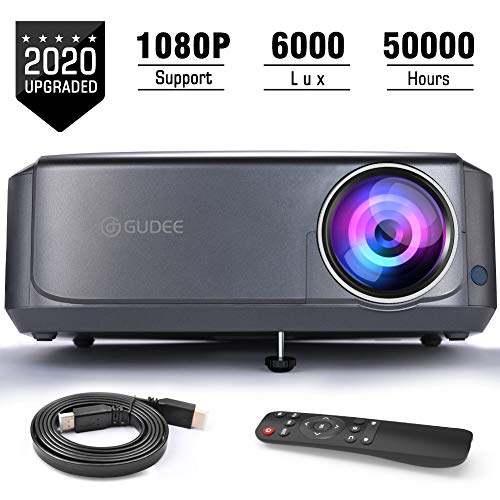
Video Projectors (Upgraded), GuDee Full HD Movie Projector for Home Theater, 6000 Lux Overhead Projector for Business PowerPoint Presentations, Compatible with Laptop, Smartphone, HDMI, USB

Product Description
Video Projectors (Upgraded), GuDee Full HD Movie Projector for Home Theater, 6000 Lux Overhead Projector for Business PowerPoint Presentations, Compatible with Laptop, Smartphone, HDMI, USB
- 【Brighter and Crispier Images】GuDee video projector adopts the advanced 3lcd image technology with 6000 lux led lighting sources, supports 1920*1080 Resolution with 16:9/4:3 Screen Ratio and 6000:1 Contrast Ratio. GuDee projector has an adjustable 32"-200" big display size with projection distance 3.6ft-19.7ft, which offers sharp and clear images and eye-protective cinema viewing experience.
- 【Perfect for Home & Business】The 1080P full hd led projector with powerful built-in stereo speakers is designed for home movie use, the ideal indoor or outdoor movie projector for basketball match, party, gaming etc. The digital projector is also applicable for PPT/EXCEL/WORD presentation in the office, conference, classroom, and church.etc. (The darker the place is, the better effect it will be)
- 【Cooling System & Reduce Noise】 Upgraded cooling system prevents overheating itself for a longer and better performance; As well as the fan sound cut in half to give you a more immersive, authentically-reproduced audio experience. There are 4 holes in the bottom of the overhead projector for ceiling mount to show video. Come with remote makes more convenient. Just lie into your sofa and enjoy your wonderful movie time.
- 【Mulitimedia Connectivity】 This projector supports Laptop, PC, PS3/4, X-Box, TV Box, TV Stick, and Smart Phones, etc. the connection it supports via a wide range of HDMI, VGA, USB, and AV interfaces. The built-in speaker offers great and loud sound for convenient use, it also supports connecting external speakers for better sound quality to making it with an awesome movie experiences in backyard.
- 【Reliable Quality and Services】: - Gudee projectors feature secure FDA, FCC and UL certificate, and receives regular security firmware updates in US professional maintenance center. Free return & exchange service within 60-day and free technical assistance for 3 years warranty. Support service is available by email [email protected]
<b>Why choose our 1080p powerpoint projector for office presentations laptop?</b><br> Tired of the tiny TV screen with small picture when watching movies or playing games at home? Now you can relax your eyes from your television and enjoy a much larger screen.<br><p> <b>Excellent Display Performance:</b><br> √ ±15°Keystone Correction & Focus Ring <br> √ Cooling System & Low Fan Noise <br> √ HI-FI level HD Stereo Sound<br> √ Mountable from Ceiling <br> √ Height & Angle Adjustments<br> √ 50000+ LED Lamp Life<br> √ Detachable Air Filter<br><p> <b>Specifications: </b><br> Projection size: 32"-200"<br> Screen ratio: 4:3\16:9<br> Projection distance:1.1m-6m/3.6ft-19.7ft<br> LED lifetime: 50000+ hours<br> Power Supply: AC100V-260V 50Hz-60Hz<br> Native Resolution: 1280x800 pixels <br> Supported Resolution: 1920x1080 pixels <br> Keystone: Manual correction ±15°<br> Weight: 5.5 Pounds<br> Video projector size:12"x10"x4.5"<br> Applications: Home, Office, Classroom, Church, Backyard, Wedding, Indoor, Outdoor<br><p> <b>Package Lists:</b><br> 1 x LCD Projector & Lens Cap<br> 1 x HDMI Cable<br> 1 x Power Cable<br> 1 x 3 in 1 AV Cable<br> 1 x Remote control (battery is not included)<br> 1 x Big Screw<br> 2 x Fuse wire<br> 1 x User Manual<br> 1 x Warranty Card<br><p> <b>Helpful Tips:</b><br> (1)If you want to connect it with smartphone:<br> For iphone: A Lighting to HDMI Adapter is needed(not included).<br> For Android: Extra Micro USB/Type C to HDMI Adapter (not included)<br> You can also connect it with smartphone via WiFi Dongle Display(not included)<br> (2)For all projectors, the screen edge is not as clear as the center.<br> (3) To connect external speakers for a better sound experience, make sure that the built-in stereo speakers are turned off.<br> (4)Please note the projector remote is only used to control the projector. If you want to do any action on PPT slides and excel, please control it from your computer or ppt clicker.<br>
Technical Specifications
You might also like

USA Gear Video Projector Case, Large Carry Case for Projectors - Compatible with DBPOWER, ViewSonic, Epson, BenQ, and More - Scratch-Resistant, Shoulder Strap and Customizable Dividers
Mount-It! Mobile Projector Stand, Rolling Height Adjustable Laptop and Projector Presentation Cart and Trolley, Black

Projector Screen with Stand, TaoTronics Indoor Outdoor Projection Screen 4K HD 100'' 16: 9 Wrinkle-Free Design(Easy to Clean, 1.1Gain, 160° Viewing Angle & Includes a Carry Bag) for Movie, Meeting

Universal Laptop Projector Tripod Stand - Computer, Book, DJ Equipment Holder Mount Height Adjustable Up to 35 Inches w/ 14'' x 11'' Plate Size - Perfect for Stage or Studio Use - PylePro PLPTS2

DinoFire Wireless Presenter, Hyperlink Volume Control Presentation Clicker RF 2.4GHz USB PowerPoint Clicker Presentation Remote Control Pointer Slide Advancer (Black)
DYNAVISTA Full Motion Universal Ceiling Projector Mount Bracket with Adjustable Height and Extendable Arms Rotating Swivel Mount for Home and Office Projector (Black)
AmazonBasics 16:9 Pull Down Projector Screen - 80 Inch, White
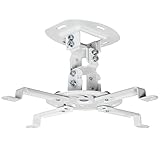
VIVO Universal Adjustable White Ceiling Projector | Projection Mount Extending Arms Mounting Bracket (MOUNT-VP01W)

Elite Screens Manual B, 100-INCH 16:9, Manual Pull Down Projector Screen 4K / 8K Ultra HDR 3D Ready with Slow Retract Mechanism, 2-YEAR WARRANTY, M100H