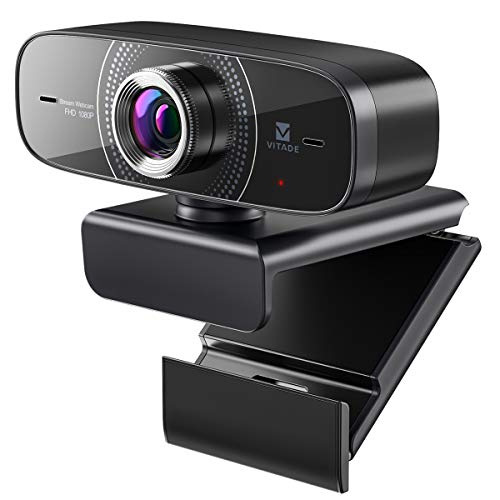
Webcam 1080P with Microphone HD Web Cam 30fps, Vitade 826M USB Computer Web Camera Cam for Streaming Gaming Conferencing Mac Windows 8 10 PC Laptop Desktop Zoom Skype OBS Twitch YouTube, Plug & Play
Product Description
Webcam 1080P with Microphone HD Web Cam 30fps, Vitade 826M USB Computer Web Camera Cam for Streaming Gaming Conferencing Mac Windows 8 10 PC Laptop Desktop Zoom Skype OBS Twitch YouTube, Plug & Play
- WEBCAM HD 1080P ➤ With the excellent performance of quintuple glass lens and full HD 1080P/30fps, you can enjoy vivid and realistic streaming distribution. Perfect for streaming on social media and gaming such as OBS, Zoom, Skype, Twitch, Youtube, Facebook, Xbox one, GoReact. ★Vitade offers 30 days money back & 1-years worry-free guarantee & friendly customer service★
- STEREO MICROPHONE ➤ 826M usb camera built-in dual omni-directional mics with noise cancellation effectively reduces distracting background noise for natural and clear sound. In addition, the noise reduction function allows your voice to reach the other party clearly even in a noisy environment. Clearly pick up audio at 15 feet (about 5 meters), which is super convenient for multi-person meetings.
- LIGHT CORRECTION & MANUAL FOCUS➤ Automatic low-light correction provide true-to-life video even in dim or overexposed lighting conditions. Web camera with adjustable manual focus allows you to find the fit angle in your live streaming or video conferencing. Make you can enjoy videophone calls such as Zoom and Skype more smoothly.
- WIDE-ANGLE LENS 110° & 360° ANGLE ADJUSTMENT➤ Unlike most webcam clips only rotating 90°, 826M webcam plate can rotates 360° freely. You can shoot in all directions indoors. In addition, webcam with 110° wide angle lens captures high definition imageYou can adjust the viewing angles as you like. Tripod-ready universal clip fits all computers, laptops, Mac, LCD or monitors. (*Tripod must be purchased separately)
- PLUG & PLAY➤ Quick and easy setup in 1 minute. No drivers needed. Compatible with Mac OS/Windows 2000/XP/Vista/Win7/Win8/Win10/Linux etc. Works with social media and gaming such as Zoom, Skype, OBS, Twitch, YouTube, Facebook, Xbox One, GoReact and more. (If you are unstable to access Windows 10's preinstalled Skype, please go to the Skype official website to download the desktop version.)
Technical Specifications
You might also like
Skque Universal Leather Case Cover Stand with Micro Cable Keyboard for 10 Inch Tablets, Black [NEW Updated Version]

NEOGLORY Blue Crystals Heart Love Shaped Necklaces Jewelry, Heart of The Ocean Necklace from Titanic Crystal Pendant for Women Gift 18+2inch

Jockey Men's Underwear FormFit Lightweight Seamfree Thong, Black, XL
MYJS Bella Rhodium Plated Mini Drop Earrings with Aquamarine Blue Swarovski Crystals

Feline Natural New Zealand Canned Catfood Wet Food, High-Meat, Low-Carb, & Grain Free Cat Food Wet, Chicken & Venison Feast, 6 oz, Pack of 12
Auto Transmission Service Kit (Oil Pan+Filter+Gasket+24 Bolts + Pump) + 6L ATF for BMW Select Models (ZF-6HP19 Trans.)

Magic The Gathering - Dragonlord's Servant (138/269) - Dragons of Tarkir

XIAOMI Redmi Note 15 Pro 5G Ai (Compatible with Tmobile Mint Tello & Global) (512GB + 8GB) NFC 6.83" 120Hz 200MP Pro AI Camera Model 25080RABDG Unlocked Dual Sim Liberado (Black)