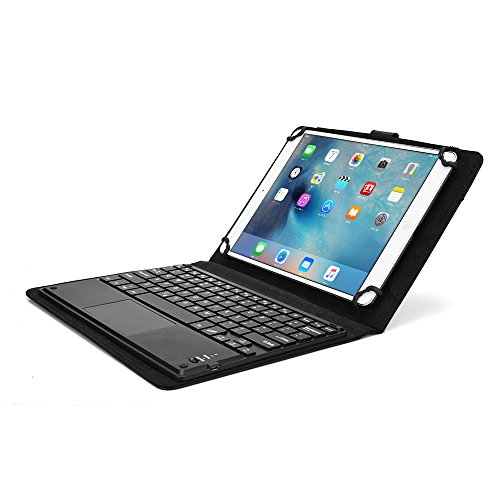
Asus ZenPad 10 keyboard case, COOPER TOUCHPAD EXECUTIVE 2-in-1 Wireless Bluetooth Keyboard Mouse Leather Travel Cases Cover Holder Folio Portfolio + Stand Z300C (Black)
Product Description
Asus ZenPad 10 keyboard case, COOPER TOUCHPAD EXECUTIVE 2-in-1 Wireless Bluetooth Keyboard Mouse Leather Travel Cases Cover Holder Folio Portfolio + Stand Z300C (Black)
- UNIVERSAL DESIGN TO FIT ASUS ZENPAD 10 - designed to fit any tablet with 9'' to 10.5'' inch screen including Z300C models. Rubberized, silicon covered scratch proof claws tightly fit on 4 corners to hold tablet securely. Claws expand from 6.5'' to 7.35'' width (165-187 mm) & 9.25'' to 10.7'' length (235-272 mm). Open sides provide easy access to all tablet ports, buttons and speakers.
- 2-in-1 LEATHER FOLIO CASE WITH STAND & DETACHABLE KEYBOARD - multi purpose functionality > use as compact keyboard folio case or classic folding folio tablet case. Foldout stand supports hands free screen display. Remove magnetic keyboard tray to turn keyboard cover into classic portfolio case. Premium faux leather protective exterior provides durable, rugged, shockproof cushion when dropped. Soft suede microfiber interior protects screen from scratches and breaking.
- BLUETOOTH 3.0 RECHARGEABLE KEYBOARD WITH TOUCHPAD MOUSE FOR ASUS ZENPAD 10 - QWERTY keyboard compatible with Android and Windows. Control mouse on screen with built-in touchpad (right / left mouse click on touch pad). Easy setup Bluetooth automatically connects with tablet. Features 81 laptop-like keys; 16 shortcut keys to tablet's native functions; 10m range; 100 hour rechargeable lithium battery.
- IDEAL FOR TYPING IN BUSINESS, SCHOOL, TRAVEL OR HOME - designed to stand your tablet hands free so you can focus on work, reading, watching videos, typing like on normal computer laptop. Executive carrying looks great for man, woman, students, boys, girls, kids and teens in school. Weighs same as 3x billiard / pool balls - 517 g / 1.1 lbs.
- RISK-FREE PROMISE - If this case doesn't make typing and using mouse on tablet easier, doesn't convert your tablet into a laptop and doesn't make you work & study faster, then you are entitled for a full 100% refund - no questions asked! All stock shipped from USA. Next day delivery available with Express shipping (excl. remote areas).
<b>QWERTY Keyboard with 16 Shortcut Buttons</b><br> The keyboard cover offers easy typing with QWERTY key layout and built-in touchpad mouse. Top row of buttons has 15 shortcut keys for quick access to tablet's native functions. <br><br> <b>Features</b><br> - Universal design fits a range of 9-10.5'' sized tablets including Asus ZenPad 10<br> - Premium faux-leather cover with soft microfiber inner lining & buckle closure<Br> - Built-in, collapsible kickstand for hands-free display<br> - Scratch proof, silicon coated corner claws allow for clear access to tablet's buttons and ports<br> - Easy to remove magnetic keyboard tray<br> - Wireless Bluetooth 3.0 connection - up to 10 meters working distance<br> - Mouse touchpad with right & left click. Compatible with Windows 10, Android<br> - English QWERTY 81 key keyboard with 15 hotkeys including Home, Search, Select All, Copy, Paste, Cut, Email, Switch Language, Previous Song, Play/Pause, Next Song, Volume Down, Volume Up, Mute, Lock<br><br> - 450 mAh rechargeable lithium battery (100 hour work time, 2 hour recharge)<br> - 275mm x 195mm x 30mm / 10.8in x 7.7in x 1.18in<br> - 517 grams / 1.1 pounds weight (like 3x Billiard / Pool balls)<br> - Package contents: 1x Keyboard case, 1x Manual, 1x Charging cable<br> - PRODUCT WARRANTY only valid when purchased from Authorized distributors (Tablet2Cases)<br><br> <b>How To Pair Your Device</b><br> - Before first use charge Keyboard for 6+ hours<br> - Insert tablet into case. Place 2 tablet corners into claws then stretch remaining claws over unlocked tablet corners.<br> - Turn on/off switch to ''on'' (Bluetooth light will light for 3 seconds, then switch off to save battery)<br> - Push FN+C keys (Bluetooth light will flash)<br> - On your device go to Settings > Bluetooth<br> - Turn Bluetooth on<br> - Search for available devices<br> - Choose ''Bluetooth keyboard'' to connect<br> - Type pairing code on screen (if prompted)Asus ZenPad 10
Technical Specifications
You might also like

ASUS ZenPad 10.1", 2GB RAM, 16GB eMMC, 2MP Front / 5MP Rear Camera, Android 6.0, Tablet, Dark Gray (Z300M-A2-GR)

ASUS ZenPad 10.1", 2GB RAM, 64GB eMMC, 2MP Front / 5MP Rear Camera, Android 6.0, Tablet, Dark Gray (Z300M-C2-GR)

SPARIN ASUS ZenPad 10 (Z300M/Z300C/Z300CL/Z300CG) 10.1 Inch Screen Protector [Tempered Glass], Screen Protector for ASUS ZenPad 10 (Z300C / Z300M)

Bobj Rugged Case for ASUS ZenPad Z300, Z300CX, Z300C, Z300CG, Z300CL, P023, Z300M, P00C, P01A - BobjGear Custom Fit - Patented Venting - Sound Amplification - BobjBounces Kid Friendly (Bold Black)