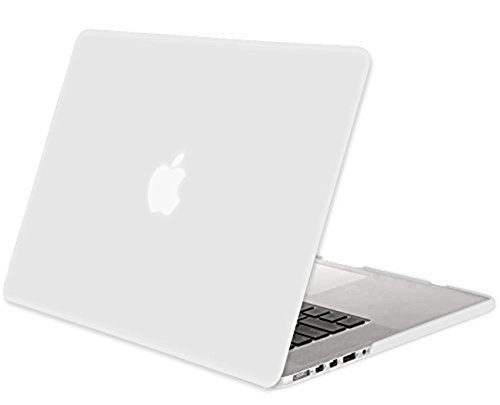
MacBook-Pro-15-inch-Case-with-Retina-Display-NO-CDROM-Drive-Mosiso-Retina-154-SoftTouch-Plastic-Hard-Case-Cove

Product Description
MacBook-Pro-15-inch-Case-with-Retina-Display-NO-CDROM-Drive-Mosiso-Retina-154-SoftTouch-Plastic-Hard-Case-Cove
- Prefect fit for NEW Macbook PRO 15" A1398 with Retina Display (No CD-ROM Drive)
- Protects your MacBook Pro from scrapes and scratches.
- Fully access to all buttons and features. Snap on design, easy on easy off.
- Fully vented for safe heat disbursement * No Cut Out Design.
- Plug your charger, cable or headset without removing the case
<b>Mosiso® High Quality Soft-Touch Plastic Hard Case Series </b> <br> <br> <b> Specifications </b> <br> <br> - Designed to fit MacBook Pro 15.4" with Retina Display A1398 <br> - Snap on design, easy on easy off <br> - Fully access to all buttons and features <br> - Plug your charger, cable or headset without removing the case <br> - Super light-weight with smooth rubberized exterior texture to protect your MacBook from scrapes and scratches <br> - Material: Polycarbonate <br> <br> <b> Case Compatible with </b> <br> <br> <b> MacBook Pro 15.4" with Retina Display </b> <br> <br> Model: A1398 <br> Newest Release 2015: MJLQ2LL/A, MJLT2LL/A <br> Release 2014 and 2013 <br> MGXA2LL/A, MGXC2LL/A <br> ME293LL/A, ME294LL/A <br> Release 2012 <br> MC975LL/A, MC976LL/A, ME664LL/A, ME665LL/A <br> <br> <b> Case NOT Compatible with </b> <br> <br> - Macbook Air 11" (A1465 / A1370) <br> - Macbook Air 13" (A1466 / A1369) <br> - Macbook Pro 13" with Retina Display (A1502 / A1425) <br> - Macbook 12" with Retina Display (A1534) <br> - Macbook Pro 13" (A1278) <br> - Macbook Pro 15/15.4" (A1286) <br> <br> <b>Installation</b> <br> <br> 1. Start with the top cover of the case. Clip the 2 clips at the back of the MacBook first. <br> 2. Pull the case slightly to the front until the 3 clips "clicking". <br> 3. Turn around the MacBook. Clip the bottom cover on the back of the MacBook first. <br> 4. Pull the case slightly to the front until the clips "clicking". <br> <br> *** Apple MacBook are registered trademarks of Apple, Inc. Products are Apple compatible and not endorsed by Apple, Inc.
Technical Specifications
You might also like

German WWI M16 Helmet Leather Liner - 7 1/4 (58 cm)

Floatie Kings Black Swan Party Pool Float - Original Giant Premium Inflatable

Festool 497427 Platin S1000 Grit Abrasives for Ro 90 Dx Sander, 15-Pack

Fotga Metal Heavy Duty C Clamp U Clip Bracket for Photo Studio Light Stand Camera Flash

The Jerry McNeal Series, a Paranormal Snapshot Collection Volume 1: (Books 1-3) Always Faithful, Ghostly Guidance, Rambling Spirit (The Jerry McNeal Series Clean & Cozy Collection)

Will to Wild: Adventures Great and Small to Change Your Life

The Big Four: Hercule Poirot series Book 5

Leonhard Seppala: The Life, Courage, and Enduring Legacy of Leonhard Seppala: The Legendary Sled Dog Musher Who Braved the Arctic and Changed History Forever