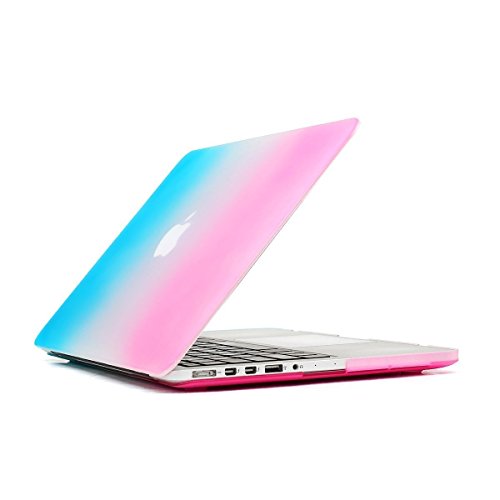
Mosiso MacBook Case Pro 15 inch with Retina Display (No CD-ROM Drive), Ultra Slim Soft-Touch Plastic See Through Hard Shell Snap On Cover for Retina 15.4"(Model: A1398), Rainbow
Product Description
Mosiso MacBook Case Pro 15 inch with Retina Display (No CD-ROM Drive), Ultra Slim Soft-Touch Plastic See Through Hard Shell Snap On Cover for Retina 15.4"(Model: A1398), Rainbow
- The case Only fits for Macbook Pro 15.4" with Retina Display No CD-ROM (A1398), No Cut Out design, transparency is different from color to color
- WARNING: This case can't Fit Macbook Pro 15"(A1286), Old Macbook with Silver Keyboard (A1260), Macbook Pro 13" with Retina Display (A1502/A1425), Macbook Air 13" (A1369/A1466), Macbook Pro 13"(A1278), Macbook White 13"(A1342), Macbook Air 11"(A1370/A1465)
- Please kindly check the model number "A1xxx" on the back of the laptop before your purchase
- Fully vented for safe heat disbursement,Fully access to all buttons and features. Snap on design, easy on easy off. Plug your charger, cable or headset without removing the case
- Mosiso 1 year warranty on case and Mosiso lifetime warranty on rubber feet
<b>Mosiso® High Quality Soft-Touch Plastic Hard Case Series </b> <br> <br> <b> Specifications </b> <br> <br> — Designed to fit MacBook Pro 15.4" with Retina Display A1398 <br> — Snap on design, easy on easy off <br> — Fully access to all buttons and features <br> — Plug your charger, cable or headset without removing the case <br> — Super light-weight with smooth rubberized exterior texture to protect your MacBook from scrapes and scratches <br> — Material: Polycarbonate <br> <br> <b> Case Compatible with </b> <br> <br> <b> MacBook Pro 15.4" with Retina Display </b> <br> <br> Model: A1398 <br> Newest Release 2015: MJLQ2LL/A, MJLT2LL/A <br> Release 2014 and 2013 <br> MGXA2LL/A, MGXC2LL/A <br> ME293LL/A, ME294LL/A <br> Release 2012 <br> MC975LL/A, MC976LL/A, ME664LL/A, ME665LL/A <br> <br> <b> Case NOT Compatible with </b> <br> <br> — Macbook Air 11" (A1465 / A1370) <br> — Macbook Air 13" (A1466 / A1369) <br> — Macbook Pro 13" with Retina Display (A1502 / A1425) <br> — Macbook 12" with Retina Display (A1534) <br> — Macbook Pro 13" (A1278) <br> — Macbook Pro 15/15.4" (A1286) <br> <br> <b>Installation</b> <br> <br> 1. Start with the top cover of the case. Clip the 2 clips at the back of the MacBook first. <br> 2. Pull the case slightly to the front until the 3 clips "clicking". <br> 3. Turn around the MacBook. Clip the bottom cover on the back of the MacBook first. <br> 4. Pull the case slightly to the front until the clips "clicking". <br> <br> *** Apple MacBook are registered trademarks of Apple, Inc. Products are Apple compatible and not endorsed by Apple, Inc.
Technical Specifications
You might also like
TopCase Faded Ombre Series Wireless Keyboard for Macbook Pro 13-Inch 15-Inch, 17-Inch with or without Retina Display, Macbook Air 13-Inch, Mix Hot Blue and Purple

HDE Rainbow Pride Color Silicone Rubber Keyboard Skin Cover for Macbook Pro (Metallic Rainbow)
TopCase Pink USB Optical Wireless Mouse for Macbook (pro,air) and All Laptop + TopCase Mouse Pad