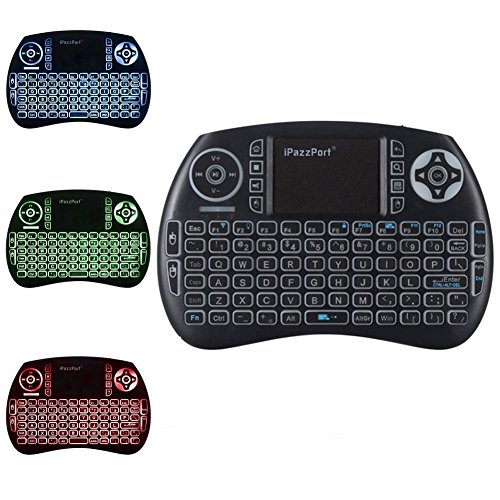
iPazzPort RGB Backlit Mini Wireless Keyboard with Touchpad for Nvidia Shield TV, Android TV Box, Smart TV, Raspberry Pi KP-810-21SDL
Product Description
iPazzPort RGB Backlit Mini Wireless Keyboard with Touchpad for Nvidia Shield TV, Android TV Box, Smart TV, Raspberry Pi KP-810-21SDL
- 3 in 1 multifunction 2.4ghz mini wireless qwerty keyboard, touchpad combo, with usb interface adapter (open the battery cover you will see it )
- The mini wireless keyboard with 3 color backlight, just hit fn+f2 to switch between colors,Much easier to use it with Nvidia ShIeld than the shields remote control in dark room.
- Qwerty keyboard with 92 keys, wireless keyboard with touchpad supporting multi-touch function, a single finger click as left mouse function
- Build-in removable rechargeable li-ion battery that with longer standby time, no worry about standby time
- Compatible with nvidia shield tv 2017 and 2018 streaming , pc, google android tv box, smart tv, htpc, iptv, Xbox 360, ps3, etc.
<b>Product description:</b><br> * 3-in-1 Multifunction 2.4GHz Mini Wireless QWERTY keyboard with built-in touchpad combo and included USB interface adapter (open the back battery lid and you will see it )<br> * The mini wireless keyboard has evenly-distributed RGB LED backlight. Just hit FN+F2 for free and convenient switches among 3 available colors in dim room. <br> * 92-key QWERTY keyboard with sensitive touchpad, supporting multi-touch function: a single-finger click(on the touchpad) acts as a click on left mouse, <br> two-finger slide as browsing up and down, and three-finger click as a click on the right mouse.<br> * Removable and rechargeable Li-ion battery guarantees longer standby time. No worry about standby time.<br> * Compatible with PC, Google Android TV Box, Smart TV, HTPC, IPTV, XBOX 360, PS3, etc with current popular OSs like Windows, Linux, Android/Google, Mac. <br><br> <b>Note:</b><br> * You can set and change the backlit colors among RED, BLUE and GREEN by holding and pressing “F2†( you can also just turn it on/off like that) .<br> * With this wireless mini combo, you can change the channels and perform other operations .<br> * smoothly and conveniently without leaving your comfortable couch.<br><br> <b>How to pair:</b><br> * In case of lose connection between USB dongle and keyboard, please follow the steps below to do re-pair procedure:<br> 1. Press button “Fn†and “F1†at the same time till the LED flashes;<br> 2. Plug USB dongle into any USB port of your computer;<br> 3. Put mini keyboard close to the USB dongle and LED goes off, which means re-pair is successful.<br><br> <b>Package includes:</b><br> 1 *Wireless Backlight Keyboard<br> 1 *USB Wireless Receiver<br> 1 *Charging Data Cable <br> 1 *User Manual<br>
Technical Specifications
You might also like

CanaKit Raspberry Pi 3 B+ (B Plus) Starter Kit (32 GB EVO+ Edition, Premium Black Case)
iPazzPort Backlit Keyboard and Bluetooth Mini Wireless Keyboard with Touchpad for Raspberry Pi and Android Smart Tv and PC KP-810-21SBL

Element14 Raspberry Pi 3 B+ Motherboard

Raspberry Pi 7" Touch Screen Display

V-Kits Raspberry Pi 3 Model B+ (B Plus) Retro Arcade Gaming Kit with 2 Classic USB Gamepads [2018 Model]

SmartiPi Touch 1 - Case for The Official Raspberry Pi 7" Touchscreen Display - Adjustable Angle

TFT Touch Screen, Kuman 3.5 inch 320x480 Resolution TFT LCD Display with Protective Case + 3 x Heat Sinks+ Touch Pen for Raspberry Pi 3 Model B, Pi 2 Model B & Pi Model B (TFT Touch Screen) ...

CanaKit Raspberry Pi 3 B+ (B Plus) with 2.5A Power Supply (UL Listed)
Miuzei Raspberry Pi 3 B+ Case with Fan Cooling and 3× Heat-Sinks, 5V 2.5A Power Supply with On/Off Switch Cable for RPi 3 B+, 3B, 2b

iPazzPort Wireless Mini Keyboard with Touchpad for Android TV Box and Raspberry Pi 3 B+ and HTPC KP-810-21S