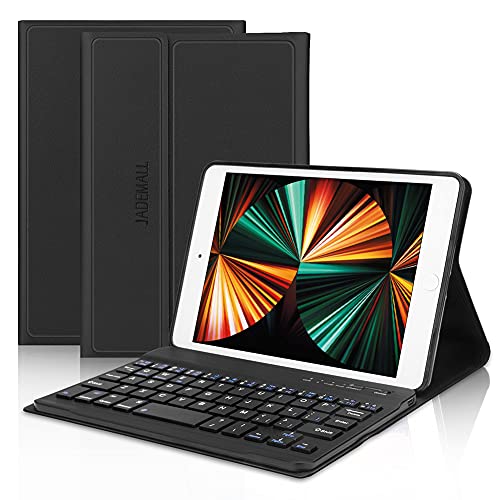
JADEMALL Keyboard Case for iPad mini 4 - iPad mini 5 Protective Cover - Wireless, Bluetooth, Magnetic - for iPad mini 3th Generation - Auto Wake & Sleep, Multi-Angle - for iPad mini 2/1 Gen - Black

Product Description
JADEMALL Keyboard Case for iPad mini 4 - iPad mini 5 Protective Cover - Wireless, Bluetooth, Magnetic - for iPad mini 3th Generation - Auto Wake & Sleep, Multi-Angle - for iPad mini 2/1 Gen - Black
<br><b>Compatible for:</b> <br>iPad Mini 5 (7.9'' 2019) inch keyboard case , iPad Mini 4 keyboard case, iPad Mini 3 keyboard case, iPad Mini 2 keyboard case and iPad Mini 1 Keyboard Case, Sleep/Wake Smart Cover Folio PU Adjustable Bluetooth Keyboard . <br> <br><b> Design </b> <br>Designed for iPad Mini 5th Gen 7.9 inch (2019 Release), iPad Mini 4 inch, iPad Mini 3 inch, iPad Mini 2 inch, iPad Mini 1 inch <br> <br><b>MULTI ANGLE VIEWING</b> <br>1.Support 180 degree rotatable to accommodate the perfect viewing angle. <br>2.Sleep/Wake function to save battery power. <br>3.Thin body design: Ultra-thin, Only 20 mm thickness. <br>4.Durable protective case, Minimalist and attractive design,Simple installation process for a comfortable typing experience. <br>5.Fantastic iPad mini 5/mini 4/mini 3/mini 2/mini 1 case tablet offers you a fantastic and colorful viewing experience and makes your iPad working and learning at night easily. <br>6.Easily adjust the viewing angle you like and ideal for working, writing, or watching videos at business, school, travel, and home. <br> <br><b>Connection method:</b> <br>1.Turn on the power switch of your Keyboard Case and keep the indicator lighting up. <br>2.Print the "FN+C". Once the Blue Teeth light hits, it means that the Blue Teeth showing "on". <br>3.Open your iPad and select "setting-universal". <br>4.Initiate your iPad the Blue Teeth function and keep the Bluetooth function showing "On" searching state. <br>5.Search for Blue Teeth devices, when the "BT 4.0 Keyboard"is displayed, just choose it, then the connection is successful and now you can enjoy the convenient Keyboard Case. <br> <br><b>Package Includes:</b> <br>1 * iPad Mini Leather Keyboard Case <br>1 * USB cable <br>1 * User Manual <br> <br><b> Guarantee</b> <br>JADEMALL Provides 100% satisfaction product to our customers and 24-hour email contact service. If there is any issue with the product, please feel free to contact us.
Technical Specifications
You might also like

amFilm Glass Screen Protector for iPad Mini 5 (2019) and iPad Mini 4, Tempered Glass

OMOTON [2 Pack] Screen Protector for iPad Mini 5 2019 / iPad Mini 4 - Tempered Glass/Apple Pencil Compatible/Scratch Resistant
(2 Pack) Supershieldz for Apple iPad Mini 5 (2019) and iPad Mini 4 Tempered Glass Screen Protector, Anti Scratch, Bubble Free

Apple iPad Mini 2 with Retina Display - ME277LL/A - (32GB, WiFi, Space Gray) (Renewed)

MoKo Case Fit New iPad Mini 5 2019 (5th Generation 7.9 inch) - Slim Lightweight Smart Shell Stand Cover with Translucent Frosted Back Protector, with Auto Wake/Sleep - Space Gray
2 Pack for iPad Mini 4/Mini 5 (2019) Screen Protector, AINOPE Easy Install Frame Tempered Glass for iPad Mini-Apple Pencil Compatible with/Anti Fingerprint/Scratch-Resistant/9H Hardness

JETech Screen Protector for iPad Mini 1 2 3 (Not Mini 4/5), Tempered Glass Film
Ailun Screen Protector for iPad Mini 1 2 3 Tempered Glass 9H Hardness 2Pack Compatible with Apple iPad Mini 1 2 3 Ultra Clear 2.5D Edge Anti Scratch Case Friendly