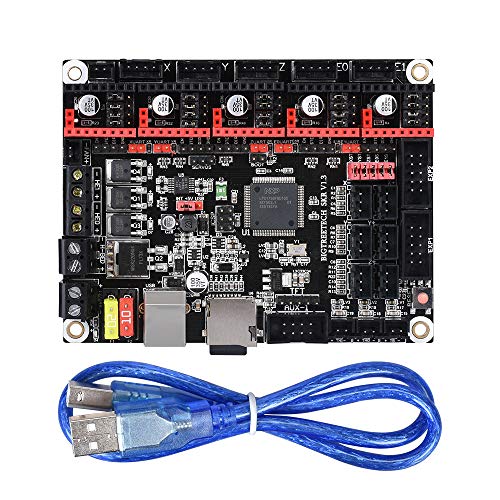
WitBot SKR V1.3 Control Board 32-Bit CPU Equipped with Open Source Firmware Marlin2.0 and Smoothieware and Use Gold Deposition Technology Support TMC2130 TMC2208 DRV8825 A4988 Driver for 3D Printer.
Product Description
WitBot SKR V1.3 Control Board 32-Bit CPU Equipped with Open Source Firmware Marlin2.0 and Smoothieware and Use Gold Deposition Technology Support TMC2130 TMC2208 DRV8825 A4988 Driver for 3D Printer.
- SKR V1.3 motherboard uses 32-bit main frequency 100MHz ARM-class Cortex-M3 series LPC1768 master chip.Four-Layer Circuit Board,Gold deposition technology,and obtain CE certification.
- Equipped with highly modular and open source firmware Marlin2.0 and Smoothieware, it is convenient for users to DIY and secondary development, and can avoid worries of not mastering the core code.
- Support SPI working mode of TMC2130 driver, self-contained material detection function; TMC2130SPI, without using additional limit switch, can realize the function of limit switch by modifying Marin firmware.
- Reserved extended port SERVOS of PWM signal to support BL Touch;Support 2.8-inch and 3.5-inch color touch screens, support 2004 LCD and 12864 LCD.
- Support Resume Printing While Power Off,Filament Break Detection,Automatic Shutdown After Printing and other functions.
1.Supported hot bed power increased to 144W,The power of the hot bed connected to the motherboard must be less than or equal to 144W (ie, the thermal bed resistance is greater than 1Ω), if a high-power hot bed is used, the external hot-bed power expansion board must be connected.<br><br><b>SKR motherboard power:</b><br> After the SKR main board is powered on, the red light of the D4 in the lower left corner will light up, indicating that the power supply is normal; the 5V SEL in the middle of the board is the power selection end;<br> 1)When using USB to power the motherboard, connect the +5V and USB pins with a shorting cap.<br> 2)When using 12V-24V power supply, connect the +5V and INT pins with the shorting cap;<br> <b>NOTE</b>:It can be connected to [12V-24V power supply] and [USB] at the same time. The printing process must use the shorting cap to connect the +5V and INT pins.<br><br> <b>SKR motherboard communicates with computer:</b><br> The SKR motherboard communicates with the computer through the [USB] interface. After the driver is installed, the motherboard is inserted into the computer to recognize the port for data transmission. It is easy to see that the computer does not recognize the USB port without installing the driver.<br> 1.smoothieware-usb-driver-v1.1 driver installation (Windows systems only)<br> The driver can be obtained from our open source network;(Contact us to get the link)<br> <b>Note:</b>When using smoothieware open source firmware, since only Windows system drivers, the SKR board at this time can only be recognized by the Windows system port! ! !<br> 2.If you are using Marlin2.0 firmware, follow the tutorial to install;(Contact us to get the link)<br><br> <b>NOTE:</b>If you need more methods and materials, as well as how to change the firmware and get the firmware, please contact us.
Technical Specifications
You might also like

TMC2208 V1.2 3D Printer Stepper Motor Driver Module, Eryone with Heat Sink Screwdriver for 3D Printer Mother Boards Reprap MKS Prusa and More (5pcs/Pack)

Capricorn Bowden PTFE Tubing XS Series 1 Meter for 1.75mm Filament (Genuine Capricorn Premium Tubing)
Printer 3D Stepper Motor Driver, FYSETC TMC2208 V1.2 Stepstick Stepper Motor Driver Module Carrier with Heat Sink Screwdriver for 3D Printer Controller Boards Ramps1.4 MKS Gen Ender-3 Pro, Black 5 Pcs

BIGTREETECH TMC2209 V1.2 Stepper Motor Driver 2.8A Peak Driver 3D Printer Parts for SKR V1.3 SKR PRO V1.1

Genuine E3D Hotend Thermistor Cartridge Replacement

6 Pack Mini MP1584EN DC-DC Buck Converter Adjustable Power Step Down Module 24V to 12V 9V 5V 3V (6 Pack)

BIGTREETECH 3D Printer Parts TFT35 V2.0 Touch Screen Display 3.5 Inch RepRap Smart Controller Panel Compatible with MKS GEN V1.4 Control Board
WINSINN Dual Gear Extruder, Works with Creality Ender 3 CR10 CR-10 Pro CR-10S Tornado Upgraded Aluminum Drive Feed for 3D Printer 1.75mm Filament

BIGTREETECH TFT24 V1.1 Graphic Smart Display Controller Board for 3D Printer Ramps 1.4 RepRap 3D Printer Can Select Two Work Modes