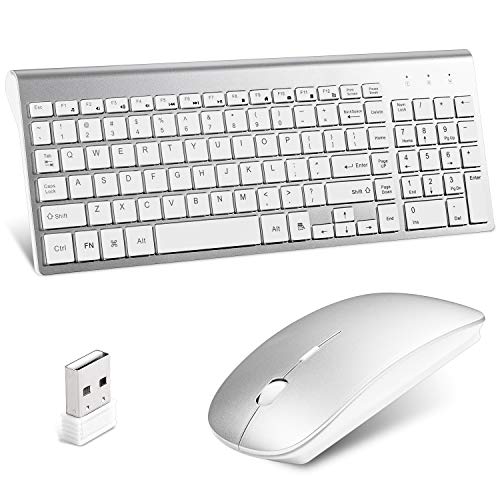
Lucloud Wireless Keyboard and Mouse Combo,Ultra Slim with Mute Whispe-Quiet Keys for Laptop Notebook Mac PC Computer Windows OS Android (LC-TZ22-2)
Product Description
Lucloud Wireless Keyboard and Mouse Combo,Ultra Slim with Mute Whispe-Quiet Keys for Laptop Notebook Mac PC Computer Windows OS Android (LC-TZ22-2)
- ADVANCED 2.4G WIRLESS:Delivers the reliability and speed of a corded connection that allows you to work with your PC from a distance. One tiny Unifying receiver (USB 2.0) connects both the keyboard and mouse to your computer.
- DESIGN: Environmentally friendly ABS material. 3 adjustable DPI, set the track you need. ltra-thin mouse built-in MINI receiver, travel tourism is not easy to lose. District 2 full keyboard design, simple and compact, saving desk space.
- MUTE: Sensitive mouse click, the sound is smaller. Key comfortable and smooth, softly typing and let you focus on your work and not disturb the people around you.The chocolate-like keycap gives you an excellent feel.
- WARMLY NOTE: 1. Not fully compatible with Mac System,hotkey functions can not be fully applied. 2.The keyboard needs 2 x AA battery and mouse needs 2 x AAA battery (not included).
- BRILLIANT CUSTOMER SERVICE: 24 hours stand-by professional customer service promise to give you a satisfied solution and every products with 12-Months warranty.
<p><b>Wireless keyboard and mouse combo </b></p> <P> </p> <P> </p> <br> Feature <br>2.4G wireless keyboard and mouse combo,High quality material. <br>Connect both keyboard and mouse just need a nano receiver. No wires make a more smart and tidy desktop. <br>Luxury silver and white color,simple and elegant. Finishing greatly match your mac book or other laptop. <br>Electroplated face shell,dustproof and easy to clean. <br>Nice quality,portable and easy to use. <br>Scissor whisper keys,comfortable typing. No disturbance to you and others. <br>With numeric keypad and detailed indicator light. <P> </p> <P> </p> <br> Get Started <br>Step 1: Take out the 2.4G nano receiver , insert batteries for each unit (keyboard and mouse) <br>Step 2: Plug the nano receiver into the USB port of your laptop/PC/tablet <br>Step 3: Switch on both keyboard and mouse.It will connect to your device automatically. <br>Note: The keyboard and mouse will enter sleep mode to preserve power after about 10 mins of inactivity,press any key and wait for 3 seconds to activate again. <P> </p> <P> </p> <br>Solution for keyboard and mouse no response <br>1.power off all other 2.4G devices in your room,make sure both the keyboard and mouse are "off" <br>2.Plug im the receiver,power on the keyboard and press down the ESC + Q together for seconds,then the keyboard will repair <br>3.To repair the mouse,please plug out the receiver and replug.After that,press the left and right clicks at the same time and then power on the mouse.Do not release the clicks for 4 seconds and the mouse will work <br>NOTE: If the above actions failed,please power off the both,remove the receiver and restart from step 2<P> </p> <P> </p> <br>Last but not least:If you have any problems,pls contact us.We will give you best service! Thank you~
Technical Specifications
You might also like
Apple Mac Mini MGEM2LL/A 1.4 Ghz Intel Core i5, 4GB LPDDR3 RAM, 500GB HDD Desktop (Renewed)
Replacement US Plug Extension Cable for Apple iMac G5 20" 21.5' 24" 27" Power Supply Cord

Stereo Gaming Headset for PS4, Xbox One, Nintendo Switch Ifmeyasi Surround Over Ear Headphones with LED Light, Noise Cancelling, Microphone for PC, Laptop, Mac, ipad and Smartphones

Apple iMac MC309LL/A 21.5-Inch Desktop (Renewed)

HIDEit MiniU Mount - Patented Mac Mini Wall Mount, VESA Mount, Under Desk Mount - Made in The USA

Hard Silver Metal Aluminum Mouse Pad Mat Smooth Magic Ultra Thin Double Side Mouse Mat Waterproof Fast and Accurate Control for Gaming and Office(Small 9.05X7.08 Inch)
KingDian 2.5 inch SATA3 240GB SSD with 256M Cache Solid State Drive for Laptop Desktop Pcs(S280 240G)

VIOTEK NB24CW 24-Inch LED Curved Monitor with Speakers, Bezel-Less Display, 75Hz 1080P Full-HD FreeSync VGA HDMI VESA - Xbox Ready (White)

Aluminum Laptop Stand for Desk Compatible with Mac MacBook Pro/Air Apple 12" 13" Notebook, Portable Holder Ergonomic Elevator Metal Riser for 10 to 15.6 inch PC Desktop Computer, Soundance LS1 Silver