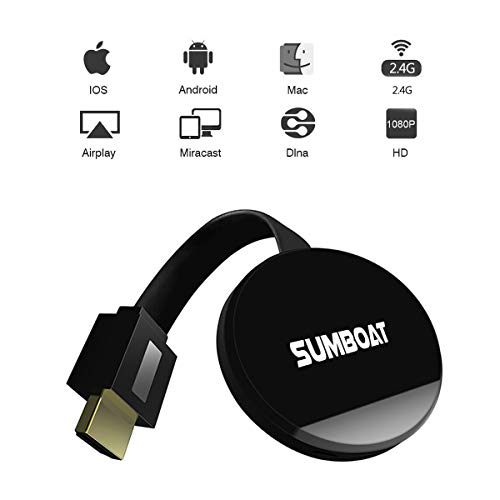
Wifi Display Dongle - Wireless HDMI Dongle, 1080P Mirroring Dongle Compatible with IOS/Android/Windows/MAC, Support Airplay Mirror/DLNA/Miracast by SUMBOAT (black)
Product Description
Wifi Display Dongle - Wireless HDMI Dongle, 1080P Mirroring Dongle Compatible with IOS/Android/Windows/MAC, Support Airplay Mirror/DLNA/Miracast by SUMBOAT (black)
- 【Small Screen to Big Screen】-Stream up to 1080P HD output and sharing full contents on your screen (photo/video/music/game/document from Android and iOS smartphone). suitable for home entertainment, business, educations, training etc.
- 【Muti Working Modes】- Support Miracast / DLNA / Airplay three modes to sync cast photo /video/music/office file and more from iPhone/Android Smart phone/tablet PC to large screen TV/ Projector by WiFi, also perfect for PPT presentation and video meeting
- 【Support Online Connection】- Compatible with the app that requires copyright, like Netflix/ iTunes/ Amazon Video/ HBO go/ Hulu Plus/ Honda Motor/ ESPN/Google Pixel. Just go to browser, input the IP address->Choose "WIFI"-> Click "Scan"and choose available wifi->connet. Note: if you choose the way of connect the wifi of "Mirroring-xxxxxx", can not surf in the Internet.
- 【Note】- Using NETFLIX/iTunes/Amazon Video/ HBO go/ Hulu Plus/ Honda Motor/ ESPN/Google Pixel, you need to open Google app:home. Since the Apple Store does not support Google's HOME APP, iphone/IPAD products can only use the airplay feature.
- 【Package List & Service】- 1 x Wireless Wi-Fi Display Dongle Receiver,1 x USB with Wi-Fi 2 in 1 cable,1 x User Guide. If you have any further question, please contact us without hesitation. We will reply you within 24hour.
Color: black <br><br> Cast photo/video/music/document from Android and iOS smartphone/Mac tablet PC to large screen TV/Projector.<br> Support multi-screen interactive features like DLNA/Miracast/Airpaly.<br> <b> Steps for usage:</b><br> Before setting, please plug the dongle in your TV. (Equipped with an HDMI extension cable) and another USB cable for power needed<br> <b>First Way</b><br> Step1: Turn on the WiFi of your smartphones or other devices and search the WiFi of dongle<br> Step2: Open the browser,visit IP address > Choose icon "WiFi" > Select your WiFi of router, enter password> Connect. <br><br> <b>Second Way</b><br> Step1: find the dongle (SSID: Mirroring-xxxxxx). Select and connect.<br> Step2: Please turn on Miracast function directly, also called screen-sharing or screen-mirroring or not. (Because different brands of smartphone or PC have their customized system,the name of wireless display will be different.) <br>Â <br> <b>After the first setting, next time when you open the function of wireless display, it will mirror automatically. No need to set up again.</b><br><br> <b>Compatible with:</b><br> * Android 4.3 model with 1GB RAM and above<br> * IOS 7 and above. Iphone 4+,ipad 2+, ipod 4+<br> * Windows 8.1 and above<br> * MAC 10.8 and above<br><br> <b>Package Content: </b><br> 1 X WiFi Display Receiver <br> 1 X HDMI extension cable<br> 1 X USB cable<br> 1 X Manual<br><br> <b>Notice: </b><br> 1. Before you use, please plug the usb cable for power needed <br> 2. Please make sure your smartphone or tablet Miracast / DLNA is compatible before you buy the stick.<br> 3. Two ways to connect to big screen (both Android and Apple device)<br> 4. If you choose the second way to connect, can not surf in the Internet. Just share your local data<br> 5. Please read the operating instructions carefully. Please be patient with it. If you have any question about the use of the product, please contact us at any time.<br><br>
Technical Specifications
You might also like
Wifi Display Dongle Miracast DLNA Airplay Wireless display HDMI adaptor TV Stick dongle for iPhone Android IOS
SUMBOAT Wireless HDMI Adapter 1080P Wireless HDMI DongleSupport Airplay DLNA MiracastWifi Display Dongle for SmartphoneIPad and PC (Black)

Microsoft Wireless Display Adapter (P3Q-00001)

Spy Camera Wireless Hidden WiFi Camera AREBI HD 1080P Mini Camera Portable Home Security Cameras Covert Nanny Cam Small Indoor Video Recorder Motion Activated/Night Vision A10 Plus [2019 Upgraded]

AmazonBasics 3.5mm to 2-Male RCA Adapter Cable - 25 Feet

AmazonBasics HDMI Coupler, 29 x 22mm, Black

General Tools 833 Plastic Contour Gauge, Profile Gauge, Shape Duplicator, 10-Inch (254mm), Precisely Copy Irregular Shapes For Perfect Fit and Easy Cutting
Actiontec ScreenBeam Mini2 Wireless Display Receiver(SBWD60A01)