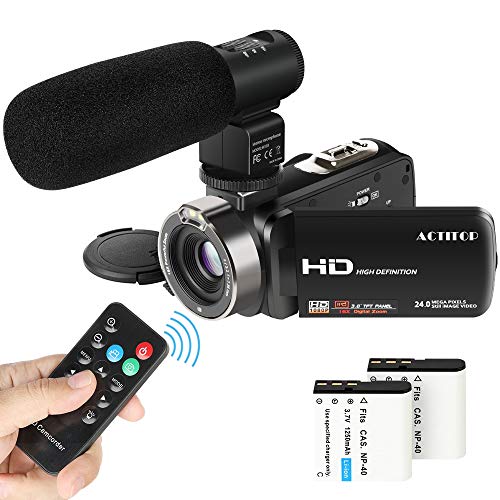
Video Camcorder,ACTITOP 1080P FHD Camcorder 24MP 16X Digital Zoom Video Camera 3.0inch Screen Face Detection LED Light Camcorder Camera with External Microphone,Remote Control,2 Batteries (HDV302)
Product Description
Video Camcorder,ACTITOP 1080P FHD Camcorder 24MP 16X Digital Zoom Video Camera 3.0inch Screen Face Detection LED Light Camcorder Camera with External Microphone,Remote Control,2 Batteries (HDV302)
<br><br><b>Remote Control</b> No one will be excluded from group photo and no more asking people around to take photos for you <br><br><b>Real-Time Broadcasting from your Camcorder</b>The FHD video camera can be used as a webcam,so that you can live-stream events on your social media as they are being recorded in FHD resolution<br><br><b>Please Note that you need to download "Amcap" software before using it as a webcam. If you use Mac,then you don't need to download any software when using this webcam function.</b> <br><br><b>Continuous Recording and Timer Capture</b>When recording a video,you can press OK button to pause recording,and press OK button again to continue recording. Set a timer as you like ( 2s/10s), capture anytime you want and free your hand. <br><br><b>Â 3" TFT LCD Digital Video Camcorder</b>The 3.0 inch (16:9) Clear Photo LCD displays sharp, bright, vivid images, letting you compose a shot more easily - even outdoors, while enabling you to change settings to best represent the scene <br><br><b>FHD Video Camera Specifications:</b> <br> Image Sensor: CMOS image sensor <br> Image Resolution: 20M(5120x3840),16M(4608x3472) <br> Video Resolution: FHD(1920x1080),HD(1280x720),VGA(640x480) <br> Digital Zoom: 16x <br> File Format: JPEG,AVI <br> Display: 3.0inch TFT LCD(16:9) <br> USB Port: 2.0 <br> TV Output: NTSC/PAL <br> Focal Distance: f=7.36mm <br> Aperture: f=3.2 <br> Power: 3.7V 1250mAh Rechargeable Lithium Battery <br> Memory Card: External SD/MMC Card (4GB to 32GB)(NOT INCLUDED) <br> Operating System: Windows 7/2002/XP/Visa <br> Camera Size: 12.5cm*5cm*5.5cm <br><br><b>Package Contents:</b> <br> 1* FHD Camcorder <br> 1* Video Camera Bag <br>1* External Microphone <br> 1* USB Charging Cable <br> 1* Charging Adapter <br> 1* HDMI Cable <br> 2* Rechargeable Lithium Battery <br> 1* User Manual <br><br><b>How To Contact Us?</b>Â <br><b>Login your amazon account > choose "Your orders" > find the order ID > click "Contact seller".</b>
Technical Specifications
You might also like

AmazonBasics 50-Inch Lightweight Tripod with Bag

SanDisk 32GB Ultra Class 10 SDHC UHS-I Memory Card Up to 80MB, Grey/Black (SDSDUNC-032G-GN6IN)

HATTEKER Hair Clippers for Men Cordless Hair Trimmer Beard Trimmer Hair Cutting Kit Waterproof Rechargeable LED Display With Charging Dock

SanDisk 128GB Ultra UHS-I Class 10 SDXC Memory Card, Black, Standard Packaging (SDSDUNC-128G-GN6IN)

SanDisk 64GB Ultra SDXC UHS-I Memory Card SDSDUNC-064G-GN6IN

AmazonBasics 60-Inch Lightweight Tripod with Bag
Vanzon X5 Pro Bluetooth Speakers - 20W Portable Wireless Speaker V5.0 with Louder Stereo Sound, Rich Bass, IPX7 Waterproof & 24 Hr Playtime, 2019 New Edition for Home and Outdoors
ONSON Adjustable Mandoline Slicer with Spiralizer Vegetable Slicer - V Blades Food Slicer Veggie Slicer Cutter Zoodle Maker - Vegetable Spiralizer with Julienne Grater

32GB SD Card, BOYMXU Professional 1000 x Class 10 SDHC UHS-I U3 Memory Card Compatible Computer Cameras and Camcorders, SD Memory Card Up to 95MB/s, Green/Black