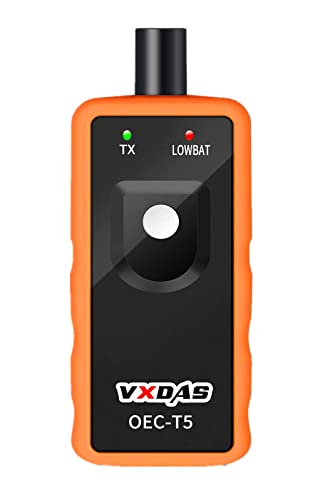
VXDAS TPMS Relearn Tool for GM Tire Sensor TPMS Reset Tool Tire Pressure Monitor system Activation Tool OEC-T5 for GM Buick/Chevy/Cadillac Series Vehicles 2023 Edition
Product Description
VXDAS TPMS Relearn Tool for GM Tire Sensor TPMS Reset Tool Tire Pressure Monitor system Activation Tool OEC-T5 for GM Buick/Chevy/Cadillac Series Vehicles 2023 Edition
- 🚗2023 UPDATED FOR WIDER COMPATIBILITY: Specifically designed to work with most GM vehicles 2006-2023 (Chevy / Buick / GMC / Opel /Cadillac and more) equipped with 315/433 MHz. Your vehicle deserves the best tire pressure sensor reset tool.(It is not suitable for heavy trucks with more than 4 tires or vehicles with an external TPMS system.)
- 🚗SAVE TIME, SAVE MONEY: Tire pressure monitor sensor activation tool is quick, simple, and efficient. With a press of a button, activate your TPM sensors within 1-2 minutes, saving you trips to the dealer or a tire store.
- 🚗ESSENTIAL, EASY TO USE TOOL: This tire pressure reset tool is essential for replacing tire pressure sensors, removing tire pressure alarms or changing tires. Simply ensure your vehicle is in TPMS Learn Mode, hold the tool against the tire sidewall near the valve stem, and depress the Learn button!
- 🚗SUPERIOR QUALITY, SUPERIOR PERFORMANCE: Featuring a sensitive sensor chip for faster operation and an immersion gold process circuit board for stability. Our GM TPMS relearn tool is built for precision, accuracy, and durability.
- 🚗MAXIMIZE SAFETY WITH TPMS RELEARN TOOL: Ensure optimal tire pressure with our TPMS Reset tool. Enhance safety and gain control on every journey, taking away the worries of tire underinflation!
<b><br>Before tire pressure monitoring system works normally properly, the body control module will record ID information of each position in the tire pressure sensor; and use the following methods to read the tire pressure sensor after replacing a tire or wheel speed sensor. Please refer to the specific methods as follows:<br></b> <b><br>Step 1 - Enter leaning mode<br></b> <br>Set the gearshift lever to "P",Put the ignition switch to "ON",Enter the interface of tire pressure display by DIC,DIC shows "Press Set / Ctrl to re-learn" Press "Set / Ctrl",The turn signal is lighted for 3 seconds and the horn beep sound twice to enter the learning mode<br> <b><br>Step 2 - Read tire pressure sensor information<br></b> <br>Start from the front-left wheel,Make the J-46079 or Diagnostic Tool antenna up against the valve core position & close to the rim of the tire sidewall, tire pressure tool starts by the start switch,Successful to read the tire pressure sensor information when the horn bleeps once<br> <b><br>Step 3 - Same method to read other tire pressure information<br></b> <br>Follow the instuction above to read tire pussure of the front-right, rear-right, rear-left wheels,Turn signals is lighted for 3 seconds and the horn bleeps twice when the learning is complete
Technical Specifications
You might also like
ACDelco 13598771 GM Original Equipment Tire Pressure Monitoring System (TPMS) Sensor
ACDelco 13598772 GM Original Equipment Tire Pressure Monitoring System (TPMS) Sensor Kit with Sensor, Stem, Bolt, and Cap

CDWTPS 13581558 GM Tire Pressure Monitoring System TPMS Sensor 315MHZ Fits for Buick GMC Chevrolet Cadillac Set of Four(4)

ACDelco 15234846 GM Original Equipment Tire Pressure Monitoring System (TPMS) Sensor Nut
ACDelco 13586335 GM Original Equipment Tire Pressure Monitoring System (TPMS) Sensor

CNCMOTOK 13581558 Tire Pressure Monitoring System TPMS Sensor 315MHZ Fits for GM Buick Cadillac GMC Chevrolet Pontiac Set of Four(4)
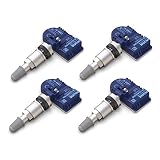
MOBILETRON MoreSensor | 4-Pack 315 MHz Clamp-in Direct-Fit TPMS Tire Pressure Sensor for Cadillac/Chevrolet/GMC/Hummer, fits 50+ Models | CX-S021-4
ACDelco 13598771 Tire Pressure Monitoring System (TPMS) Sensor

ACDelco 20925924 GM Original Equipment Tire Pressure Monitoring System (TPMS) Sensor
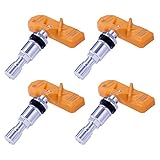
IM1001 (Set of 4) TPMS Sensor 315MHz | OE Replacement for Select Models of GM, Ford, Chrysler, Dodge Jeep, Toyota, Mazda, Nissan