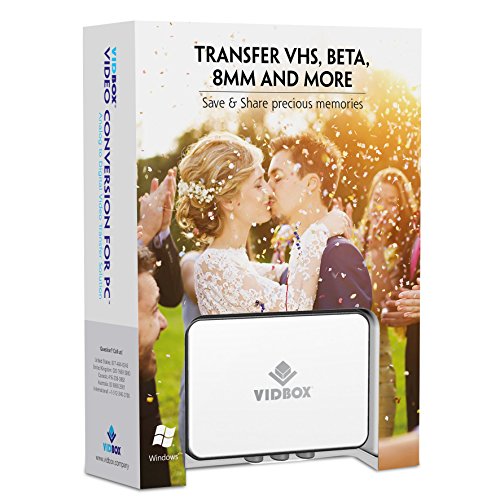
VIDBOX USB 2.0 Video Conversion for PC For Windows 10, Windows 8
Product Description
VIDBOX USB 2.0 Video Conversion for PC For Windows 10, Windows 8
- What's in the box: USB video capture device, USB Cable, RCA AV Cable, Quick Start Guide, Installation Software CD (or Download Card)
- Capture old VHS, Beta, 8mm or camcorder tapes and convert them to DVD or other digital formats.
- Convert and watch your captured video on portable devices, and share your videos with friends and family on Facebook and YouTube.
- Bonus: Record audio from your cassettes and LP records to create WMA files or audio CDs.
<p style="line-height: normal; border: none;"> <span style="color: #333333; background: white;">Videotapes can deteriorate over time. Your old videos will develop color bleed, white specks, and other distortions increasingly over time. Don't risk this happening to your home video collection</span><span style="color: #333333;">! Whether you are a novice or a professional, VIDBOX Video Conversion for PC enables you to <span style="background: white;">save and secure your precious memories from old VHS, Betamax, and camcorder tapes.</span></span> </p> <p style="line-height: normal; border: none;"> <span style="color: #333333; background: white;"> </span> </p> <p style="line-height: normal; border: none;"> <span style="color: #333333; background: white;">Video Conversion for PC provides the tools you need to easily convert your videos to digital formats and to DVD. All you need is a VCR or a camcorder and a PC. Step-by-Step pictorial instructions guide you through the simple process. You can even share your video online with friends and family by uploading your video to Facebook and YouTube.</span> </p> <p style="line-height: normal; border: none;"> <span style="color: #333333; background: white;"> </span> </p> <p style="line-height: normal; border: none;"> <span style="color: #333333; background: white;">#1 Bestselling: All-in-one video converter software and hardware solution (U.S. consumer software category, latest NPD report).</span> </p> <p style="border: none; margin: 12.0pt 0in 11.0pt 0in;"> <strong><span style="color: #333333; background: white;">What's Included:</span></strong> </p> <ul> <li> <span style="color: #333333; background: white;">USB video capture device</span> </li> <li> <span style="color: #333333; background: white;">USB cable</span> </li> <li> <span style="color: #333333; background: white;">RCA cables for composite video</span> </li> <li> <span style="color: #333333; background: white;">Software Installation CD</span> </li> <li> <span style="color: #333333; background: white;">Quick Start Guide</span> </li> </ul> <p style="border: none; margin: 12.0pt 0in 11.0pt 0in;"> <strong><span style="color: #333333; background: white;">System Requirements:</span></strong> </p> <ul> <li> <span style="color: #333333; background: white;">Operating System: Windows 10, 8, 7</span> </li> <li> <span style="color: #333333; background: white;">Available USB 2.0 or 3.0 port</span> </li> <li> <span style="color: #333333; background: white;">Processor: Intel Core 2 Duo or higher</span> </li> <li> <span style="color: #333333; background: white;">Memory: 1GB of RAM</span> </li> <li> <span style="color: #333333; background: white;">Free hard disk space: 15GB recommended</span> </li> <li> <span style="color: #333333; background: white;">VCR or camcorder for tape conversion</span> </li> </ul> <h3 style= "line-height: normal; page-break-after: auto; border: none; margin: 7.0pt 0in 11.0pt 0in;"> <strong><span style= "font-size: 11.0pt; color: #333333; background: white;">Output Formats:</span></strong> </h3> <ul> <li>DVD, MPEG-2, MP4 </li> </ul>
Technical Specifications
You might also like

Cmple - S-Video Cable Gold-Plated (SVHS) 4-PIN SVideo Cord - 6 Feet
Cmple - S-Video Cable Gold-Plated (SVHS) 4-PIN SVideo Cord - 3 Feet
Panasonic PV-V4022 4-Head Mono VCR

Sony V8-6CLD 8mm / Hi8 / Digital8 Camcorder Video Head Cleaning Cassette
Cassette Adaptor camcorders svhs VHS-C to vhs ORIGINAL sealed factory

Monster MC 200SV-2M High Performance S-Video Cable (2 Meters)
Roxio Easy CD and DVD Burning [PC Disc] [Old Version]
ClearClick Video to Digital Converter 2.0 (Second Generation) - Record Video from VCR's, VHS Tapes, AV, RCA, Hi8, Camcorder, DVD, Gaming Systems

Verbatim CD/DVD Slim Cases (0.21 inches) - Assorted Colors - 50pk

VHS VCR to Digital Converter, HuGle USB 2.0 Video Capture Card for Win XP/Win Vista/Win 7/ Win 8/ Win 10