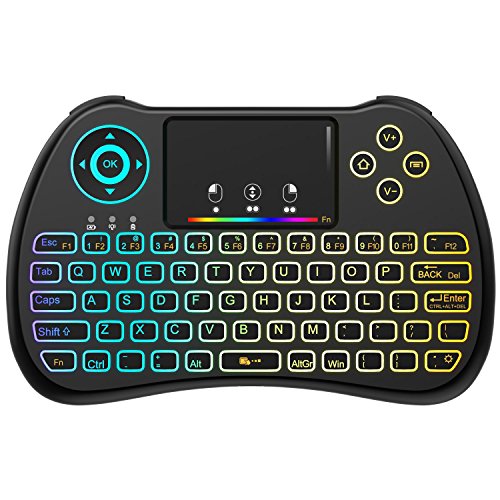
(Upgraded Version) Aerb 2.4GHz Colorful Backlit Mini Wireless Keyboard with Mouse Touchpad Rechargeable Combos for PC, Pad, Google Android TV Box and More
Product Description
(Upgraded Version) Aerb 2.4GHz Colorful Backlit Mini Wireless Keyboard with Mouse Touchpad Rechargeable Combos for PC, Pad, Google Android TV Box and More
- 8 LED BACKLIGHT: You're free to choose from 8 different LED backlights. You can not only use this keyboard at night with other lighting closed, not to disturb others , but also enjoy the good mood and wonderful experience it brings.
- 3 in 1 MULTIFUNCTION: Wireless Keyboard + Mouse + Touchpad, RF 2.4G wireless connection, enjoy up to 10m operating distance.
- TOP QUALITY: High sensitive smart touchpad made of imported skin-friendly material as well as sweat proof and durable; Innovative shape, portable, elegant and ergonomical design.
- COMPACT AND POWERFUL: Mini size wireless keyboard with a full QWERTY keyboard, with function buttons, multi-media control keys, scroll buttons, and a track pad.
- EASY TO USE: Plug and play, no need to install software. The rechargeable and removable Li-ion battery is stored at the back of the keyboard. The keyboard will automatically go into sleep mode if 3 minutes in-activity.
This is a perfect combo of wireless keyboard and mouse, which could be used to replace your traditional USB keyboard and mouse. The backlit function makes it easy to use at night even in a dark room. With Aerb wireless mini keyboard, you are going to enjoy your network experience in your home or office!<br><br>How to use:<br>1. Find the power switch at the back panel; slide the switch to ¡°ON¡±, and you will see the blue light flashes; it will go out if receiver is not plugged or signal is not received.<br>2. Press the [Fn+RF] for three seconds to pair the keyboard with the USB receiver<br>3. Insert the USB receiver into your computer or other devices, make sure keyboard is within 10 meters to the receiver, and it takes 10 seconds to 3 minutes for the device to install drivers. (your device has to connect to the internet)<br>4. You will see solid blue light while it is paired / connected and ready to work.<br><br>Backlit Modes:<br>Press the "Fn" and " ," ( the right corner) repeatedly to switch among the four modes of backlight.<br>Mode 1: colorful backlight mode<br>Mode 2: white backlight mode<br>Mode 3: Auto-changing backlight mode <br>Mode 4: close the backlight<br><br>When use the backlit function, press the Fn button then use the touch pad<br>(1) Adjust the brightness by sliding up and down on the touch pad<br>(2) Switch the color by sliding left and right on the touch pad<br>(You are supposed to press the Fn button then adjust the brightness or switch the color on the touch pad)<br><br>Computer system compatibility:<br>Windows 2000<br>Windows XP<br>Windows Vista, Windows CE, Windows 7<br>Linux(Debian-3.1,Redhat-9.0 Ubuntu-8.10 Fedora7.0 tested)<br>Android 4.0+ system
Technical Specifications
You might also like
Raspberry Pi 3 Model B Motherboard

(2018 Backlit Version)REIIE H9+ Backlit Wireless Mini Handheld Remote Keyboard with Touchpad Work for PC,Raspberry Pi 2, Android TV Box ,KODI,Windows 7 8 10
(2018 D8 Pro) Aerb Backlit Mini Wireless Keyboard with Large Touchpad Mouse, Rechargable Li-ion Battery & Multi-Media Handheld Remote for PC/Google Android TV Box and More
Beastron Mini Wireless Keyboard with Mouse Touchpad
Backlit Mini Keyboard Touchpad Mouse AMGUR Mini Wireless Keyboard With Touchpad and Multimedia Keys for Android TV Box HTPC PS3 XBOX360 Smart Phone Tablet Mac Linux Windows OS
Dupad Story [2018 Updated] H9 2.4GHz Colorful Blacklit Mini Wireless Keyboard with Touchpad Mouse Combo, USB Rechargeable for Raspberry Pi,Google Android TV Box,HTPC,IPTV,PC,PAD,PS4 and More
EASYTONE Backlit Mini Wireless Keyboard With Touchpad Mouse Combo and Multimedia Keys for Android TV Box HTPC PS3 XBOX360 Smart Phone Tablet Mac Linux Windows OS,New Model Mini Keyboard Touchpad Mouse
REIIE (2018 H9S Wireless Mini Handheld Remote Keyboard with Touchpad Work for PC,Raspberry Pi 2,3, Android TV Box,XBMC,Windows 7 8 10
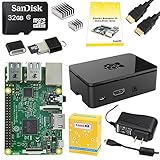
CanaKit Raspberry Pi 3 Complete Starter Kit - 32 GB Edition