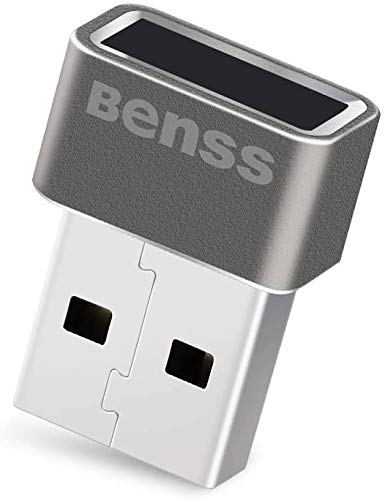
Benss USB Fingerprint Reader for Windows 10 Hello, 360 Degree Touch, Speedy Matching, Biometric PC Laptop Scanner, Multi-Finger, Silver, 0.83 x 0.6 inches
Product Description
Benss USB Fingerprint Reader for Windows 10 Hello, 360 Degree Touch, Speedy Matching, Biometric PC Laptop Scanner, Multi-Finger, Silver, 0.83 x 0.6 inches
- [Quick Recognition ] Identifying fingerprint in 0.15 seconds, 360 degrees recognition, makes a more accurate and responsive performance than traditional optics
- [Easy Operation] Genuine win 10 don't need to download any driver file to make it work.(If it is not genuine, you need to download the driver.
- [PC Security ] Featuring a biological detection will high precision algorithm to detect the real fingerprint not the forged, protect your privacy better than passwords input, also not need to remember complex password.
- [Share with families] Family member can enjoy fingerprint recognition and encryption, My 'world' enables setup up to 10 fingerprint IDs
<br>Support win10, 32-bit 64-bit systems. <br>Secure and Convenience: Touch base Fingerprint dongle with great FAR(<0.002%) and FRR(< 3%), high secure but also easy-of-use (<1 sec.matching ). <br>Accept 360 degrees fingerprint matching to free your finger touch scenarios. <br><br><b>Installation Guidelines:</b> <br>1.Insert the product into the computer; <br>2.Start from "Settings"=>"Accounts" ; <br>3."Sign-in Options", Fingerprint "Setup" ; <br>4.Need PIN code first; if no PIN code yet, Windows Hello will guide you to setup ; <br>5.Register your fingerprint, Try to touch your finger by different area, don't always touch by same finger area. <br><br><b>If you already installed a previous version driver: </b> <br>1.Uninstall the driver first; <br>2.Upgrade by INF(following Windows Hello Validation requirement); <br>3.Since we insert "Scheduler" in by registry keys,please "reboot" system to make those "run once" effective. <br><br><b>Warm Tips: </b> <br>1.This version currently only supports Windows 10, and the next version will be upgraded to be compatible with win7 / 8 /10. <br>2.Windows Hello only allows 3 times fingerprint matching, If you failed to login in for 3 times or more,please switch to PIN code to login again. <br>3.If any issues during the process, please feel free to leave us message directly. We'll be glad to show you in details. <br><br><b>For the detailed guide, please scan the QR code on the package <br>For more information, please click: </b> <br>http://www.benss-tech.com/index.php/proview-35-11.html
Technical Specifications
You might also like
USB Fingerprint Reader, DDSKY Portable Security Key Biometric Fingerprint Scanner Support Windows 10 32/64 Bits with Latest Windows Hello Features (1-Pack)

Kensington VeriMark USB Fingerprint Key Reader - Windows Hello, FIDO U2F, Anti-Spoofing (K67977WW)

Benss Fingerprint Reader Analyzer for Windows 7 8 10 Hello, Fingerprint Scanner Wireless Biometrics Computer Security Login Lock with WQHL Certification for PC Laptop
Mini USB Fingerprint Reader for Windows 7,8 & 10 Hello, PQI My Lockey 360° Touch Speedy Matching Multi Biometric fido Security Key

Yubico - YubiKey 5 NFC - Two Factor Authentication USB and NFC Security Key, Fits USB-A Ports and Works with Supported NFC Mobile Devices - Protect Your Online Accounts with More Than a Password
BIO-key EcoID Fingerprint Reader - Tested & Qualified by Microsoft for Windows Hello - Eliminate Passwords on Windows 7/8.1/10 - Includes OmniPass Online Password Vault with Purchase

Corsair Flash Voyager GTX 128GB USB 3.1 Premium Flash Drive
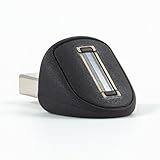
Eikon Mini USB Fingerprint Reader for PC
CalDigit USB-C Pro Dock - 85W Charging, Thunderbolt 3, UHS II SD Card Slot, USB C Gen 2, USB A x 3, Dual DisplayPort 1.2, LAN, 3.5mm Audio for Thunderbolt and USB-C Computers (0.7 Meter Cable - Gray)

Taglio PIVKey C910 Certificate Based PKI Smart Card for Authentication and Identification, Dual Interface Contact/Contactless Smart Card, Supports Windows PIV Drivers, Standard ISO.