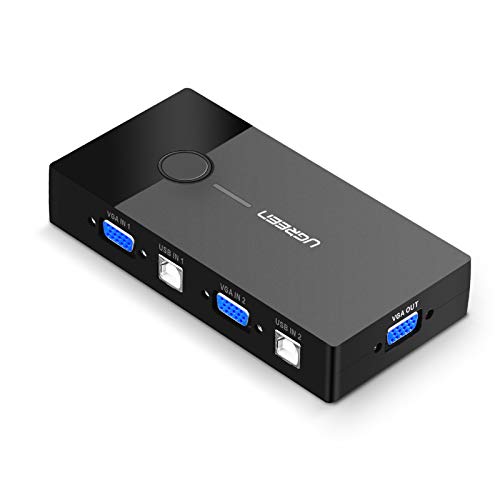
UGREEN USB KVM Switch Box 2 Port VGA Video Sharing Adapter 2 in 1 Out Manual Switcher with USB Cables for Computer PC Laptop Desktop Monitor Printer Keyboard Mouse Control

Product Description
UGREEN USB KVM Switch Box 2 Port VGA Video Sharing Adapter 2 in 1 Out Manual Switcher with USB Cables for Computer PC Laptop Desktop Monitor Printer Keyboard Mouse Control
<b>Multi-Tasking</b> <br> Ugreen USB VGA KVM Switch allows you to share one USB keyboard, USB mouse, and VGA monitor to control 2 computers.<br> It is designed for multitask with two computers at your convenience, increasing productivity in the office or at home ; You can switch between 2 computers using a manual switch located on the top of the KVM unit. <br> <br> <b>Specification</b> <br> 1. One USB keyboard, USB mouse, and VGA monitor control two computers<br> 2. Max resolution: 1920 x 1440;<br> 3. No software drivers required;<br> 4. No power adapter required;<br> <br> <b>How It Works</b> <br> 1. Connect the USB devices to the USB A female connectors on the switch;<br> 2. Connect a VGA cable to the VGA OUT interface and the display device;<br> 3. Connect VGA IN1 and USB IN1 to PC1 at the same time;<br>4. Connect VGA IN2 and USB IN2 to PC2 at the same time;<br>5. Press the manual switch button to switch between the two computers.<br> <br> <b>Operating Systems</b> <br> * Windows 10 / 8/ 7/ XP/ Vista (32-bit / 64-bit)<br> * Mac OS X v10.3.9 or later<br> * Sun Solaris<br> * Linux<br> <br><b>Important Note</b><br>Please make sure the VGA Input Connector 1 and USB B Connector 1 were plugged in the same Host. VGA IN1 and USB IN1 is corresponding. Do NOT support VGA IN1 and USB IN2 mixed insertion. <br><br><b>Package Contents</b> <br> Ugreen 2-Port USB VGA KVM Switch x 1;<br> USB 2.0 Type A to Type B Cable 1.5M x 2<br> <br>
Technical Specifications
You might also like

(2 Pack) 15Pin VGA Male to Male Cable - 3Feet

UGREEN VGA SVGA HD15 Male to Male Video Coaxial Monitor Cable with Ferrite Cores Gold Plated Connectors Support 1080P Full HD for Projectors, HDTVs, Displays and More VGA Enabled Devices

VGA Cable,SHD VGA to VGA HD15 Monitor Cable for PC Laptop TV Porjector-3Feet
Rankie VGA to VGA Cable, 6 Feet

UGREEN USB KVM Switch Box, 4 IN 1 OUT VGA Switch 1080P Sharing Video Adapter with 3 Port Extended USB Hub Conveniently for you to control multi devices like Computer PC Laptop Desktop with One Monitor
VGA Cable, Benfei VGA to VGA Cable with Ferrites, 6 Feet

UGREEN VGA SVGA HD15 Male to Male Video Coaxial Monitor Cable with Ferrite Cores Gold Plated Connectors Support 1080P Full HD for Projectors, HDTVs, Displays and More VGA Enabled Devices 6FT

PASOW VGA 2 in 1 Out 2 Port VGA Switch Press Button Two Way VGA Vedio Switch for PC TV Monitor -Black

VGA Cable,SHD VGA to VGA HD15 Monitor Cable for PC Laptop TV Porjector-6Feet

HDMI to VGA, Benfei Gold-Plated HDMI to VGA 6 Feet Cable (Male to Male) Compatible for Computer, Desktop, Laptop, PC, Monitor, Projector, HDTV, Chromebook, Raspberry Pi, Roku, Xbox and More - Black