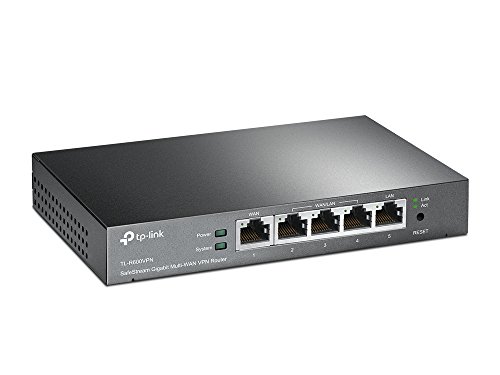
TP-Link Safestream Multi WAN VPN Router | 1 Gigabit WAN+3 Gigabit WAN/LAN+1 Gigabit LAN Port | IPsec/L2TP/PPTP VPN Supported| SPI Firewall | DoS Defense | Lightning Protection(TL-R600VPN)
Product Description
TP-Link Safestream Multi WAN VPN Router | 1 Gigabit WAN+3 Gigabit WAN/LAN+1 Gigabit LAN Port | IPsec/L2TP/PPTP VPN Supported| SPI Firewall | DoS Defense | Lightning Protection(TL-R600VPN)
- 1 Gigabit WAN port, 1 Gigabit LAN Port, and 3 Gigabit WAN/LAN ports provide high-speed wired connectivity
- Supports IPSec, L2TP/IPSec, and PPTP VPN protocols, Simultaneous supports up to 20 IPsec VPN tunnels, 16 L2TP VPN tunnels and 16 PPTP VPN tunnels
- DoS defense and IP/MAC/Domain name filtering protect your network.
- Professional 4KV lightning protection keeps your investment safe and sound
- Note: Please kindly refer to the manual when setting up
<div class="aplus"> <div class="rightImage" style="width:300px"> <img src="https://images-na.ssl-images-amazon.com/images/G/01/electronics/detail-page/tplink-logo-sm._CB339934671_.png" width="300" height="69" alt="tplink-logo"> </div> <h4>What This Product Does</h4> <p>TP-LINK's SafeStream Gigabit Broadband VPN Router TL-R600VPN supports Gigabit Ethernet connections for both WAN and LAN ports, which guarantees high-speed wired connectivity. It also integrates multiple VPN protocols and high-security VPN capabilities to enable employees' remote connections to their main office as if they were in the office. Besides, TL-R600VPN's abundant security strategies such as SPI Firewall, DoS Defense and IP-MAC Binding help protecting your network against most known attacks. TL-R600VPN is an ideal solution for small offices that need cost-effective and reliable VPN solutions.</p> <h4>Key Features</h4> <div class="third-col"> <br> <div class="centerImage"> <img src="https://images-na.ssl-images-amazon.com/images/G/01/electronics/detail-page/tplink-B007B60SCG-TL-R600VPN-f1-sm._CB339934669_.jpg" width="285" height="60" alt="B007B60SCG-TL-R600VPN"><div class="imageCaption">See larger image.</div> </div> </div> <div class="two-third-col last"> <h5>High-Security VPN Capabilities</h5> <p>TL-R600VPN supports IPsec and PPTP VPN protocols and can handle IPsec/PPTP/L2TP pass-through traffic as well. The maximum throughput can reach 20 Mbps. It also features a built-in hardware-based VPN engine allowing the router to support and manage up to 20 LAN-to-LAN IPsec and 16 PPTP VPN connections. Advanced VPN features include: </p> <ul> <li>DES/3DES/AES128/AES192/AES256 encryption</li> <li>MD5/SHA1 authentication</li> <li>Manual/IKE key management</li> <li>Main/Aggressive negotiation modes</li> </ul> </div> <div class="break"></div> <div class="two-third-col"> <h5>Abundant Security Features</h5> <p>For defense against external threats, TL-R600VPN features SPI Firewall function. Additionally, it can automatically detect and block Denial of service (DoS) attacks such as TCP/UDP/ICMP Flooding, Ping of Death and other related threats. Moreover, this router provides IP/MAC/Domain name filtering functions, which forcefully prevent attacks from intruders and viruses. For applications such as FTP, TFTP, H.323 and RTSP which are not well compatible with NAT, TL-R600VPN offers administrators an one-click activation of ALG choices corresponding to the forementioned applications.</p> </div> <div class="third-col last"> <div class="centerImage"> <img src="https://images-na.ssl-images-amazon.com/images/G/01/electronics/detail-page/tplink-B007B60SCG-TL-R600VPN-f2v2-sm._CB339934454_.jpg" width="285" height="93" alt="B007B60SCG-TL-R600VPN"> </div> </div> <div class="break"></div> <h5>Safety-Minded Enterprise Investments</h5> <p>Professional lightning protection technology is embeded to prevent electrical surges from penetrating the interior of the electrical equipment. The router can withstand up to 4KV in well-grounded connection conditions. This feature ensures that the router remains as safe as possible.</p> <div class="third-col"><br> <h4>Specifications</h4> <ul> <li>1 Gigabit WAN port and 4 Gigabit LAN ports provide high-speed wired connectivity</li> <li>Support Up to 20 IPsec VPN tunnels and 16 PPTP VPN tunnels</li> <li>Support DES, 3DES, AES128, AES192, AES256 Encryption</li> <li>Support MD5 and SHA1 Authentication</li> <li>Support Manual and IKE Key Management Mode</li> <li>Support LAN-to-LAN IPsec VPN</li> <li>Support Dead Peer Detection and Perfect Forward Secrecy</li> <li>SPI firewall and DoS defense protect your network from most known Internet attacks</li> <li>Professional 4KV lightning protection</li> <li>Support 100- to 240-volt power supply</li> </ul> </div> <div class="third-col"><br> <h4>What's in the Box</h4> <ul> <li>VPN Router TL-R600VPN</li> <li>Power cord</li> <li>Ethernet cable</li> <li>Quick installation guide</li> <li>Resource CD</li> </ul> </div> <div class="third-col last"><br> <p> </p> </div> <div class="break"></div> </div>
Technical Specifications
You might also like

TP-Link Omada AC1750 Wireless Access Point - Seamless Roaming, Gigabit, MU-Mimo, Beamforming, Poe Powered, Free PoE Injector, Free Managing Software, Free Facebook/SMS Registration Portal(Eap245)
—

TP-Link Omada Cloud Controller - Working with All Omada Eaps, No Extra Cost, Poe Powered, USB Port(Oc200)
—

TP-Link Omada AC1350 Wireless Access Point - Seamless Roaming, Gigabit, MU-Mimo, Beamforming, Poe Powered, Free PoE Injector, Free Managing Software, Free Facebook/SMS Registration Portal(Eap225)
—

TP-Link 8 Port Gigabit Ethernet Network Switch | Ethernet Splitter | Sturdy Metal w/ Shielded Ports | Plug-and-Play | Traffic Optimization | Unmanaged (TL-SG108)
—

TP-Link 16-Port Gigabit PoE+ Easy Smart Managed Switch with 110W 8-PoE Ports | Unmanaged Plus | Plug and Play | Desktop/Rackmount | Metal | Lifetime (TL-SG1016PE)
—

Ubiquiti EdgeRouter X Advanced Gigabit Ethernet Routers ER-X 256MB Storage 5 Gigabit RJ45 ports
—

TP-Link EAP225-Outdoor Omada AC1200 Wireless Access Point - Waterproof, Dustproof, Lightening Protection, Seamless Roaming, Gigabit, PoE Powered, Free PoE Injector, Free Managing Software
—

TP-Link PoE Switch Gigabit 8 Port | 4 Port PoE 55W | Easy Smart | 802.3af Compliant | Shielded Ports | Traffic Optimization | Plug and Play | Sturdy Metal (TL-SG108PE)
—

TP-Link 5 Port Gigabit PoE Switch | 4 Port PoE 56W | 802.3af Compliant | Shielded Ports | Traffic Optimization | Plug and Play | Sturdy Metal (TL-SG1005P)
—