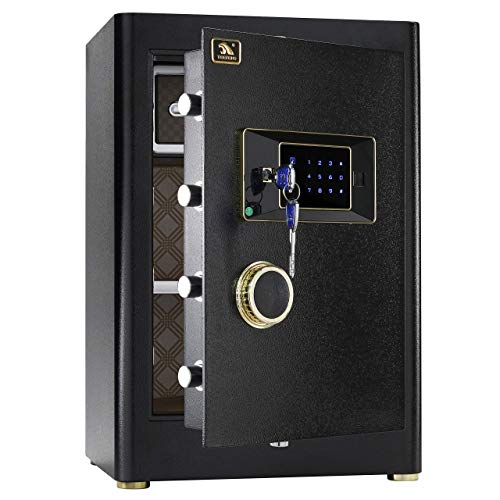
TIGERKING ????? ???? Large Safe Box, 2.05 Cubic Feet Home Safe with Touch Screen Keypad & Built-in Lock Box, Digital Safes for Home Office
Product Description
TIGERKING ????? ???? Large Safe Box, 2.05 Cubic Feet Home Safe with Touch Screen Keypad & Built-in Lock Box, Digital Safes for Home Office
- 【Safe & Sturdy】:Tigerking high-security digital safe is made of highly thick steel material for long-lasting and reliable protection; Equipment with 3-sided,total of 6 live-locking bolts offers physical protection from forced entry
- 【Interior】:Supper large inner space allows you to load almost all of your valuables; The removable shelves help you organize your important things easily; The inside locking box adds one more protection for your privacy; Soft inner layers prevent your unreplaced-cherished belongings from scratches or damage
- 【Digital Lock With Manual Override】:With your digital combination safe, you can access your valuables very fast; The override key (emergency key) is in case you forget your code; What’s more, this safe features secondary lock (master key lock) for additional protection; Even someone gets your code or emergency key, they will be shut out of the door if the secondary lock is locked
- 【Dual Alarm System】:For this big safe, violent vibration or three- incorrect entries can activate the alarm system; Enter the correct code can stop the alarm
- 【About TIGERKING】 TIGERKING has been producing all kinds of safes since 2000. We have a professional after-sales team. We offer a 1-year warranty for our clients. If you have any problems or concerns about the safes, please contact us directly, we will provide you with a satisfactory solution as soon as possible.
<br><b>Prepare your safe with first open:</b><br> 1ã€There are two ways to open the safe, the external battery box is for emergency use , it can charge the keypad outside;<br> 2ã€The reset button is a green button in the hinge side of the door, near the internal led light; <br><br> <b>Open the door(preset user code is "1234", master code is "123456"): </b><br>Emergency key plus Master key:<br>STEP 1: Inset Emergency key, push the key into the hole and turn anticlockwise;<br>STEP 2: Insert master key, turn clockwise and then rotating the handle clockwise to open the door. <br> Personal code plus Master key: <br>STEP 1: Press"#" to wake up system, input the master code or user code;<br>STEP 2: Press"#" to confirm, if the code is right, the system will confirm by two sounds of "beep" and the "unlock" indicator light will be on.;<br>STEP 3: Insert master key, turn clockwise and then then rotating the handle clockwise to open the door. <br><br> <b>Reset code(Pls do change master code and user code after receive the safe):</b><br>Master code:<br> STEP1: Open the door. Wait until the screen is in standby model and then press"#" to wake up system;<br> Input"00" and then press reset button, the system will utter one sound of "beep" and the "unlock" light will blink;<br> STEP3: Input the new master code (1 to 12 digits) and press "#" and then all light will turn off .The new code will be confirmed by long sound of "beep".<br>User code:<br>STEP1: Open the door. Press reset button, the system will utter one sound of "beep", and the "unlock" light will blink;<br>STEP2: Input the new user code (1 to 12 digits) and press "#", all light will turn off. The new code will be confirmed by long sound of "beep".<br><br><b>Package Includes: </b><br>★ 1 x Safe box <br>★ 1 x Instruction <br>★ 4 x Expansion bolt <br>★ 2 x Master key <br>★ 1 x External Battery Box <br>★ 2 x Emergency key
Technical Specifications
You might also like
Fireproof Money & Document Bag, MoKo 15" x 11" Fire & Water Resistant Cash & Envelope Holder, Protect Your Valuables, Documents, Money, Jewelry, Zipper Closure for Maximum Protection, Black

JUNDUN Fireproof Document Bags,13.4"x 9.4"Waterproof and Fireproof Money Bag,Fireproof Safe Storage Pouch with Zipper for A4 Document Holder,File,Cash and Tablet
ROLOWAY Small Fireproof Bag (5 x 8 inches), Non-Itchy Fireproof Money Bag, Fireproof Wallet Bag, Cash Fireproof Bag Set for Valuables - Passport, Currency & Keys (2-Pack)
Fireproof Money Safe Document Bag. NON-ITCHY Silicone Coated Fire & Water Resistant Safe Cash Bag. Fireproof Safe Storage for A5 Size File Folder Holder, Money, Document, Ipad, Jewelry and Passport

SentrySafe EF4738E Fireproof Waterproof Safe with Digital Keypad, 4.71 Cubic Feet
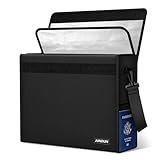
JUNDUN Fireproof Money Bag, 10.6"x6.7" Fireproof and Waterproof Cash Bag with Zipper Closure,Fireproof Safe Storage Pouch Envelope for A5 File Folder,Document, Bank Deposit,Passport,Jewelry

SentrySafe SFW205GQC Fireproof Safe and Waterproof Safe with Digital Keypad 2.05 Cubic Feet Black

Noiposi Fireproof Document Bags,13.4"x9.4" Waterproof and Fireproof Bag for Documents and 10.6"x6.7" Fireproof Money Bag with Zipper,Silicone Fire Safe Storage Pouch for Documents,Money and Cash

COLCASE Fireproof Document Bag 15 x 11 Inches Non-Itchy Silicone Coated Fire Resistant Bag Fireproof Safe Storage for Money, Documents, Jewelry and Passport