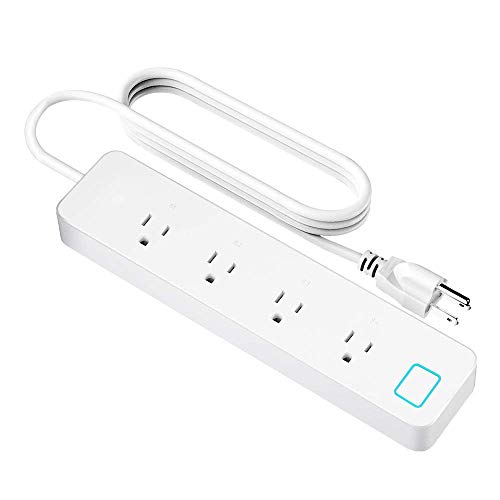
Smart Power Strip Wifi Smart Plug Compatible with Alexa Outlet and Google Home Remote Control and App Control Your Device Individually or Grouply Anywhere
Product Description
Smart Power Strip Wifi Smart Plug Compatible with Alexa Outlet and Google Home Remote Control and App Control Your Device Individually or Grouply Anywhere
<br><b>Product Description</b>:<br>1.Support IOS 8.0 and Above/Android 4.2 and Above <br>2.Max Power: 2200 W, Max Current Rate: 10 A<br>3.Work with Amazon Alexa, echo, echo dot, google home, google assistant and google mini.<br>4.Packing inside:<br>1*XUNTIY smart power strip <br>1*User Manual. <br><br><br><b>Simple to set up and use</b> <br>Search for the eFamilyCloud APP on the App store or google play, you can also scan the QR code in your User Manual provided. <br>Connect method1: Press the button for 6 seconds until the indicator light flash quickly then open eFamilyCloud APP to connect. <br>Following the steps of User Manual. <br>Connect method2: Press the button for 5 seconds again until the indicator light flash slowly, open APP, after the steps of ADD devices then choose AP mode, confirm the indicator light slowly blink. <br> Following the steps of APP.<br><br><br><b>Warm tips</b> <br><b>Only support 2.4GHZ </b>WiFi network, 5GHZ is not available. <br><b>No hub required</b> if you are using BT router and failed to connect, you need to reset the router, you can also consult our technical support. <br><b>Share with family</b> you could share the smart plug with your friends and family by adding device sharing. <br><b>Group Control</b> you could control more than 2 smart devices by create group.<br><br><br><b>How can i do when failed to connect</b> <br>1.Please check if the smart outlet is powered on;<br>2. Whether the mobile phone network is available;<br>3. Please check if the route of the connection extension socket is 2.4G; (our socket only supports 2.4G routing connection) <br>4. When adding an smart power strip, whether the Wi-Fi password entered in the app is correct;<br>5.If the number of access devices has reached the upper limit of the router, try to turn off some Wi-Fi devices, reset the router and re-provision the network.
Technical Specifications
You might also like

Gosund Wifi Smart Plug Outlet Dual Extender Mini Work with Alexa, Google Home, IFTTT, with Control Independently or Together, 10A, No Hub Required, FCC Listed (2 Pack)

LINGANZH Smart Power Strip Surge Protector WIFI Extension Socket, Compatible with Amazon Alexa and Google Home, Smartphone App Control Appliances, Individual Control, Timing Schedule, No Hub Required

Smart Plug, Surge Protector, POWRUI Wifi Outlet Compatible with Alexa, Google Home & IFTTT, No Hub Required, Remote Control your home appliances from Anywhere, 15A,1080 Joules, ETL Certified (2 packs)

MOES WiFi Smart Light Dimmer Switch,Smart Life/Tuya APP Remote Control,Compatible with Alexa Google Home for Voice Control,No Hub Required(Standard Size)

DAISY ENCENS Eye Cream for Appearance of Dark Circles, Puffiness, Wrinkles and Bags - for Under and Around Eyes -30ML

GeMoor Upgrade Rechargeable Lint 6-Blade Shaver & Adjustable Shave Height for Dual Protection Quick & Effective Fabric Shaver Pill Fuzz Remover for Clothes, Sweater, Furniture