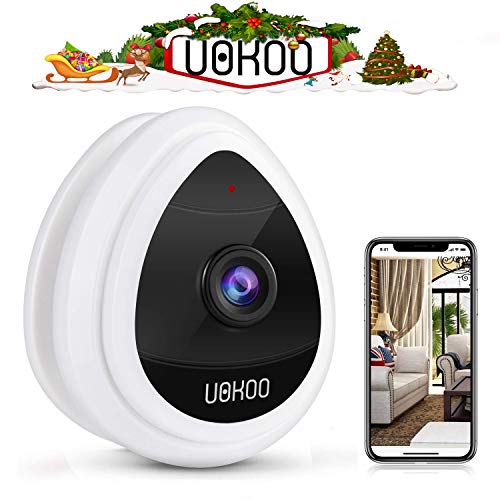
UOKOO Mini IP Camera Security Camera, Wi-Fi Wireless Security Smart IP Camera Surveillance System Remote Monitoring with Motion Alert for Pet Baby Elder Pet Monitor, Nanny Cam, 2019 White
Product Description
UOKOO Mini IP Camera Security Camera, Wi-Fi Wireless Security Smart IP Camera Surveillance System Remote Monitoring with Motion Alert for Pet Baby Elder Pet Monitor, Nanny Cam, 2019 White
- 【Easy setup】sonic recognition technology featuring one key Wi-Fi configuration makes setup so quick and easy,.just plug in the power cable, download the 'I smart view Pro' app and set it up via your andr
- 【Motion detection】motion detection with email or push alert notifications based on motion sensing technology. Motion detection sensibility can be adjusted by your, when the camera detected Abnormity O
- 【Very easy installation Can put the Mini security camera on desk and adjust the viewing angle to your needs or take the plastic part off and put it on the wall with the included screws. Install the
- 【Trouble shooting】make sure the red LED always on for the power cord. Make the blue LED blinks or on for the camera. If the power cord LED does not on always please contact After-sales team for replac
- 【Please】 please make sure the wi-fii is not 5G, and there is no special character on the wi-fii name and password. Please make sure there is a blinking Blue light before you do the one-key wi-fii conf
Simply scan, connect, and see what you want!<br> <br>(1) download app "I smart view Pro", Click "More" --"One key Wi-Fi" -- Input Wi-Fi name and Wi-Fi password", and then click "configure".<Br> <br>(ps: pls make sure to connect your mobile to Wi-Fi, not 3G or 4G. The camera only work on a 2.4 GHz wireless channels> <br>(2) when the phone sounds "beeps", place the mobile near to the camera's than 1M) until the camera LED blinks quickly, and then become always "on" Status.<Br> <br>(3) click "Add camera" On app, then scan QR code on camera or click "LAN search", then input The original password "123456".You can customize the password after logging in which is very important<br><br> <trouble shooting <br>A. Cannot connect to Wi-Fi <br>A. Make sure the app version is the latest. <Br>b. Make sure your Wi-Fi has password, otherwise, you will configure failed <br>c. Make sure you have done the Wi-Fi configuration, visit YouTube video above <br>d. Make sure the RED LED always on for the power cord, and the blue LED blinks or on for the camera. <Br>if the power cord LED does not on always please contact after-sales team for replacement. <Br>e. Reboot the camera via plug out the cord for 1 minute and re-plug in the cord. <Br>f. If above steps does not work, please reset the camera via press and hold the reset button for 10 seconds, and the blue LED will be off for 1 second and then flash slowly.<Br> <br>b. Motion detection Email setting <br>advanced settings>alarm setting>motion detect armed on, save picture on SD/FTP, send email when alarm <br>If you need to set email: advanced settings>mail settings in all blanks including authentication on
Technical Specifications
You might also like
Wireless Security Camera, 720P HD Home WiFi Wireless Security Surveillance IP Camera with Motion Detection Pan/Tilt, 2 Way Audio and Night Vision Baby Monitor, Nanny Cam

SanDisk Ultra 32GB microSDHC UHS-I card with Adapter - 98MB/s U1 A1 - SDSQUAR-032G-GN6MA
Wyze Cam 1080p HD Indoor Wireless Smart Home Camera with Night Vision, 2-Way Audio, Works with Alexa

Wireless Security Camera, Home WiFi Wireless IP Camera with Motion Detection Remote Monitoring Baby Monitor, Nanny Cam
Echo Dot (2nd Generation) - Smart speaker with Alexa - Black

1byone Easy Chime Plug-in Wireless Doorbell Operating at 500 feet, CD Quality Sound and LED Flash, 6 Levels Volume, 36 Chimes, White

Zmodo Wireless Security Camera System (2 Pack), Smart Home HD Indoor Outdoor WiFi IP Cameras with Night Vision, Cloud Service Available

CDE Angel Wing Pendant Necklace White Gold Plated Women Jewelry Heart of Ocean Made with Swarovski Crystals Necklaces, Gifts for Her

Family Feud Strikeout Card Game