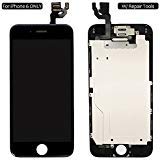
Screen Replacement For iPhone 6 Black, Fully Pre-Assembled LCD Display and Touch Screen Digitizer Replacement for A1549/A1586/A1589, Including Repair Tools
Product Description
Screen Replacement For iPhone 6 Black, Fully Pre-Assembled LCD Display and Touch Screen Digitizer Replacement for A1549/A1586/A1589, Including Repair Tools
<b>What you got?</b><br> 1. Screen replacement display assembly for iPhone 6: <br> - LCD display touch screen<br> - Digitizer assembly<br> - Back metal plate<br> - Front camera<br> - Ear piece speaker<br> - Proximity sensor<br> 2. Screen protector for iPhone 6<br> 3. Repair tools set:<br> 1 x Philips screwdriver<br> 1 x Pentalobe screwdriver<br> 2 x Triangle Pry Pick<br> 1 x Suction Cup<br> 1 x Dust Wipes<br> 1 x Sim card pin<br><br> <b>Tips:</b><br> 1. Make sure your phone is powered off before installation. This step will protect your phone from incorrect installation short circuit damage.<br><br> 2. Mark each screws when you unscrewed them. You might broke your screen if you put the screw in a wrong hole.<br><br> 3. For the beginners, you'd better watch at least one repair guide.<br><br> 4. Be careful with the flex cables, they are very sensitive and frangible.<br><br> <b>Simple Troubleshoot</b><br> 1. There are lines across the screen.<br> <b>Solution:</b> Remove the LCD screen and clean the connectors. Lines are normally because those flex cables are not well seated in or some dust in the connectors. <br><br> 2. Screen won't turn on but all cables are connected well.<br> <b>Solution:</b> Reset the phone by holding both Power and Home button together pressed for min 15 sec.<br><br> 3. Touch feedback lag or does not working properly. <br> <b>Solution:</b> The problems are caused to cables damage. Check all cables to find if there is any damage or crease on the flex cables.<br><br> 4. The Proximity Sensor/Earpiece Speaker/Front Camera doesn't work.<br> <b>Solution:</b> Swap your original parts from your old screen to the new screen. <br><br> <b>Further help please contact us via Contact Seller on Amazon.</b><br>
Technical Specifications
You might also like

Uowlbear Replacement iPhone 6 Battery for iPhone 6 A1586 A1589 A1549 with Tools Kit -1810mAh 3 Year Warranty

Full Screw Set Replacment with Bottom Pentalobe Screws for Iphone 6 Space Grey/Silver/Gold (iphone6 4.7inch)

iPhone 6 Battery, Ombar Apple iPhone 6 Battery Replacement 1810mAh with Complete Repair Tools Kit, Adhesive, and Instructions Brand New 0 Cycle
iPhone 6 Battery Replacement Kit with Complete Tools, Adhesive, and Instructions 1810mAh 0 Cycle - 1 Year Warranty
DAXTROMN iPhone 6 Battery Replacement- Repair Kit with Tools, Adhesive Strips - 1810 mAh 0 Cycle - 2 Years Warranty

YONTEX Battery Model iP6 0 Cycle - with Replacement Repair Tool Kits, Adhesive Strip and Screen Protector [24-Month Warranty]

iPhone 6 Plus Screen Replacement Black LCD Premium Repair Kit with Tools - Easy Manuals Videos and Instructions - FOR iPHONE 6 NOT 6S

For Iphone 6 (4.7 inch) (A1549, A1586, A1589) screen replacement LCD screen digitizer Assembly Touch screen front glass black

COHK Lightning USB Charging Dock Port Flex Cable with Microphone and Headphone Audio Jack Replacement for iPhone 6 4.7'' (Gray)

For iPhone 6 Screen Replacement LCD Display Touch Screen Digitizer Frame Assembly Full Set with Repair Tools for iPhone 6 (4.7 inches) Black