
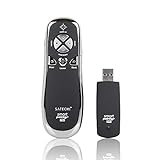
Satechi SP400 Smart-Pointer (Red) 2.4Ghz RF Wireless Presenter with mouse function for Mac and PC
Product Description
Satechi SP400 Smart-Pointer (Red) 2.4Ghz RF Wireless Presenter with mouse function for Mac and PC
- Compact and lightweight - This remote fits naturally into your palm, allowing you to control presentations with ease
- Control PowerPoint and Keynote presentations - Advance and backtrack slides, blank out the screen, stop and resume presentations, and use the red laser to indicate key points
- Mouse Mode - Page up and down, left and right click, control mouse movement to browse the Internet and click on links
- Using a radio frequency of 2.4Ghz, this remote works up to 100 feet away from the USB receiver - no need to remain within line-of-sight
- USB receiver is compatible with Mac or PC - works with Windows 7, 8, 8.1, Vista, XP, Mac OS, MacBook OS Mavericks
SP400 Smart-Pointer 2.4Ghz RF Wireless Presenter with Mouse Function and Laser Pointer enables you to control your onscreen presentations within a range of 100 feet, making it the perfect tool to use in a large conference room. The presenter supports the most common PowerPoint presentation functions including Page Up, Page Down, Mouse Arrow, Right Click, Left Click, Darken Screen, and Resume Screen. It also has a laser pointer built-in to help your audience focus on key points of your presentation. The compact and lightweight design lets you control your presentation with ease as you present. Just plug and play and you are ready to go - no software is required. No need to aim the transmitter to the receiver. Minimum system requirements: Windows 7, Vista, XP, Mac OS with one USB Port To use: - Plug in USB receiver into computer you would like to pair with. - Wait a few moments to allow the drivers to install. - While the LED light on the receiver is blinking, press and hold any button (except laser) on the SP400 remote for 4 seconds. This will allow the remote to communicate with the receiver. - The LED light will turn off. - Push the Mode switch on the right side to Presentation or Mouse mode. - If the laser remains in the On position, this indicates that batteries must be replaced.
Technical Specifications
You might also like

Case Logic USB-201 USB Flash Drive Case (Magenta)
Satechi SP600 Smart-Pointer 2.4Ghz RF Wireless Presenter with Mouse Function and Laser Pointer, Black (SP600RB)

Red Star Tec Wireless Powerpoint Presentation Remote Clicker and Keynote Presenter with Wireless Mouse (PR-820)

Logitech Wireless Presenter R800 with Laser Pointer Green

AMERTEER Wireless Presenter RF 2.4GHz Presentation Laser Pointer Finger Ring Remote PowerPoint PPT Slides Clicker Pen Rechargeable

Apple Mini DisplayPort to VGA Adapter MB572Z/B

Kensington Wireless Presenter with Red Laser Pointer (K33374USA)

Kensington Expert Wireless Presenter with Red Laser Pointer and Cursor Control (K72425AM)

Crayola Colored Pencil Bulk, 240 Count Classpack, 12 Assorted Colors