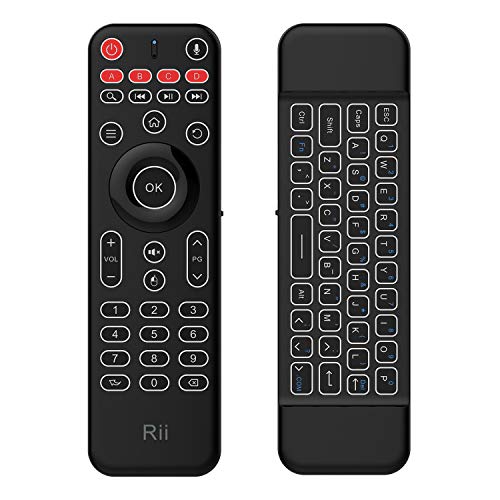
Double-sided Mutimedia Wireless Keyboard MX9
Product Description
Double-sided Mutimedia Wireless Keyboard MX9
<b>Quickview</b><br />Rii as the first mini keyboard remote brand ,all keyboard remotes designed by Riitek Team. Wireless Keyboard and mouse,White LED Backlight Keyboard,Voice search control,With 3-Gyro + 3-Gsensor, it's more convenient to operate in horizontal and vertical mode for games and typing ,Rechargeable keyboard for Android TV BOX ,Smart TV ,Xbox ,Raspberry Pi,PC,Tablet,HTPC,Android ,Windows ,MacOS.<br /><br /><b>Repair with USB Receiver Location</b><br />The wireless keyboard and mouse controller need repair with the USB dongel ,when the connction no smooth.<br />Step 1. Press the buttons"OK" and "Back" at the same time,Blue LED flashs fast,<br />Step 2. Insert the USB dongle into the host device ,the Blue LED flash 2-3s then off ,that means the repair success .<br /><br /><b>Automatically control the White LED Backlight function</b><br />1.In the darkness ,the Backlight will light automatically .<br />2.When you turn one keyboard side to controller side,the backlight will change together.<br /><br /><b>Voice remote controller </b><br />1.Firstly to check that the host device has the Voice control function<br />2.Open the voice control function,such as: turn on the google voice search <br />3.Press the Microphone icon button to talk <br /><br/><b>Note:For some host devices maybe not support the voice search .<br /><br/><b>How to operate the Infrared Learning function ?<br /><b/>Infrared button : Power, A,B,C,D (Top side of the Remote controller side)<br/>1.Press and hold down one of the five infrared keys for 3 seconds,the LED will be on to indicate that it has entered in learning state.<br/>2.Let the larnt remote controller's infrared focus on the original receiving infrared,keep the distance as close as 1-3cm and then press downthe learnt button.<br/>3.If the learning is completed success ,the LED will flash 2 seconds and quit learning state.<br/>4.The learning state will end if it has not detected any infrared signal with 10 seconds.
Technical Specifications
You might also like

VANMASS USB C Hub, 9 in 1 USB C Adapter with 4K HDMI, RJ45 1Gbps Ethernet, 4 USB 3.0 Ports, Micro SD/SD Card Reader, and 90W PD Charging Port for MacBook Pro/Air & More USB C Devices

Portable Charger Power Bank 24000mAh Huge Capacity Battery Pack with LCD Screen, 3 Inputs 2 Outputs Backup Battery Phone Charger Compatible Smart Devices Tablet Android Phone and Other Cellphones

Nooie Outdoor Security Camera 1080P HD Wireless WiFi Camera Home Surveillance Camera Weatherproof Bullet Camera with Two-Way Audio, Waterproof, Night Vision, Theft-Deterrent Alarm

Rii RM105 Wired Mouse,Colorful RGB Backlit,3 Adjustable DPI Levels,Comfortable Grip Ergonomic Optical,USB Wired Mice for PC,Computer,Black
Rii RK100+ Multiple Color Rainbow LED Backlit Large Size usb Wired Mechanical Feeling Multimedia Gaming Keyboard For Working or Gaming,Office Device

Cmore for iPhone 11 Pro Max Case,iPhone 11 Max Wallet Case(6.5"),PU Leather Wallet Case with Strap &Kickstand&Card Slots Magnetic Flip Cover for Men/Women/Boys/Girls (Black)

Homech 6L Cool Mist Humidifiers Quiet Ultrasonic Humidifier 100 Hours, Easy to Clean, for Nursery Babies Room Large bedroom Living Guitar Room 360° Nozzle ,Tank-Removal and Waterless Auto Shut-Off

GCION[2 Pack-Upgrade Version]Compatible with Iphone 11 Pro(5.8 inch) Iphone 11 Pro Max (6.5 inch) Screen Protector,Camera Lens Protector, Ultra Thin, High Definition, Anti-Scratch, Anti-Fingerprint