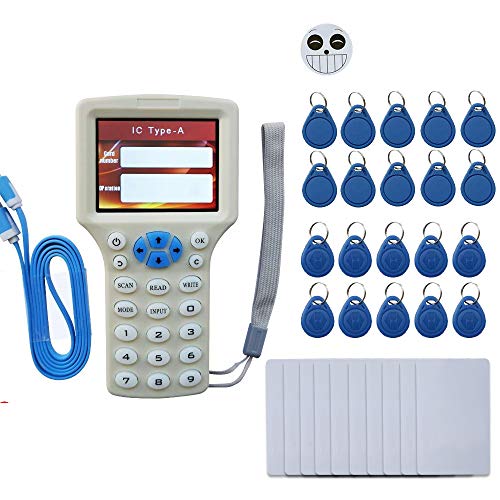
RFID NFC Card Copier Reader Writer Duplicator for IC ID Cards, Rewritable RFID Keyfobs, Copy M1 13.56MHZ Encrypted Programmer USB NFC UID Tag Key Card
Product Description
RFID NFC Card Copier Reader Writer Duplicator for IC ID Cards, Rewritable RFID Keyfobs, Copy M1 13.56MHZ Encrypted Programmer USB NFC UID Tag Key Card
- Please watch the video at listing before using.It works for unencrypted tags. It does NOT work for fully-encrypted tags. Use the build-in decoding software connect PC, it may work for some of half-encrypted tags, but not all. Please read the How to Use in this listing before purchasing.
- The provided tags&cards are blank. They can't be read before writing data. Please copy your tags and write data to them to use. And don't mix them. Tags of different frequencies the image showed at the listing are not compatible, IC/ID own different chip, please press SCAN to check.
- Support read write frequency: 125KHz, 250KHz, 500KHz, 375KHz, 625khz, 750kHz, 875KHz, 1000KHZ, 13.56MHz (ISO1443A/B), HID Prox cards.Support cards write: HID 1386/1326/1346, T5577, EM4305, Mifare UID cards.EM4100/EM4200, Mifare classic, UID cards, Ultralight, Ntag203, HID 1386/1326/1346
- 3.2inch screen display and voice operation prompt,4 AAA batteries power(NOT include), portable to use.
- The embedded PC software is not virus, just the PC don't know it. Don't worry, turn off the scanner. Please note that it can crack most but not all encryption cards.
<p>It works for unencrypted cards. It does NOT work for fully-encrypted cards! By its decoding software, it may work for some of half-encrypted cards, but not all.</p><p></p><p>Working frequencies. ID cards: 125 kHz, 250 kHz, 500 kHz, 375 kHz, 625 kHz, 750 kHz, 875 kHz, 1000 kHz. IC cards: 13.56 MHz, 125 kHz prox card.</p><p>Come with decoding software (Windows).</p><p></p><p><br></p><p><b>How to copy the 125khz&13.56MHz RFID cards:</b></p><p>Press the "on/off "button,</p><p>put the original 125khz cards on the back of the copier,</p><p>then the copier will be show the "Disclaimer"page,</p><p>Press "ok" button,</p><p>then put the cards on the back side of the copier,</p><p>then press"scan",</p><p>then the copier will auto scan it is 125khz cards,</p><p>and the copier will show the card number,</p><p>then we put one writable EM4305 key on the back side of the copier,</p><p>then press"Write",</p><p>then that will be write succesfully.</p><p><br></p><p></p><p><b>How to Crack encryption 13.56Mhz cards:</b></p><p>Please read it carefully and follow the steps as below:</p><p>When the 13.56mhz cards have encrypted,it should be using the software to crack the cards.</p><p>Conneted with copier with computer via USB cable,</p><p>then Press the "on/off" button,</p><p>then the copier will be show the "Disclaimer"page,</p><p>NOT press any button on the Copier,</p><p>then your computer will show a removeable disk,</p><p>open the disk,</p><p>there are the manual and the software,</p><p>Press the button "OK" to agree with the Disclaimer on the </p><p>computer fistly,</p><p>then argee with the copier's "Disclaimer"page,</p><p>that's will be connect successfully,</p><p>put your original cards on the back side of the Read/Write area,</p><p>then press the button "scan"to crack the passwords,</p><p>after 2 or 5 minutes,the passwords will be cracked successfully,</p><p>then put one UID cards in the read/write area,</p><p>then press"write"button,</p><p>that will be ok.</p>
Technical Specifications
You might also like

125Khz RFID Reader Writer - ID Card Compatible With Proximity Key Card Reader Duplicator Copier EM4100 Card Reader Writer Including 3M Sticker 2Pcs, Blank Card 5Pcs, RFID Key Fob 5Pcs

Galaxy's Edge Star Wars Kyber Crystal (White)

Star Wars The Child Animatronic Edition "AKA Baby Yoda" with Over 25 Sound and Motion Combinations, The Mandalorian Toy for Kids Ages 4 and Up

Galaxy's Edge Star Wars Kyber Crystal (Green)

Galaxy's Edge Star Wars Kyber Crystal (Purple)

Galaxy's Edge Star Wars Kyber Crystal (Red)

Galaxy's Edge Star Wars Legacy Lightsaber (26" Lightsaber Blade)
Galaxy's Edge Star Wars Electronic Sith Holocron Pyramid
Galaxy's Edge Star Wars Kyber Crystal (Yellow)

Star Wars: Galaxy's Edge: The Official Black Spire Outpost Cookbook