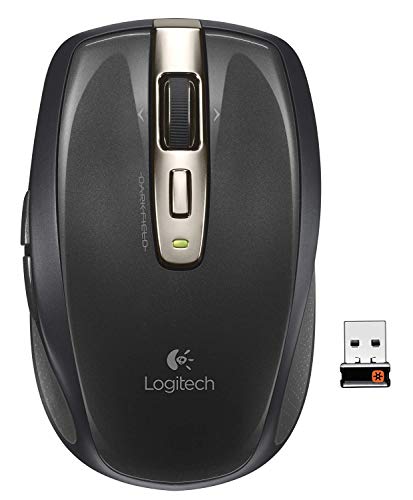
Logitech Wireless Anywhere Mouse MX for PC and Mac (Renewed)
Product Description
Logitech Wireless Anywhere Mouse MX for PC and Mac (Renewed)
- Forward and back thumb buttons flip through web pages and photos faster than ever Compact, sculpted shape for greater mobility and comfortTiny Logitech Unifying receiver stays in your notebook - plug it in, forget it, even add compatible wireless devices without multiple USB receivers.
- Before connecting your Anywhere Mouse MX: Make sure you have fresh batteries in your mouse. For battery installation instructions, see Knowledge Base article 13770. Make sure the mouse is turned on. Please see Knowledge Base article 13779 for instructions on turning your Anywhere Mouse MX on and off. Make sure the Unifying USB receiver is directly and securely plugged into a working USB port on your computer. Turn your computer on.
- This Certified Refurbished product is tested and certified to look and work like new. The refurbishing process includes functionality testing, basic cleaning, inspection, and repackaging. The product ships with all relevant accessories, a minimum 90-day warranty, and may arrive in a generic box. Only select sellers who maintain a high performance bar may offer Certified Refurbished products on Amazon.com
- Hyper-fast scrolling lets you fly through long documents and web pages
- To re-connect your Anywhere Mouse MX, do the following: Download the correct version of Mouse and Keyboard software (SetPoint) from the Anywhere Mouse MX Downloads Page. Launch the Logitech Unifying Software: Windows: Start > Programs > Logitech > Unifying > Logitech Unifying Software Macintosh: Application / Utilities / Logitech Unifying Software The Logitech Unifying Software Welcome screen will appear. Click Next.Follow the on-screen instructions to turn your Anywhere Mouse MX Off then On:When your Anywhere Mouse MX is detected, you will see a confirmation message as shown below. Click yes, then Next.
The Logitech Wireless Anywhere Mouse MX is the perfect mouse for just about any job. Equipped with a precision laser, the MX will work perfectly on glass and other surfaces that most mice can't. Its sleek, compact design makes it perfect for travel and use with laptops and notebooks. Just plug in the nano USB receiver and you're ready to go. The hyperscroll feature allows you to scroll through long documents with ease, and inline forward and back buttons let you navigate through webpages. Ergonomic and comfortable enough for long-term use, the Logitech Wireless Anywhere Mouse MX is the only mouse you'll need.
Technical Specifications
You might also like

Logitech Wireless Anywhere Mouse MX for PC and Mac
Logitech MX Anywhere 2 Wireless Mouse - Use On Any Surface, Hyper-Fast Scrolling, Rechargeable, for Apple Mac or Microsoft Windows Computers and laptops, Meteorite

Dell Professional P2217H 21.5" Screen LED-Lit Monitor

Anker 4-Port USB 3.0 Unibody Aluminum Portable Data Hub with 2ft USB 3.0 Cable for MacBook, Mac Pro/Mini, iMac, XPS, Surface Pro, Notebook PC, USB Flash Drives, Mobile HDD, and More