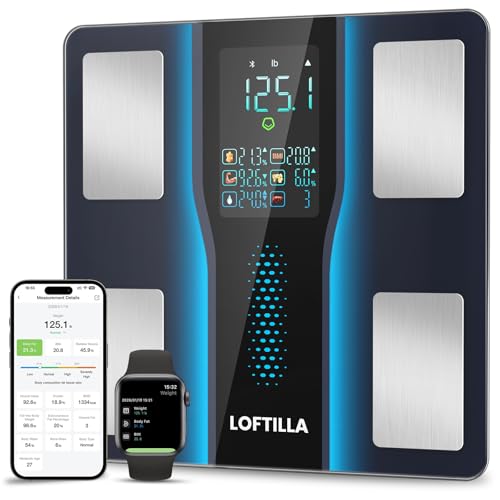
LOFTILLA Smart Scale for Body Weight, Accurate Scale with BMI Body Fat Muscle Mass, 8-in-1 Large Display, Bluetooth Digital Bathroom Scales for 14 Body Composition Metrics, Sync with Fitness App
Product Description
LOFTILLA Smart Scale for Body Weight, Accurate Scale with BMI Body Fat Muscle Mass, 8-in-1 Large Display, Bluetooth Digital Bathroom Scales for 14 Body Composition Metrics, Sync with Fitness App
- 5.4” Large Display with 8 Key Metrics : Step onto this smart body scale and instantly view 8 essential health metrics on the bright LED display: Weight, Body Fat, BMI, Muscle Mass, Body Water, Bone Mass, Visceral Fat, and Body Type. Easy-to-read icons help you understand each result at a glance
- High Accuracy with Enlarged Electrodes: This weight scale is engineered with 4 high-precision sensors and oversized electrodes to ensure stable contact and reliable readings. Utilizing advanced BIA technology, it delivers consistent accuracy to 0.1 lb with a 400 lb capacity, providing reliable body composition analysis you can trust
- 14 Body Composition Metrics & Progress Tracking: Sync this smart scale with BMI, body fat, and muscle mass monitoring to the Feelfit App via Bluetooth to unlock tracking for 14 detailed body composition metrics. Monitor your progress with intuitive daily, weekly, and monthly charts, set personalized goals, and gain deeper insights to guide your health and fitness journey effectively
- Smart Recognition for the Whole Family: Perfect for households, this body fat scale automatically identifies users and syncs their data to separate profiles, supporting multiple family members. With dedicated Standard and Athlete modes, it delivers personalized, accurate metrics for everyone—from daily wellness tracking to fitness performance monitoring—all on one convenient device.
- Syncs with Fitness Apps: The Feelfit App syncs your body metrics with leading platforms like Apple Health, Google Fit, and Fitbit. It consolidates your weight, body fat, activity, nutrition, and sleep data from other apps, providing a complete wellness overview that helps you make informed decisions and stay motivated toward your goals.
- Note: For optimal accuracy, place the scale on a solid, flat surface. Not suitable for individuals with pacemakers, other internal medical electronic devices, or for use during pregnancy. Initial setup requires connecting to the Feelfit App to input height and age
<b>Easy to Use:</br></b><b>1. Place your scale on a hard, flat surface,</b> <br> <b>2. Step on to turn on the scale, then step off to let it calibrate. Wait until you see it displays '0.00', then step on again to measure your weight.</b><br> <b>3. Keep standing on the scale until the digits on the screen flash 2 times with your final measurement.</b> <br> <br> <b>Get started with App:</b><br> 1. Search and download Loftilla Plus App in Apple App Store or Google Play.<br> 2. Turn on Bluetooth (Location permission required for Android users) in your phone and start App.<br> 3. Tap '+' in the top right corner and choose 'Device management' on the 'measurements' page. The App will ask you to step on the scale to turn it on, find and tap 'CS20B' on the pairing page.<br> 4. Keep standing on scale for 5-10 seconds, then you can find your weight shows in both LED display and your Mobile App, you can also get your 14 measurements in App at the same time.<br><br> <br> <b>How to connect with WiFi?</b><br> 1. With the above steps, you made an initial measurement using the Bluetooth connection. Now on the 'Select Wi-Fi' page, tap 'Wi-Fi Configurations' button.<br>2. Select a Wi-Fi network. Type in the network password, and then tap the 'Next' button.<br> 3. In the Wi-Fi 'Connect' Page. Don't close your app during the connection period. Once done, the configuration is complete.<br> 4. To test your Wi-Fi configuration, close your App, and use the scale to make a new mesurement. When finish, re-open your App again, and your new data should be already recorded.<br> By now, your App setup is complete with both Bluetooth and Wi-Fi connections.<br>5. If Wi-Fi connection was not setup initially, you can setup later: On 'Measurements' page, tap '+' at the top right corner, then select 'Device Management', tap 'CS20B' to enter the 'Select Wi-Fi' page. It is in the above Step1. Then follow the instructions to complete step 2-4 to finish Wi-Fi configurations.<br>
Technical Specifications
You might also like

Vacuum Insulated Wine Tumbler with Sliding Lid - Stainless Steel Wine Glass Tumbler Coffee Mug 12 oz, Spill Proof, Travel Friendly for Champagne, Cocktail, Beer and More, 1 Pack

BEBEN Bluetooth 5.0 True Wireless Earbuds, IP68 Waterproof 30H Cyclic Playtime TWS Stereo Headphones for iPhone Android with Charging Case, in-Ear Earphones Headset with mic for Sport/Travel/Gym

KIPOZI 0.9" Ceramic Hair Straightener, Small Lightweight & Portable Flat Iron for Short Hair, Dual Voltage Straightening Iron, Travel Size, Black
OUTZEST 50ft Expandable Garden Hose, Leakproof Lightweight Water Hose with 9 Functions Sprayer and Super Durable 3750D Fabric, Gardening Flexible Hose Pipe with Solid Brass Fittings

Dash Camera for Cars, YOCHOS 1080P Front and Rear Dual Dash Cam, 3" LCD Screen 170° Wide Angle Dash Cam with Night Vision WDR G-Sensor Parking Monitor Loop Recording Motion Detection.(SD Card Include)
Portable Charger, PD 3.0 15000mAh Power Bank, RAVPower 30W High-Speed Tri-Output with LED Display, Ultra Compact Phone Charger Compatible with iPhone Xs X 8 7 6 Samsung Galaxy S9 Note 9 iPad Tablet
Bayco 10 Pack Glass Meal Prep Containers, Glass Food Storage Containers with Lids, Airtight Glass Lunch Bento Boxes, BPA-Free & FDA Approved & Leak Proof (10 lids & 10 Containers)