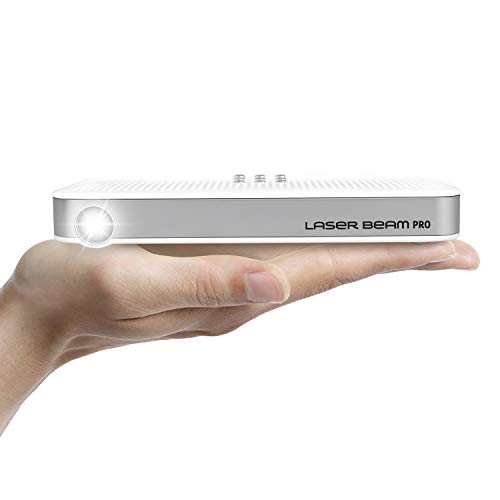
Laser Beam Pro C200, FDA Assessed Class 1 Laser Projector, Focus Free 20-150", HD 768P Native Resolution, 120 Min Rechargeable Battery, Compatible w/ HDMI Support Devices, Built-in Internet, YouTube
Product Description
Laser Beam Pro C200, FDA Assessed Class 1 Laser Projector, Focus Free 20-150", HD 768P Native Resolution, 120 Min Rechargeable Battery, Compatible w/ HDMI Support Devices, Built-in Internet, YouTube
- Laser Beam Pro is Focus-Free, FDA accessed (# 1611158-000) Class 1 Eye-Safe Laser, which means the projected image from around 3 ft. to 15 ft. away from the screen and diagonal 30 in. to 150 in. of screen size is completely FOCUS FREE. No need to worry about FOCUSING ever again! This projector also supports up to 4K input and 1366 x 768p progressive HD native resolution of output with maximum of 200 Lumens, which provides vibrant colors and soft images on the bright-color wall, ceiling, or projector screen and performs better in a complete dark environment
- By using Wi-Fi or Hotspot, you can surf the web and enjoy movies straight from Laser Beam Pro. You may use the apps such as YouTube, Netflix, and Amazon Prime TV after Wi-Fi or Hotspot connection is established. Built-in Bluetooth function also lets you connect a variety of other Bluetooth devices, up to 7 different devices such as Bluetooth Speaker, Bluetooth Mouse, Bluetooth Keyboard, and etc. See Product Description for more details on which apps are supported
- Connect Laser Beam Pro to iOS devices or Android devices wirelessly to share photos or watch your own downloaded videos with your friends and family straight through the projector. Consider using a cable or your own hotspot to video stream. See Product Description for more details on how to connect your mobile devices with Laser Beam Pro
- Connect to different devices such as Laptop, PC, MAC, or Game Console that supports HDMI using a Certified Micro HDMI cable and/or HDMI power splitter (must purchase separately). See Product Description for instructions on how to connect these devices with Laser Beam Pro
- It is the world's first Laser beam projector equipped with Google's Android Lollipop Minimal Operating System with 8 GB of internal memory, 1 GB of RAM, and more features and functions you can use to enjoy our projector! You may also use your own USB flash drive or micro SD card, FAT (Below 32 GB), if you need extra storage spaces
<p><span style="font-family: verdana; font-size: small;"><span style="font-family: verdana; font-size: small;"> <strong>WATCHING VIDEO APPS</strong> <br /><strong>1. How to watch YouTube, Netflix, and Amazon Prime TV</strong> <br /><strong>A.</strong> Using Apps on Laser Beam Pro (Required: Wi-Fi or **Hotspot and a Mouse) <br />i. From the interface menu of Laser Beam Pro, go to Setting > Wi-Fi and select to turn Wi-Fi on. If you don’t have Wi-Fi, you may turn your mobile device into a **Hotspot and connect Laser Beam Pro through that connection. (** It may use the data.) <br />ii. Connect your own Bluetooth Speaker for better sound quality. From Laser Beam Pro, go to Setting > Bluetooth and select to pair your Bluetooth speaker. <br />iii. Or you may also connect your own speaker system by using an *auxiliary cable (*Not included and must be purchased separately)<br /> <br /><strong>B.</strong> Using Apps on iOS Phone or Tablet (Required: *Micro HDMI to HDMI Cable + *iOS AV Lightning Adapter) <br />i. Simply connect your iOS device with Laser Beam Pro by using *micro HDMI to HDMI cable and *iOS AV Lightning Adapter. (*Not included and must be purchased separately) <br />ii. Connect your own Bluetooth Speaker for better sound quality. From your iOS smartphone/tablet, go to Setting > Bluetooth and select to pair your Bluetooth speaker. Make sure to Slide up bottom bezel and tap the music section to look for the connected Bluetooth Speaker to activate it, which is going to be your main sound source. The volume can be controlled from the smartphone/tablet device, not from the projector.<br /> <br /><strong>C.</strong> Using Apps on Android Phone/Tablet through Mirroring/Wireless connection (Required: Miracast Enabled Smartphone/Tablet) <br />i. This method only supports YouTube and Amazon Prime TV. <br />ii. From Laser Beam Pro, go to Android Mirroring and then select to turn on Smart View option from your Android Smartphone/Tablet which may be labeled as ‘Smart View’, ’Smart Mirroring’, ‘Screen Sharing’, or etc. <br />iii. Connect your own Bluetooth Speaker for better sound quality. From your Android smartphone/tablet, go to Setting > Bluetooth and select to pair your Bluetooth speaker. OR from Laser Beam Pro, go to Setting > Bluetooth and select to pair your Bluetooth speaker. <br />iv. May use data if you don’t use Wi-Fi while using internet.<br /> <br /><strong>D.</strong> Using Apps on Android Phone/tablet through Cable/Wired connection (Required: MHL Enabled Smartphone/Tablet + *MHL Cable or *Micro HDMI to HDMI cable) <br />i. Simply connect your Android Phone to Laser Beam Pro by using *MHL or *Micro HDMI to HDMI cable. <br />ii. Extra *micro HDMI male receive adapter/cable may be required depending on the model of your Android smartphone/tablet. (*Not included and must be purchased separately) <br />iii. Connect your own Bluetooth Speaker for better sound quality. From your Android smartphone/tablet, go to Setting > Bluetooth and then select to pair your Bluetooth speaker. OR from Laser Beam Pro, go to Setting > Bluetooth and select your Bluetooth speaker.<br /> <br /><strong>E.</strong> Using Apple Computer/Laptop (Required: *Micro HDMI to HDMI Cable + *Apple Computer/Laptop Mini Display Port Adapter) <br />i. Simply connect your device to Laser Beam Pro by using *micro HDMI to HDMI cable and *Apple computer/laptop mini display port adapter. If screen shows blank, disconnect the cable and reconnect back again. (*Not included and must be purchased separately) <br />ii. You may also connect your own speaker system to Apple Computer/laptop using an *Auxiliary cable for better sound quality. (*Not included and must be purchased separately)<br /> <br /><strong>F.</strong> Using Windows PC/Laptop (Required: *Micro HDMI to HDMI Cable) <br />i. Simply connect your device to Laser Beam Pro by using *Micro HDMI to HDMI cable and make sure to change the screen monitor setting to ‘Duplicate’. (*Not included and must be purchased separately) <br />ii. Extra *HDMI male receive adapter/cable may be required depending on the model of your PC/laptop. ( *Not included and must be purchased separately) <br />ii. You may also connect your own speaker system to Windows PC/laptop using an *Auxiliary cable for better sound quality. (*Not included and must be purchased separately)<br /> <br /><strong>G.</strong> Using Roku or Apple TV (Required: *Micro HDMI to HDMI Cable) <br />i. Simply connect your device to Laser Beam Pro by using a micro HDMI to HDMI cable. <br />ii. You may also connect your own speaker system to Laser Beam Pro using an *Auxiliary cable. (*Not included and must be purchased separately) <br />iii. Some apps might NOT be running properly due to other restrictions applied by the developer. Please contact KDCUSA to find out App supports.<br /> <br /><strong>2. How to watch Hulu, Vudu, Crackle, HBO, and Showtime:</strong> You may follow the step E, F, or G from above instruction. (VuDu: When using Roku, please reboot Roku if you see the message saying, “HDCP unauthorized content disabled,†and play the content again.)<br /> <br /><strong>3. How to watch YouTube Live TV:</strong> You may follow the step B, E, or F from above instruction.<br /> <br /><strong>4. Other APPS:</strong> Some apps might be incompatible due to the size limitation and other restrictions applied by the developer. You may only install up to 2GB worth of apps, and the system may require you to delete some of the apps to free up some space in order for you to be able to install the app that you wish to install.<br /> <br /><strong>* ALL Cables and Adapters are NOT included and must be purchased separately.</strong><br /> <br /><strong>CONNETING WITH OTHER DEVICES</strong> <br />1. How to connect game consoles (Required: *Micro HDMI to HDMI Cable + *HDMI Switch Box w/AC Adapter) <br />i. Simply connect your game console, such as Nintendo Switch or PS4, to Laser Beam Pro by using *micro HDMI to HDMI cable and *HDMI switch box w/AC adapter. <br />ii. Connect your own speaker system to Laser Beam Pro by using an *Auxiliary cable for better sound quality.<br /> <br />2. SD card: Supports only SDHC, FAT file format. (Supports up to 1080P video files only)<br /> <br />3. USB: Host 2.0 Supports only FAT file format. (Supports up to 1080P video files only)<br /> <br />4. Bluetooth devices: Supports up to Bluetooth V 4.0. May connect up to 7 different Bluetooth devices such as speaker, keyboard, mouse, headset, etc. simultaneously.<br /> <br />5. Audio Jack: 3.5 mm (*Auxiliary cable not induced.)<br /> <br />6. For external power bank, it has to be more than 5.0V 3500 mAh to use with Laser Beam Pro.<br /> <br /><strong>* ALL Cables and Adapters are NOT included and must be purchased separately.</strong><br /> <br /><strong>SPECIFICATIONS</strong> <br />- Laser Class: Class 1 <br />- Focus Option: Focus FREE <br />- Brightness: ANSI 100 to Maximum 200 Lumens <br />- Output Resolution: Native WXGA 768 x 1366 HD progressive <br />- Input Resolution: Up to 4K (Supports only when connected with other players via HDMI) <br />- Aspect Ratio: 16 : 9 <br />- Throw Distance: 2 ft. – 15 ft. <br />- Throw Ratio: 1.39 : 1 <br />- Screen Size: 20 inches – 150 inches (Works best in complete dark room) <br />- Contrast Ratio: 2,000 : 1 <br />- Rechargeable Battery Capacity: 3.7V 6200 mAh <br />- Battery Output: 5.0V 4000 mAh <br />- Battery Life: 1-2 hours depends on playing contents and usage <br />- Power: C type charger 110 – 220 Vac. <br />- Keystone: Vertical manual adjustment from +23 to -23 <br />- Built-in Wi-Fi: 802.11 a/b/g/n (2.4/5.0 GHz) <br />- Built-in Speaker: 1 watt <br />- Audio Jack: 3.5 mm (*Auxiliary cable not included) <br />- HDMI input: Micro HDMI (*Micro HDMI cable not inclued) <br />- Expandable Storage: *micro SD card slot and *USB Flash port (Supports only FAT file format) <br />- OS: Android Lollipop <br />- Processor: Quad Core <br />- Ram: 1 GB <br />- NAND Flash: 8 GB <br />- Dimension: 2.79 inch x 5.53 inch x 0.74 inch <br />- Weight: 260 g <br />- OP temp & Humidity: 10C-40C, 15%-85%<br /> <br /><strong>* ALL Cables and Adapters are NOT included and must be purchased separately.</strong><br /> <br /><strong>KEYPAD TIPS</strong> <br /><strong>1. Use Power Button as Power Saving mode button: </strong> The ‘Power Saving Mode’ will be initiated if the projector is not in use and will be shut down completely if not turned back on within 20 minutes for battery saving purposes. <br /><strong>2. Use Back Button as Mouse Mode button: </strong> Press and hold the back button to turn on virtual mouse mode. Repeat this process to disable this mode.<br /></span></span></p> <p> </p>
Technical Specifications
You might also like

Cable Matters 2-Pack Micro HDMI to HDMI Adapter (HDMI to Micro HDMI Adapter) 6 Inches with 4K and HDR Support
—
Portable Mini Projector [Laser Beam Pro C200] CES Awarded Focus-Free FDA Eye Safety Class1 200 Lumens 1080P 4K Supported 768P HD Output 150" Screen Max Wi-Fi Bluetooth USB Micro SD HDMI OS Equipped
—

Mini Tripod Tabletop Stand with Ballhead for mini Projector DSLR Digital Cameras Video Gopro Nikon Canon Sony by WOWOTO
—

120" inch Portable Spandex Projector Screen. Complete Kit Includes 5'x9' Stretch Fabric Material & Hardware for Indoor or Outdoor Back Yard Movie Screen use. 3D DLP Ready with Both Front & Rear Projection Capability (unlike Blackout Cloth)
—

Hermitshell for Sony Portable HD Mobile Projector MPCL1 / Celluon PicoPro Travel EVA Hard Protective Case Carrying Pouch Cover Bag Compact Sizes
—

AmazonBasics Flexible and Durable Micro HDMI to HDMI Cable - Supports Ethernet, 3D, 4K HDR and ARC (4K@60Hz, 18Gbps) - 6 Foot, Black
—
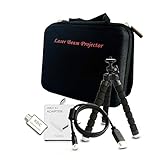
Accessory for Laser Beam Pro C200 Projector Accessories - Customized Carrying Bag, Certified Micro HDMI to HDMI Cable, HDMI to USB-C Adapter, Flexible Tripod C200 Stand (Basic Accessory Sets)
—
AmazonBasics Lightweight Mini Tripod
—

UGREEN High-Speed Micro HDMI Male to HDMI Female Cable with Ethernet Type D to Type A Gold Plated Support 1080P 3D 4K Resolution for Raspberry Pi 4, GoPro Action Cameras, Smart Phones, Tablets
—

GANA Micro HDMI to HDMI Adapter Cable, Micro HDMI to HDMI Cable (Male to Female) for Gopro Hero and Other Action Camera/Cam with 4K/3D Supported
—