
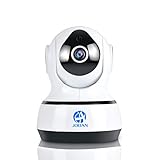
JOOAN C6 1.0 Megapixel Wireless Camera IP Camera Pan/Tilt Motion Detection Night Vision IP Camera for Remote Viewing - No TF Card

Product Description
JOOAN C6 1.0 Megapixel Wireless Camera IP Camera Pan/Tilt Motion Detection Night Vision IP Camera for Remote Viewing - No TF Card
- baby monitor IR-Cut filter for true color video and images; Easy to set up and use; Indoor use only .
- High quality microphone perfect sound monitoring; Two way audio, pan/tilt remotely viewing via tablet, smartphone, PC. Note, Please use the network cable connect the camera and your router.
- HD 720P camera lens, supporting infrared night vision.(It won't record through a window at night because of shining window.);amera lens, supporting infrared night vision.(It won't record through a window at night because of shining window.); Camera doesn't support 5G wifi network.
- TIPS:Pls click the link: www.yoosee.co to download software computer client(Pls use 0.14 version or 0.19 version) and install it. Make sure your operating system is Windows, this is a key factor. Pls note the register accounts of smartphone client and of tablet client should be different in order to smooth connection.
- One year quality warranty,Lifetime Tech Support. Any problem or suggestion pls do not hesitate to contact us firstly. Thanks a lot ! !(Customer service email: [email protected]; Skype: [email protected]).Service online: 5 PM ~ 2 AM (PST).
<b>Highlights:</b><br /> a. Clear Two-Way Audio built in mic and speaker.<br /> b. 3.6mm fixed lens for wide angle viewing. <br /> c. Smooth Remote Control on your fingertips.<br /> d. One million pixel, HD Video 1280 x 720p 25 fps.<br /> e. H.264 video compression format with maximum clarity.<br /> f. Night Vision Up to 50ft distance for 24-hour Surveillance.<br /> g. Pan/Tilt: Horizontal 355°, Vertical 90°.<br /> <br /> <b>Clarity:</b><br /> a. Allowing multiple viewers. <br /> b. Video recording to TF card only, no digital zoom.<br /> c. Card slot record directly to Micro SD/TF card(support max 64G).<br /> d. Live Video Streaming Via Smart Phone, Tablet or with web browser on PC.<br /> e. Dual stream technology, ensure smooth video on Smartphones with HD quality when recording.<br /> f.  Accessories: IP camera,Network cable, Power adapter,Quick start guide,Mount support,Screws.<br /> <br /> <br /> <br /> <b>Fast and Easy Connection:</b><br /> Pls use a network cable to connect IP camera to your router first.<br /> Find the harmless app"Yoosee" from APP store and do the operating steps as per our user manual.The following steps for your reference too:<br /> 1. Download Yoosee App on your smartphone or tablet, and install and start it.<br /> 2. On the Device List: you can see the mark"+" on the top right corner, and then click it and choose Smartlink.<br /> 3. On the Smartlink: click Next. FYI, if you do not hear the sound(Di-Di-Di) from camera, pls reset the camera.<br /> 4. On the Smartlink: Camera needs WIFI to connect, input your WIFI password, and then click Next. During this step you will hear the sound(Dong) which means you make it.<br /> 5. On the Add Device: input the device password(123), waiting for connection in seconds.<br /> NOW ENJOY LIVE VIEWING ! <br /> <b></b>
Technical Specifications
You might also like

IP Camera,JOOAN 720P Network IP Camera With Two Way Audio Remote Wireless Baby Monitor With Night Vision(Update Version)
—

JOOAN 530YRB-T Video Monitor Analog Camera Bullet Surveillance Camera with Night Vision
—

Abowone 4Channel 1080N CCTV DVR Hybrid 5-in-1 H.264 Surveillance Video Record System NO Hard Disk (1080P NVR+1080N AHD TVI CVI +960H Analog)
—

JOOAN 703NVR-4Y 4CH NVR Kit 720P POE Camera System HD Security IP Camera System CCTV Monitor System Complete Surveillance Network Camera System Home Video Camera System
—

Security Camera Outdoor, JOOAN 604YRA-T (Update Version)1000TVL CCTV Outdoor Waterproof Bullet Surveillance Camera For Security 42-IR-LED - Black
—
JOOAN L2 Doorbell Wireless Premium Portable Waterproof Doorbell kit with 1 Remote Push Button Transmitter and 1 Door Chime 1000ft Range with 36 Chimes, No Batteries Required for Receiver
—

Security Camera System, 8 Channel 1080N DVR 4x720P HD-TVI Indoor/Outdoor IP66 Waterproof Bullet Cameras with IR Night Vision LEDs Home CCTV Video Surveillance Kits NO Hard Drive
—

JOOAN 518MRC 1000tvl CCTV Camera Security System for Indoor / Outdoor Weatherproof Camera with 8mm Lens
—

JOOAN 60ft Pre-made All-in-one BNC Video and Power Security Camera Cable for CCTV Security System
—

JOOAN 4CHannel 1080N 5 in 1(Compatible TVI,CVI,AHD,CBVS,IPC) CCTV DVR, H.264 NO HDD Security Surveillance Video Record (Full 960H, 1080P HD-Output/VGA/BNC Output, Smartphone& PC Easy Remote Access)
—