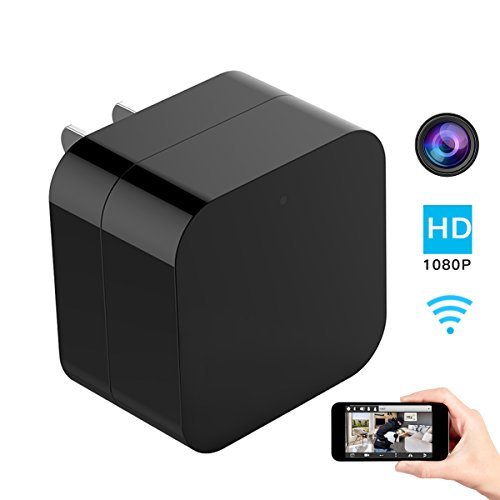
Hidden Spy Camera, 1080P Home Security Mini Camera USB Charger with WiFi Remote View, Motion Detection (Upgraded Version)
Product Description
Hidden Spy Camera, 1080P Home Security Mini Camera USB Charger with WiFi Remote View, Motion Detection (Upgraded Version)
- UPGRADED VERSION - 1080P high resolution, Mini lens is built in the charger that is hard to be noticed. Perfect for keeping an eye on your home security or monitor something. You can know what was happening when you were out of home.
- EASY SETUP - Install the APP "HHMiniCam" on your phone (iOS/Android). The setup is easy. You can view online video from anywhere on your smart phone with Internet access. Even if there is no Internet access, you can insert micro SD card to record videos.
- MOTION DETECTION - The camera provides excellent motion detection. When motion is detected then alarm will be triggered, instant message or email notification will be sent automatically.
- VIDEO LOOP RECORDING - When the card is full, it will automatically overwrite the oldest video files with new ones. With this function, one memory card can always works, no need to change when it is full.
- 2 YEARS MANUFACTURER WARRANTY -We offer 2 years warranty and 30-day money back guarantee. Do not hesitate to contact us for any problem.
<b>Best Option - Why Should You Choose Us! </b><br><br> <b>√WIFI Remote View</b><br> You can know what was happening when you are far away from home. Everything is under your control. No need to worry any more! <br><br> <b>√Motion Dtection</b><br> When motion is detected, then alarm will will be triggered, instant message will be sent to you phone automatically. <br><br> <b>√HD 1080P Video Resolution</b><br> The updated version spy camera can provide a HD 1080P high resolution video. The video and picture quality is very clear. <br><br> <b>√Loop Recording</b><br> When the Micro Sd Card is full, it will automatically overwrite the oldest video files with new ones. One Micro SD card can always works. <br><br> <b> Please Note</b><br> 1, Only support 2.4G WiFi router, do not support 5G WiFi. <br> 2, Only can work on android and IOS system, can't work on windows phone. <br> 3, Keep the camera plugged in when operating everything including reset. <br> 4, Recording on Micro SD Card, choose "All Day" or "On Alarm". <br><br> <b>Tips Before Setup</b><br> <b>Mode 1 - Camera Signal Connection</b><br> Step 1: Download the app : HHMiniCam (Leave the app after downloading) <br> Step 2: Locate Camera Signal named "CMXXXXXXXXXXX" in WIFI list on the phone and connect it to your phone. No password needed, just click and connect. <br> Step 3: Open the APP, you will see your camera successfully added. Then you can see live video in the app. <br><br> <b>Mode 2 - WIfI Connection</b><br> Important: Please remember that you need to finish mode 1, then you can start mode 2. <br> Step 4: Open the APP now, locate setting icon - Device Settings - WiFi Config, then you will see a WIFI list in the APP. Choose your own WIFI and enter password. <br> Step 5: Wait till camera gets back online in a few seconds. If not, close the APP and reopen it. If still nothing, reset the camera then repeat all the steps above.
Technical Specifications
You might also like

SanDisk Ultra 64GB microSDXC UHS-I Card with Adapter, Grey/Red, Standard Packaging (SDSQUNC-064G-GN6MA)

Hidden Camera 1080P WiFi HD Spy Cam Bluetooth Speakers Wireless Mini Camera Rotate 180° Video Recorder Motion Detection Real-Time View Nanny Cam

SanDisk Ultra 32GB microSDHC UHS-I Card with Adapter, Grey/Red, Standard Packaging (SDSQUNC-032G-GN6MA)
AOBO Spy Hidden Camera Mini Body Camera 1080P HD Portable Small Battery Security Cameras Surveillance for Home/Office/Apartment/Car with Motion Detection Activated Night Vision Covert Tiny Nanny Cam

Mini Spy Hidden Camera,NIYPS 1080P Portable Small HD Nanny Cam with Night Vision and Motion Detective,Perfect Indoor Covert Security Camera for Home and Office
Samsung 64GB 100MB/s (U3) MicroSD EVO Select Memory Card with Adapter (MB-ME64GA/AM)

SanDisk Ultra 32GB microSDHC UHS-I card with Adapter - 98MB/s U1 A1 - SDSQUAR-032G-GN6MA
SanDisk Ultra 64GB microSDXC UHS-I card with Adapter - 100MB/s U1 A1 - SDSQUAR-064G-GN6MA

SanDisk Ultra 128GB microSDXC UHS-I card with Adapter - 100MB/s U1 A1 - SDSQUAR-128G-GN6MA