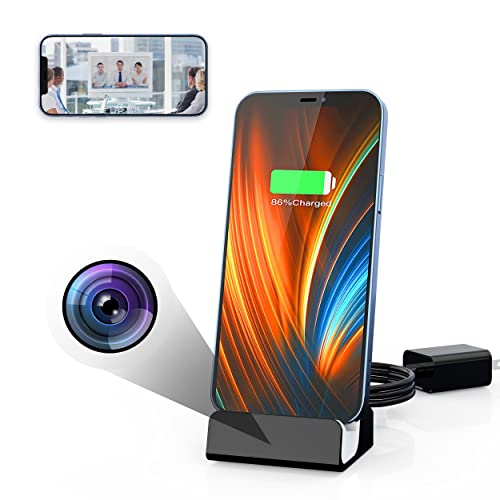
LIZVIE Lightning Docking Station Charger with Mini Camera, 1080P Security Camera with Motion Detection for Home and Office
Product Description
LIZVIE Lightning Docking Station Charger with Mini Camera, 1080P Security Camera with Motion Detection for Home and Office
- 📸【Hidden Camera】Lizvie invisible camera lens under the black special glass in the real charging base, no one will realize that there is a Spy camera inside.The nanny camera for home office surveillance, childcare, pet and cheating catching.
- 📸【Special Degined for Lightning Charger】Perfect compatible with 14,13,12, 11, XS MAX, XR, XS, 8, 8 Plus, 7, 7 plus, 6s plus, 6s, 6 Plus, 6, 5c, 5s, SE, 5, iPad, Air, Pro, Mini, iPod.Ensure safe and stable charging with minimal damage to the iphone.(Please check the matching phone model carefully before purchase. If you are not sure whether it matches or not, please contact us via 'ask a question'.)
- 📸【Motion detection & Alarm Push】Wireless hidden camera Sensitive Motion Detection, wirelessly connects via wifi to understand and get real-time alerts at home / office. Even if you don't have time to stare at your phone, you will not miss any important feelings.Does not consume a lot of phone power.
- 📸【Live View】Connect to the Wifi network via the safe free "LizviePro" App, you can watch live videos from your smartphone or tablet online, take photos or videos for certification or store on your phone or tablet.
- 📸【Micro SD Loop Recording】The USB spy camera automatically records and overwrites the oldest files when full for continuous recording.Product does not include SD card(Suitable for up to 128G memory card )Any questions or problems, please kindly let us know. Note: The audio is not included. (Due to Federal Law: 18 U.S. Code § 2512).
<p>PACKING LIST:</p><p>1x Smart Charger Dock</p><p>1x Adapter</p><p>1x Quick installation Guide</p><p>TIPS:</p><p> ON WIFI CONFIGURATION IMPORTANT NOTICE</p><p>THE CAMERA ONLY SUPPORT 2.4G WIFI NETWORK , NOT SUPPORT 5G</p><p>This spy camera also support 24-hours loop recording or timer recording while insert a Micro SD card, </p><p>it has maximum memory storage up to 128GB (SD card was not included)</p><p>Before you start to set the WIFI connection, please note:</p><p>1.Plug into the USB power directly.</p><p>2.Keep the camera and the Wifi router within 3-5 meters(3.5-15 feet).</p><p>3.Support 2.4G Wifi only, if the router is 5G, please switch to 2.4G or keep 2.4G & 5G channel both on, and make sure DHCP is on.</p><p>4.Make sure use the main router if you have more than two routers.</p><p> PLEASE SET WIFI CONNECTION STEP BY STEP BY FOLLOW THE USE MANUAL.</p><p>If set WIFI connection failed at first time:</p><p>1. Please make sure your phone has connected to WIFI</p><p>2. Please make sure your input the correct WIFI password</p><p>3. Please Turn back to input WIFI password step and input the password again.</p><p>If still can not work , Please contact our after-sale service mailbox.</p>
Technical Specifications
You might also like
Spy Camera Wireless Hidden WiFi Camera with Remote Viewing, 2020 Newest Version 1080P HD Nanny Cam/Security Camera Indoor Video Recorder Motion Activated, Support iOS/Android, No Audio
Spy Camera MCSTREE Hidden Camera in Clock WiFi Hidden Cameras 1080P Video Recorder Wireless IP Camera for Indoor Home Security Monitoring Nanny Cam 140 Angle Night Vision Motion Detection

SanDisk Ultra 128GB microSDXC UHS-I card with Adapter - 100MB/s U1 A1 - SDSQUAR-128G-GN6MA
Wall Outlet Hidden WiFi 1080p Secret Spy Camera Can Be Viewed Remotely, Socket is Powered Normally, Including 32GB Memory Card

Spy Camera Charger | Hidden Camera | Premium Pack | Mini Spy Camera 1080p | USB Charger Camera | Hidden Spy Camera | Hidden Nanny Cam | Hidden Spy Cam | Hidden Cam | Surveillance Camera Full HD
[Upgrade] Spy Camera Wireless Hidden WiFi Camera with Remote View,Hidden Spy Camera 1080P HD Nanny Cam Spy Hidden Camera Charger Recorder Motion Activated,Wireless Spy Camera Support iOS/Android
Spy Camera Wireless Hidden WiFi Camera with Remote Viewing, 2020 Newest Version 1080P HD Nanny Cam/Security Camera Indoor Video Recorder Motion Activated, Support iOS/Android, White, No Audio
Mini Spy Camera WiFi, Relohas HD 1080P Spy Camera Wireless Hidden Live Streaming, Upgraded Night Vision/Motion Activated Spy Cam Nanny Cam, Security Camera for Home and Outdoor (with Cell Phone APP)
Spy Camera Module Wireless Hidden Camera WiFi Mini Cam HD 1080P DIY Tiny Cams Small Nanny Cameras Home Security Live Streaming Through Android/iOS App Motion Detection Alerts

Smallest WiFi Spy Hidden Camera, ZTour Mini HD Portable IP Wireless Home Security Nanny Kid Camera with Motion Detection, Cloud Storage, Live Remote Monitoring for iOS/Android Mobile Phone, Window Pc