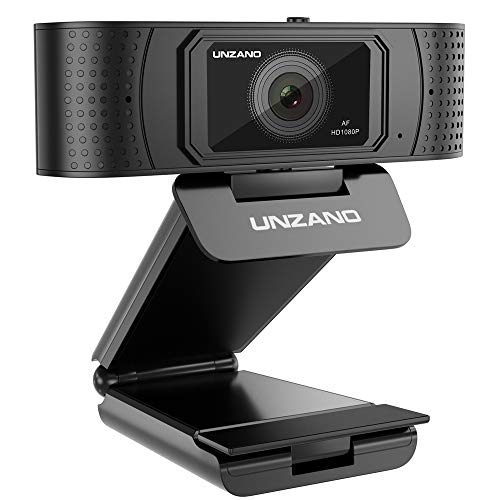
HD Webcam 1080p With Privacy Shutter, Pro Streaming Web Camera With Dual Microphone External USB Computer Camera for PC Laptop Desktop Mac Video Calling, Conferencing Skype Xbox One YouTube OBS
Product Description
HD Webcam 1080p With Privacy Shutter, Pro Streaming Web Camera With Dual Microphone External USB Computer Camera for PC Laptop Desktop Mac Video Calling, Conferencing Skype Xbox One YouTube OBS
- ★ SECURE YOUR PRIVATE SPACE - HD PC camera with Privacy cover allows you to control what your video displays at any time, effectively protecting your privacy. Just one simple finger movement, slide the usb camera cover open when you need. Close it when you don't need, blocking potential hackers. Unique design allows you to easily enjoy safe digital web life.
- ★ HD AUTOFOCUS AND LIGHT CORRECTION - Computer Camera with HDR sensor and autofocus feature captures every details of the picture , Face beauty function that make you look more confident in the video chat; The PC webcam with Automatic low-light correction, F/N2.1 large aperture aperture, capture clear image even in a dim area.
- ★ STEREO AUDIO WITH DUAL MICS - Webcam with microphone capture natural Stereo Audio within 10 meters coverage, make sure everyone hears the Real You. Perfect for streaming, conference, video chatting, webinars, gaming, distance learning and more. This PC desktop camera enables you to enjoy clearer voice for hassle-free communication.
- ★ SMOOTH LIVE STREAMING - HD streaming webcam benefit from H.264 compression Technology (1080p/30fps )enables fast uploads and live streaming on social media and gaming such as Skype, YouTube, Facebook, Xbox One,OBS, Twitch, Messenger,Hangouts, Xsplit, Mixer,Zoom and more .Background replacement feature allows you to change the live streaming background at any time.
- ★ PLUG AND PLAY - This web camera no software required ,easy to use. Compatible with Windows10/8/7 and above , Mac OS 10.6 and above, Chrome OS, Smart TV Android 5.0 or higher version. adjustable clip for multi-angles placement needs for laptop, desktop, PC,desk and even other flat surfaces.
<b>? Are you still worried about your privacy being hacked by hackers? This HD Webcam 1080p With Privacy cover which<br> unique design allows you to easily enjoy safe digital web life.</b><br> <br> <b>? Are you looking for an HD web camera to video chat with your families, friend or use in live <br>streaming, conference, skype, youtube, facebook, OBS, XBOX one, XSplit, Mixer,Messenger, Zoom?</b> <br> <b>This Pro Webcam with Privacy Shutter will be your best choice. Here, we will provide you with the best quality Webcam<br> and best services(We will full refund to you for a month if you are not satisfied; Lifetime warranty).</b><br> <br> <b>Questions and Answers:</b><br> <b>1. How to use?</b><br> If you want to have a video chat, just plug it and run the Skype. If you want to record a video, I would recommend you to<br> download the OBS Studio. Please activate the device named USB Live Camera.<br> <b>2. Operational Problems:</b><br> All the webcams were tested by us before we shipped. Please trust our product quality. Any of problems of operational<br> problems, please contact us as soon as possible.<br> <b>3. Activate the audio:</b><br> Please go into Control Panel and find the "Voice""Recording". Allowed to use "USB Live Camera audio devi"<br> <b>4. Connect to the Macbook:</b><br> Please set to use the external webcam when we use other software at the beginning. Otherwise it will operate the built-in <br>camera preferentially. For example, please run the FaceTime and click the video setting and chose to use "USB Live Camera <br>audio Devi".<br> <b>? Note: </b><br> This webcam is compatible with all operating systems based on the latest version of Skype's official website. Some Skype <br>versiondownload from Window app store or win10's preinstalled Skype can't output our advanced H.264 encoded video<br> format. If you have problem in Skype using, please download the latest version from Skype offcial website.<br>
Technical Specifications
You might also like
12" Flexible Camera Tripod Stand Mount for Logitech Webcam Brio 4K, C925e,C922x,C922,C930e,C930,C920,C615

USB Microphone Kit 192KHZ/24BIT Plug & Play MAONO AU-A04 USB Computer Cardioid Mic Podcast Condenser Microphone with Professional Sound Chipset for PC Karaoke, YouTube, Gaming Recording

Creative Pebble 2.0 USB-Powered Desktop Speakers with Far-Field Drivers and Passive Radiators for Pcs and Laptops (Black)

Lightweight Mini Webcam Tripod for Logitech Webcam C920 C922 Small Camera Tripod Mount Cell Phone Holder Stand (Black)

Unitek 4-Port USB 3.0 Hub Long Cable 48-inch with Micro USB Charging Port, Fast Data Transfer USB Hub Extender Extension Connector Compatible Windows PC, Mac, Surface Pro, Laptop, Printer, 4FT - Black

USB Podcast Condenser Microphone 192kHZ/24bit, UHURU Professional PC Streaming Cardioid Microphone Kit with Boom Arm, Shock Mount, Pop Filter and Windscreen, for Broadcasting, Recording, YouTube

DisplayPort to HDMI 10 Feet Cable, Benfei DisplayPort to HDMI Male to Male Adapter Gold-Plated Cord for Lenovo, HP, ASUS, Dell and Other Brand
Mpow 071 USB Headset/ 3.5mm Computer Headset with Microphone Noise Cancelling, Lightweight PC Headset Wired Headphones, Business Headset for Skype, Webinar, Cell Phone, Call Center

RCA USB Hub, 4 Port USB 3.0 Hub, Portable Hub for PC, Laptop, USB Flash Drives, and Mobile Hard Disk and Other USB A Devices (Black)

Sabrent 22AWG USB 3.0 Extension Cable - A-Male to A-Female [Black] 6 Feet (CB-3060)