
A1484 Battery Replacement for iPad (5th 6th 7th 8th 9th Generation) Model: A1822 A1823 A1893 A1954 A2197 A2198 A2200 A2270 A2428 A2429 A2430 A2602 A2603 A2604 A1474 A1475), for iPad 5/6/7/8/9/Air 1
Product Description
A1484 Battery Replacement for iPad (5th 6th 7th 8th 9th Generation) Model: A1822 A1823 A1893 A1954 A2197 A2198 A2200 A2270 A2428 A2429 A2430 A2602 A2603 A2604 A1474 A1475), for iPad 5/6/7/8/9/Air 1
- ➤[Keep restarting or won't charge?] Please lock the battery screw tightly!!!! Remember this, or the ipad will keep restarting or won't charge.
- ➤[Don't buy a wrong Model] Confirm the Model Name: Setting->General->About/info->Model Name: iPad (5th generation)/iPad (6th generation)/iPad (7th generation)/iPad (8th generation)/iPad (9th generation)/iPad Air(just for Air 1); or Confirm the Model numbers(on the back cover of device): A1474,A1475,A1476,A1822,A1823,A1893,A1954 A2197 A2198 A2200 A2270 A2428 A2429 A2430 A2602 A2603 A2604 A2605
- [New 0 Cycle] Grade A+ 3.73V 8827mAh 32.9Whr Lithium polymer battery cells ,ensure longer battery life and Brand new 0 Cycle, refuse refurbished.
- [Quality Guarantee] UN38.3,MSDS,ROHS and CE Certificated.
- [Package include] 1* A1484 Battery for Apple iPad Air 1/iPad 5/iPad 6 /iPad 7/iPad 8/iPad 9 Battery Replacement + a set of repair tools + 1* adhesive strips.
<b>NOTICE! </b> <br><b>When opening the ipad, do not damage the lcd, the touch glass and the cable inside, a very important step.</b><br> <b>Before reseal your iPad, test the battery with the original data cable and charger (surpport 5V, 2.1A).</b><br><br> <b>Packing List</b><br> <br> -1 Battery for iPad 5 (5th Generation) / iPad Air 1 (same battery)<br> <br> -1 Pentalobe Screwdriver<br> -1 Philips Size Screwdriver<br> -4 Triangle Opening Tool<br> -1 Pry Opening Spudger<br> -1 Suction Cup<br> <br> -1 Set of Adhesive<br> -1 Spudger<br> -1 Metal Spatula/Scraper<br> -1 Tweezer<br> <br> -<b>Kindly Note: </b><br> After the battery installed inside iPad,we suggest you full charge 100% and use the power to about 2% 3 times, then the battery will became more excellent.<br> If your iPad Air Touch Screen Glass Digitizer is broken, you can replace them at the same time. ^ v ^<br>This battery only for Apple iPad 5 gen / iPad Air 1st gen. <br> <br><b>Q: iPad can't start?</b> <br>A: Check the LCD cable and battery cable, connect the original data cable; check whether the iPad is charging,if charging,reseal iPad. <br> <br><b>Q: The iPad can be power on, but no charging; when using it for a few hours, the electricity number is not reduced?</b> <br>A: Restart the iPad, or use the iPad power to 1% and try charging again. <br><br><b>Q: No charging, but showing"charging icon"?</b> <br>A: Please use a charger that supports 5V 2.1A, and the original data cable.<br> <br><b>GoodFixer Customer Service Guarantee:</b><br> <b>24-Hour Reply</b><br> <b>365 DAYS Warranty</b><br>
Technical Specifications
You might also like

Zentop Black IPad Air 1st Generation Touch Screen Digitizer Glass Replacement Modle A1474 A1475 A1476 with Home Button,Camera Holder,Preinstalled Adhesive,Tool Kit. (Black)

Fixcracked Touch Screen Replacement Parts Digitizer Glass Assembly for Ipad air 1st + WIFI Antenna Cable and Professional Tool Kit (black)

Digitizer Replacement Touch Screen for Ipad Air 1 1st Generation A1474 A1475 A1476, Aiiworld 9.7" Touch Panel Parts with Home Button, Camera Bracket, Adhesive Pre-Installed (White)
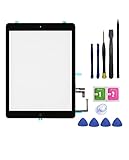
FeiyueTech iPad 5 iPad Air 1st Touch Screen Digitizer Replacement ,Front Glass Assembly -Includes Home Button + Camera Holder+PreInstalled Adhesive with Tools kit .(Black)

Fixcracked Touch Screen Replacement Parts Digitizer Glass Assembly for Ipad air 1st + WiFi Antenna Cable and Professional Tool Kit (White)

MMOBIEL Dock Connector Compatible with iPad Air (Black) Charging Port Assembly Flex Cable incl Professional Toolkit

FeiyueTech IPad Air 1st Generation (IPad 5) Touch Screen Digitizer Replacement ,Front Glass Assembly -Includes Home Button + Camera Holder+PreInstalled Adhesive with Tools kit (White)

Zentop White IPad Air 1st Generation Touch Screen Digitizer Glass Replacement Modle A1474 A1475 A1476 with Home Button,Camera Holder,Preinstalled Adhesive,Tool Kit. (White)

TechOrbits Ipad Air 1st Generation Touch Screen Replacement Glass Digitizer 9.7" with Home Button A1474 A1475 A1476 Repair Guide & Tool Kit (White)

FeiyueTech IPad Air 1st Generation (IPad 5) Touch Screen Digitizer Replacement ,Front Glass Assembly -Includes Home Button + Camera Holder+PreInstalled Adhesive with Tools kit (Black)