
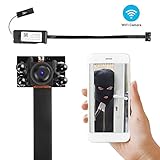
FREDI WiFi Camera, Mini Wireless Small Camera 1080P Nanny Camera with Motion Detection for Home Office

Product Description
FREDI WiFi Camera, Mini Wireless Small Camera 1080P Nanny Camera with Motion Detection for Home Office
- This mini camera is small HD 1920X1080P camera,it fits for all kinds of portable tools.
- WIFI Camera: This is a network camera. There is no distance limitation for you to view or record live videos after you complete the network configuration on your smartphone APP in the P2P mode. You can view or record live videos any where any time you want.
- Motion Detection Security Camera:You need to set the motion detection function in the app, when a moving object is detected,you will receive a alarm message.Will be the first to know what happened.IF YOU HAVE ANY PROBLEMS, PLEASE SEND EMAIL TO [email protected] MONDAY-SUNDAY, we will reply you within 24 hours.
- Loop Recording Wireless WiFi Camera: When your SD card is full, it will overwrite the old video automatically,no longer worry about SD card full stop recording
- Supports 128G Card: This wireless wifi camera supports 128GB micro TF Card in Max (Not included). You can also set the camera's SD card record mode, Such as Record time,Resolution,The time saved for video files to the SD card,Record sound,Loop recording.
This mini camera only supports 2.4G WiFi,it can't supports 5G WiFi.Most routers use one of 2 different frequencies... 2.4GHz (which is better for covering more distance) and 5.0GHz (which is typically better speed).Most routers have both 2 frequencies,you simply login to your 2.4GHz network to finish connecting. This FREDI mini camera is the top of the line photo,video recording tool.<br><br> <b>Features:</b><br> â—This device is portable and is able to record and capture anything at any time.<br> â—It is easy to use and can be used by anyone.<br> â—1080P video quality with 140°wide view angle: Your videos will come out with impeccable resolution and precision.<br> â—This device features 2 MP Motion Detection.<br> <b>Operation Step by Step As Follow:</b><br> 1.Download and install the app "BVCAM"In your phone.<br> 2.Turn on the camera .<br> 3. Take your phone connect the camera's wifi hot spots [Open the phone's "Setting"_Click "WiFi"_Search the wifi hot spot_Connected]. NOTE:The wifi hot spots is under the QR code which sticker on the camera body.<br> 4. Connects the camera [Open the app,click the"+"icon_click"Add new online Camera"_click"Search (LAN)"_click "new device"_click"OK" _the video will display Online] <br> 5. Remote view the live video [Click the "Setting" icon_click "Device Settings"_click"WiFi Config"_then choose your router's WiFi and input your wifi password_click "OK"] <br> 6. when it connection successful,you will view the live video
Technical Specifications
You might also like
1080P WiFi Hidden Camera,SILLEYE Portable Spy Mini Wireless Small Security Camera With Motion Detection Alarm Remote Home Nanny Cam For iPhone/Android Phone/ iPad/PC

SanDisk Ultra 32GB microSDHC UHS-I card with Adapter - 98MB/s U1 A1 - SDSQUAR-032G-GN6MA
Hidden Spy Camera,1080P WiFi Mini Camera Portable Wireless Security Cameras Video Recorder IP Cameras Nanny Cam with DIY Interchangable Lens/Motion Detection for Indoor Outdoor Monitoring
WiFi Hidden Camera SIKVIO HD 1080P Mini Spy Camera Security Camera Wireless Camera with Motion Detection Nanny Cam For iPhone/Android Phone/ iPad/PC

Hidden Spy Camera, 1080P WiFi Mini Camera Portable Wireless Security Cameras with Motion Detection Alarm Remote Home Covert Nanny Cam(Upgraded Version)
1080P WIFI Spy Hidden Camera module, DigiHero Mini WiFi module Camera/Security Camera with WiFi Remote View/Motion Detection for Home/Office.Support iOS/Android/PC
Spy Camera HD 1080P WiFi Hidden Camera DIY Module Wireless IP Cam Mini Covert Nanny Security Cam for Android iPhone APP Motion Detection Built-in Battery - Night Vision

Spy Hidden Camera, Wireless Wi-Fi Camera 1080P APP Mini Portable Covert Security Cam Motion Detection for iOS/Android Mobile Phone

Mini Spy Hidden Camera,NIYPS 1080P Portable Small HD Nanny Cam with Night Vision and Motion Detective,Perfect Indoor Covert Security Camera for Home and Office

SanDisk Ultra 32GB microSDHC UHS-I Card with Adapter, Grey/Red, Standard Packaging (SDSQUNC-032G-GN6MA)