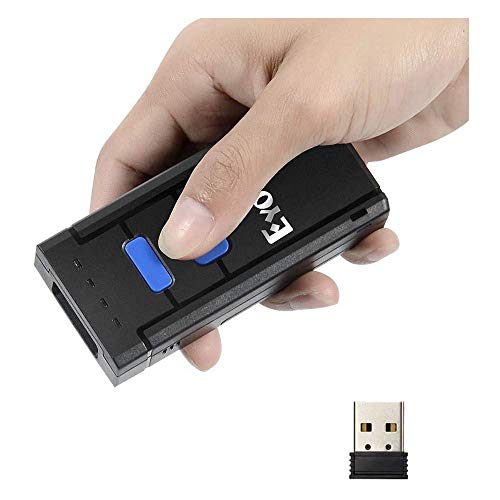
Eyoyo Barcode Scanner Portable 1D Wireless Bluetooth Barcode Reader Compatible with Windows Android iOS Systems for Store Supermarket Warehouse Library
Product Description
Eyoyo Barcode Scanner Portable 1D Wireless Bluetooth Barcode Reader Compatible with Windows Android iOS Systems for Store Supermarket Warehouse Library
- 【Portable Barcode Scanner】 Mini size and pocket design. Easy to operate and carry. Fashionable and stylish.
- 【Wired / Wireless Barcode Reader】 3 in 1 connection modes -- BT4.0, USB wired and 2.4G wireless, meeting your various needs.
- 【Multi-compatible】 Support connections with smart phones, tablets, PC based on windows xp/7.0/8.0/WinCE, Android, iOS system.
- 【Long Transmission Distance】 Under 2.4G wireless mode, up to 164ft in barrier free environment and up to 66ft under obstacles environment.
- 【Scan Barcodes on Paper】 Please note -- this scanner can only scanner barcodes on paper and can't scanner barcodes on screen.
<b>Advantages:</b> <br> <br> Perfectly support various systems: Windows, iOS, Android OS <br> Support SPP and HID mode <br> Support keypads input(iOS only)<br> Auto data detection ensures transmission accuracy<br> Easy inventory with memory of ten thousands bar codes. Users do not need to worry about the barcodes lost<br> Large capacity battery work time:72h, standby time:150h<br> <br> <br> <b>Package list:</b> <br> <br> 1,Barcode Scanner *1 <br> 2,USB Charging Cable *1 <br> 3,Quick Start Guide *1 <br> 4,USB Dongle *1 <br> <br> <br> <b>FAQ:</b><br> <br> 1. It can not connect with Android device <br><br> If the device is android 3.0 or above version,it can connect directly.<br><br> 2. It can not recognize some type of barcodes <br><br> Some inactive typebarcodes are disabled as factory default.So you should enable this tyoe via read tge ebable barcode.<br> If you don't know the type,pls contact out technical support.<br><br> 3. Bracods can't upload to PC or mobile after paired<br> <br> A:Please chekc is the pairing successfully?The indicator of scanner should be blue.<br> B:Please check if you enable inventory mode(under inventory mode,the barcodes need upload manually or read tge upload barcodefor upload)<br><br> 4. PC or mobile phone can not search out it <br> <br> A:Confirm scanner is power on.<br> B:The scanner can pair only when blue LED is flashing.<br><br> 5. Can It connect with mobile or tablet after connecting with PC<br> <br> If you want to change device,plesae clear the pairing information on the device first and reset it.The Method is according to front steps.<br><br> 6. It can not connect autolly after restart the mobile device <br><br> A. Please make sure that there is no other BT connection with mobile device.<br> B. Power on scanner,it will connect with the mobile device automatically.
Technical Specifications
You might also like

Scotty Peelers Label & Sticker Remover - 3 Plastic Red, White, Blue and 1 Metal Blade with Cover

Scotty Peeler Label Remover - The Original (Set of 3 - 1 Red, 1 White, 1 Blue)
Accuteck ShipPro 110lbs x 0.1 oz. Digital Shipping Postal Scale, Black (W-8580-110-Black)
Poly Bags with Suffocation Warning - 11x14 Extra Strong Seal - 200 Pack - Clear Poly Bags 11x14 - Range of Sizes Available - Retail Supply Co

MFLABEL Sheets 30-UP Easy to Peel Address Labels 1"x2-5/8" White Shipping Labels Plus 12pcs Fragile Stickers (3,000 Labels)
Smart Weigh Digital Shipping and Postal Weight Scale, 110 pounds x 0.1 oz, UPS USPS Post Office Scale

400 Industrial Strong Clear Poly Bag Combo Set - 100 Bags Per Size - 6x9, 8x10, 9x12, 11x14 - Super Strong Seal with Suffocation Warning

Portable Wired & 2.4G Wireless Bluetooth Barcode Scanner, Mini Handheld CCD Barcode Reader for POS, iPad, iPhone, Android Phones, Tablets or Computers with Receiver