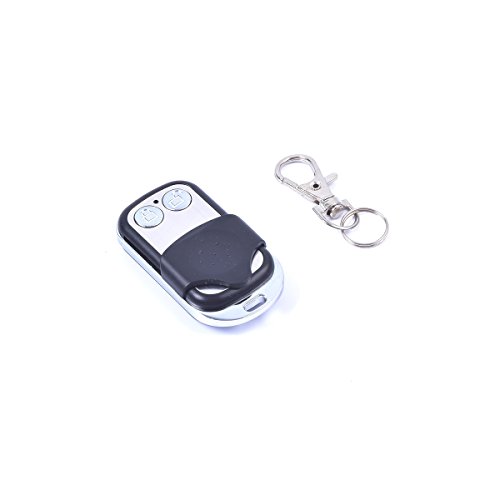
Extra Remote Control for EKYLIN Remote Battery Switch Disconnect System DC 12V
Product Description
Extra Remote Control for EKYLIN Remote Battery Switch Disconnect System DC 12V
- Extra remote control for EKYLIN Remote Battery Switch Disconnect System DC 12V
- Please notice that: the additional remote is not preset to pair with the current receiver, you need follow the steps to pair the remote control with the receiver :
- 1. Hold the pairing button for 5 seconds to re-set the receiver working mode. While holding the button for 5 seconds, don't release the button until the red light flash 3 times. This is to set the working mode for 2 button control mode.(very important)
- 2. Hold the pairing button (less than 5 seconds) until the red indicator light on. Then press the remote control button (any one of on / off), the reciever will learn the signal code and pair with it.
- 3. If the red indicator light is off, then the pairing is ok.(The previous remote control can still work because the receiver can save upto 20 remotes' codes)
<p>Extra remote control for EKYLIN Remote Battery Switch Disconnect System DC 12V</p> <p>Please notice that: the additional remote is not preset to pair with the current receiver, you need follow the steps to pair the remote control with the receiver :</p> <p>1. Hold the pairing button until the red indicator light on. (See photo 2)</p> <p>2. Then press the remote control button (any one of on / off), the reciever will learn the signal code and pair with it.</p> <p>3. If the red indicator light is off, then the pairing is ok.(The previous remote control can still work because the receiver can save upto 20 remotes' codes)</p> <p>Package Includes: <br> 1 x Remote Control with Battery Included</p>
Technical Specifications
You might also like

Car Wireless Remote Control Battery Switch Disconnect Latching Relay Anti-theft, E-KYLIN DC 12V Electromagnetic Solenoid Valve Terminal Master Kill System

EPAuto 20-Inch Battery Inverter Cable Set

12V Car Auto Electromagnetic Disconnect Switch White Box Receiver

Car Battery Remote Control Master Disconnect Switch - DC12V, 180A,Silver Contact - Electromagnetic Solenoid Valve Terminal Master Kill System
Deka 00293 Positive Battery Cable
ESUPPORT 12V Car Auto Blue LED Light Momentary Speaker Horn Push Button Metal Toggle Switch 19mm

Gate1Access Compatible GTO Mighty Mule RB741 Remote Control Transmitter (3 Pak)

SELTERM 10 Pack 6 Gauge 6 AWG 3/8" Stud UL Heavy Duty Copper Crimp Lugs Welding Cable Bare Copper Eyelet Lug

5 Pack - EPAuto 30/40 AMP Relay Harness Spdt 12V, 5-PIN SPDT Bosch Style