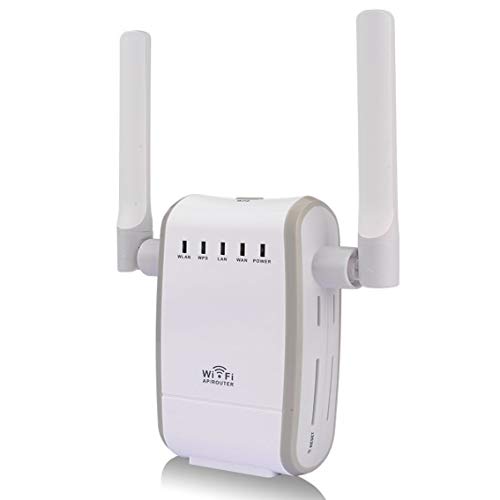
DHMXDC Wireless-N 300Mbps WiFi Range Extender Wireless Router/Repeater/AP/WPS Mini Dual External Antennas Wireless Booster Signal Wireless Access Point
Product Description
DHMXDC Wireless-N 300Mbps WiFi Range Extender Wireless Router/Repeater/AP/WPS Mini Dual External Antennas Wireless Booster Signal Wireless Access Point
- Easy to Install and Set, High Quality Network
- Boosts your existing Wi-Fi coverage to deliver fast and reliable wired and wireless connectivity, extend WiFi up to 300Mbps
- External antennas for better performance, Access Point mode creates a WiFi hotspot using a wired Ethernet connection
- Ethernet port allows the Extender to function as a wireless adapter to connect wired devices, Compatible with other 802.11n/g/b products
- Multiple Modes:Router,Repeater,AP,Wireless ISP operation modes,which is suitable for different network demands
<B>Note:<br> 1.Plug this router on your wall socket,search for the 'Wireless-N' wifi signal,then click on 'Connect'<br> 2.Open your web browser and type the address ' http://192.168.10.253 ' , then you can login and start to setup. </B><br> <br> <B>300Mbps wifi AP/Router <br> Wireless-N router works well as an ideal solution to access to Wi-Fi and enhance the signal for your study or work </B><br> <br> <B>5 optional working modes <br> 1.Wireless Router Mode: </B><br> Create an instant private wireless network and share Internet to multiple Wi-Fi devices. <br> <B>2.Repeater Mode: </B><br> Receives and broadcasts your existing wireless signal to extend wireless range. <br> <B>3.Access Point Mode: </B><br> Connect to a wired network and transform wired Internet access into wireless allowing multiple devices/users to share the Internet. <br> <B>4.Client Mode: </B><br> Connects to another device via Ethernet cable and acts as an external adapter to send/receive wireless signal from your wireless network. <br> <B>5.Bridge Mode: </B><br> Connect to an outdoor WISP (Wireless Internet Service Provider) AP to allow multiple devices/users share the same wireless internet connection. <br> <br> <B>Technical Specifications: </B><br> Wireless Standard: 802.11n, 802.11b/g <br> Frequency Band: 2.4 GHz <br> Wireless Speed: 300Mbps <br> Wireless Security: WEP, WPA, WPA2, WPA Mixed, WPS <br> Wireless Access Scheduling:Specific day and time <br> Wireless Coverage Control:15% - 100% Output Power <br> Antennas:2 fixed 3dBi external antennas <br> <br> <B>Package List </B><br> 1 x Mini Wifi Router <br> 1 x RJ-45 Ethernet Cable <br> 1 x User manual<br> <br> <B>Importantly:</B>ANY setup or product problems,please follow the INSTRUCTION PICTURES or contact us,so that we can help you solve these issues in timely.<br> <br>
Technical Specifications
You might also like
Surface Pro Charger, 44W 15V 2.58A Power Supply for Microsoft Surface Pro 3/4/5/6/Surface Laptop 2/Surface Go & Surface Book (Surface Pro Charger)

NETGEAR Universal N300 Wi-Fi to Ethernet Adapter (WNCE2001)
Wireless to Wired Ethernet/Ethernet to Wi-Fi Wireless Network Bridge Adapter

Wifi Range Extender, CIVIE 300M Wireless-N Mini Wifi Wireless Router Repeater With WPSWLAN 2.4GHz, 802.11n/b/g Network Router Wifi Signal Boosters (White) (XYLYQ)
Qooltek ST-NET Ethernet Surge Protector for 10/100/1000 Base-T PoE+ Gigabit Modem Thunder & Lighting Protection ST-RJ45
Espressif Genuine (not a Clone) ESP32 ESP32-DEVKITC inc ESP-WROOM-32 soldered Female HEADERS
Vonets VAR11N-300 Mini Multi-Functional Wireless Portable WiFi Router/WiFi Bridge/WiFi Repeater 300Mbps 802.11n Protocol

10FT White Premade BNC Video Power Cable / Wire For Security Camera, CCTV, DVR, Surveillance System, Plug & Play (White, 10)

Vonets VAP11G-300 Wireless Portable Wifi Repeater/Bridge/AP Modes, Pocket Design 300mbps Multi-Functional AP Signal Booster, Plug & Play High Power Wifi Hotspot Extender Amplifier, USB Powered