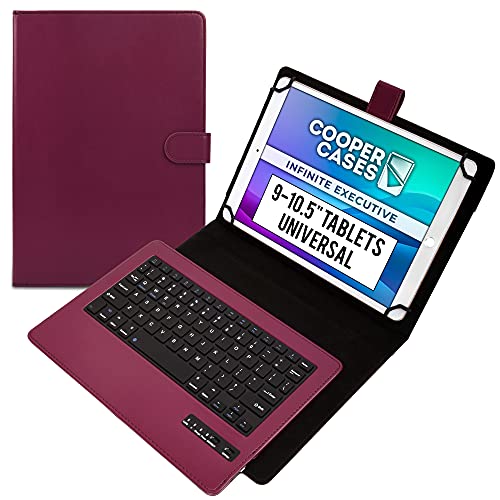
Cooper Infinite Executive Keyboard Case for 9, 9.7, 10, 10.1, 10.2, 10.5" Tablets | Leather Folio Cover & Bluetooth Wireless Keyboard with Hotkeys
Product Description
Cooper Infinite Executive Keyboard Case for 9, 9.7, 10, 10.1, 10.2, 10.5" Tablets | Leather Folio Cover & Bluetooth Wireless Keyboard with Hotkeys
<b>QWERTY Keyboard with 12 Shortcut Buttons</b><br> The keyboard cover offers keypad typing experience with QWERTY key layout. Top row of buttons has 12 shortcut keys for quick access to tablet's native functions. <br><br> <b>*Tablet not Included</b><br><br> <b>Features</b><br> - Universal design fits a range of 9-10.1" sized tablets from 5.9" to 7.2" width (150-183 mm) & 8.8" to 10.2" length (223-259 mm)<br> - Premium faux-leather cover with soft microfiber inner lining & buckle closure<br> - Built-in, collapsible kickstand for hands-free display<br> - Scratch proof, silicon coated corner claws allow for clear access to tablet's buttons and ports<br> - Easy to remove magnetic keyboard tray<br> - Wireless Bluetooth 3.0 connection - up to 10 meters working distance<br> - Compatible with Windows 10, Android and iOS iPads<br> - English QWERTY 83 key keyboard with 12 hotkeys including Home, Search, Lock, Previous Song, Play/Pause, Next Song, Mute, Volume Down, Volume Up, Copy, Paste, Cut<br> - 450 mAh rechargeable lithium battery (100 hour work time, 2 hour recharge)<br> - 275mm x 195mm x 30mm / 10.8in x 7.7in x 1.18in<br> - 470 grams / 1 pounds weight (like 4 sticks of butter)<br> - Package contents: 1x Keyboard case, 1x Manual, 1x Charging cable<br> - PRODUCT WARRANTY only valid when purchased from Authorized distributors (Tablet2Cases)<br><br> <b>How To Pair Your Device</b><br> - Before first use charge Keyboard for 6+ hours<br> - Insert tablet into case. Place 2 tablet corners into claws then stretch remaining claws over unlocked tablet corners.<br> - Turn on/off switch to "on" (Bluetooth light will light for 3 seconds, then switch off to save battery)<br> - Push connect button (Bluetooth light will flash)<br> - On your device go to Settings > Bluetooth<br> - Turn Bluetooth on<br> - Search for available devices<br> - Choose "Bluetooth keyboard" to connect<br> - Type pairing code on screen if prompted
