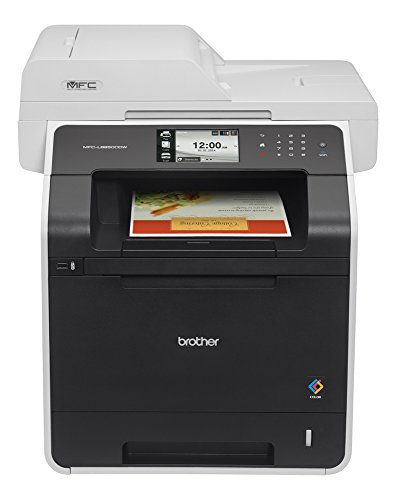
Brother Printer MFC-L8850CDW Wireless Color Laser Printer with Scanner, Copier and Fax, Amazon Dash Replenishment Ready

Product Description
Brother Printer MFC-L8850CDW Wireless Color Laser Printer with Scanner, Copier and Fax, Amazon Dash Replenishment Ready
- High-quality color printing. With print speeds up to 32ppm in both color and black, you no longer have to wait for high-impact business documents, Advanced duplex capability. Two-sided printing to help save paper. Plus, scans both sides of the page in a single-pass for fast, two-sided copying, scanning, faxing
- Flexible connectivity. Print, scan or PC fax over your wireless or Ethernet network or connect locally to a single computer via USB, 4.85" color Touchscreen display, Convenient mobile device printing & scanning. Print from your mobile device via, Advanced scanning capabilities. Supports a variety of "scan to" functions including: E-mail, file, image, OCR, FTP, SSH Server (SFTP), Microsoft SharePoint, USB, Network Folder (CIFS) and E-mail Server. Advanced scanning features including base color (background) removal, ID Scan continuous scanning and blank page skip help ensure your scans come out right the first time
- Flexible paper handling. The MFC-L8850CDW features a 250-sheet capacity tray that is adjustable for letter or legal-size paper, plus a 50-sheet capacity multi-purpose tray. An optional 500-sheet capacity paper tray is available for additional capacity, Walk-up printing and scanning. Features a front-access USB Direct Interface to directly print from and scan to your USB flash memory drive.
- Cost-efficient printing. Spend less time replacing supplies and help reduce operating costs by using high-yield replacement toner cartridges (approx. 4,000 pages black/3,500 pages color), Help control your printing costs. Use the Secure Function Lock feature to set page counts or restrict printing on a per user or group basis (supports up to 100 users), Outstanding customer support. The Brother MFC-L8850CDW offers a 1 year limited warranty with free phone support for the life of your product
- 50-page capacity auto document feeder. Convenient for copying, scanning or faxing multi-page documents (up to legal size), Legal-size document glass. Easily copy or scan bound materials or up to legal-size documents, Advanced security features. Provides a wide-range of security features including: secure print, Secure Function Lock, SSL, Enterprise Security (802.1x), and network user authentication and corporate email address lookup via Active Directory (using LDAP)
- Unit Dimensions : 19.3" x 20.7" x 20.9", Weights: 67.4 lbs.
- Class 1 Laser Product, power output is enclosed
<div class="aplus"> <h4>Brother MFC-L8850CDW</h4> <div class="leftImage" style="width: 300px"> <img src="https://images-na.ssl-images-amazon.com/images/G/01/aplus/detail-page/B00K5UZP2S_MFC-L8600cdw-rightsample_250_opt._CB336548901_.jpg" alt="Brother MFC-L8850CDW Printer" width="250" height="289"> <div class="imageCaption">High-impact color printing and copying for your small business or workgroup<br>View Larger</div> </div> <div class="rightImage" style="width: 250px"> <img src="https://images-na.ssl-images-amazon.com/images/G/01/aplus/detail-page/B00K5UZP2S_Print2XmoreACP_200_opt._CB336548903_.jpg" alt="Print 2X more" width="200" height="102"> <div class="imageCaption">Optional high-yield replacement color toners print 2x more than standard-yield toners.<sup>8</sup><br>View Larger</div> </div> <div class="leftImage" style="width: 300px"> <img src="https://images-na.ssl-images-amazon.com/images/G/01/aplus/detail-page/B00K5UZP2S_mfcl8850cdw_9_L_opt._CB336548906_.jpg" alt="Automatic Duplex Scanning" width="250" height="230"> <div class="imageCaption">Automatic duplex scanning captures both sides of a page in a single pass for fast copying, scanning, and faxing.</div> </div> <div class="rightImage" style="width: 250px"> <img src="https://images-na.ssl-images-amazon.com/images/G/01/aplus/detail-page/B00K5UZP2S_TouchScreen_200._CB336548900_.jpg" alt="Color Touchscreen Disply" width="200" height="111"> <div class="imageCaption">4.85" Color TouchScreen Display for easy navigation of machine functions.</div> </div> <div class="leftImage" style="width: 300px"> <img src="https://images-na.ssl-images-amazon.com/images/G/01/aplus/detail-page/B00K5UZP2S_mfcl8850cdw_6_L_opt._CB336548906_.jpg" alt="Multi-purpose tray" width="250" height="230"> <div class="imageCaption">Multi-purpose tray for envelopes, letterhead, and other thicker media.</div> </div> <div class="rightImage" style="width: 250px"> <img src="https://images-na.ssl-images-amazon.com/images/G/01/aplus/detail-page/B00K5UZP2S_MobileDevicePrinting_200_opt._CB336548901_.jpg" alt="Print from your Mobile Device" width="200" height="104"> <div class="imageCaption">Versatile wireless options for printing from your compatible mobile device.<sup>6</sup><br>View Larger</div> </div> <p>Connect the Brother MFC-L8850CDW to your wireless or wired network to provide your entire workgroup with fast, reliable printing and copying of high-impact color documents, plus faxing and advanced scanning capabilities. It prints brilliant color and crisp black output at up to 2400 x 600 dpi for the professional results that your business reports, spreadsheets and presentations deserve. With print speeds up to 32ppm in both color and black, automatic duplex (two-sided) printing, plus time-saving single-pass duplex copying and scanning, you won't waste time waiting for your printouts, copies or scans to complete. Whether you're printing color business documents, making copies, or scanning, the MFC-L8850CDW will help you get back to work - fast! </p> <h5>High-Quality Scanning of Color and Black and White Documents to a Variety of Network and Cloud Destinations</h5> <p>With an optical scan resolution of up to 1200 x 2400 dpi<sup>1</sup>, the MFC-L8850CDW can scan single documents with stunning clarity via the legal-size document glass. Single-pass duplex copying, scanning, and faxing captures both sides of a page in one pass, to help save time. Scan multi-page documents up to legal size, using the 50-page capacity automatic document feeder. You can even scan multiple documents to a single PDF.</p> <p>Scan to a variety of destinations, including file, image, OCR, e-mail, Microsoft SharePoint<sup>2</sup>, e-mail server<sup>3</sup>, FTP, Secure FTP, network folder (CIFS-Windows only) or to your USB flash memory drive<sup>4</sup> plugged directly into the unit's convenient front access port. </p> <p>Access popular cloud services directly from the 4.85" Color TouchScreen LCD Display using the exclusive Brother Web Connect Interface<sup>5</sup>. This allows you to scan to or print from specific cloud services using an Internet connected Brother MFC-L8850CDW without using a computer. Access popular cloud services such as DROPBOX, BR-DOCS, EVERNOTE, GOOGLE DRIVE, ONENOTE, ONEDRIVE, and more.</p> <p>Advanced scanning features including base color (background) removal, ID Scan<sup>2</sup>, continuous scanning<sup>2</sup>, and blank page skip<sup>2</sup> help ensure your scans come out right the first time.</p> <p>Scan documents to your compatible Apple iOS, Android, Kindle Fire, or Windows Phone mobile device via the Brother iPrint&Scan app<sup>6</sup>.</p> <h5>Cost-saving Features Help Maximize Your Color Printing Budget</h5> <p>Brother designed the MFC-L8850CDW to help businesses keep their printing budget in line. There are multiple ways to make the most of your printing dollar, including:</p> <ul> <li>High-yield replacement toner cartridges<sup>4</sup> (TN-336 BK/C/M/Y) print approximately 4,000 pages<sup>7</sup> black and 3,500 pages<sup>7</sup> color to help reduce printing costs.</li> <li>Secure Function Lock limits accessibility to selected functionality on a per user or group basis (for up to 100 users) to help reduce unnecessary use as well as paper and toner consumption.</li> <li>Two-sided (duplex) printing automatically produces two-sided color documents to help save paper.</li> <li>N-in-1 printing and copying to help reduce paper and toner usage by combining multiple pages onto one page.</li> <li>ENERGY STAR Qualified with Deep Sleep Mode that uses less than two watts of power when not in use.</li> <li>Auto Off Mode powers off the unit when not in use to reduce energy consumption.</li> <li>Toner Save Mode for printing your less critical business documents.</li> </ul> <h5>Flexible Connectivity and Security Options Make the MFC-L8850CDW Ideal for Your Small Office</h5> <p>It's easy to install the MFC-L8850CDW on a wireless network or on a wired network via Ethernet, or connect locally to a single computer via Hi-Speed USB 2.0 connection (cable not included). Plus, the USB Direct Interface on the front of the unit provides convenient walk-up printing from or scanning to your USB flash memory drive<sup>9</sup>. And for organizations concerned with security, the MFC-L8850CDW offers several advanced security features including: Secure Print, Secure Function Lock, SSL, Enterprise Security (802.1x), network user authentication via Active Directory (LDAP), and more.</p> <h5>Easy Printing from Leading Mobile Devices</h5> <p>Your workgroup and visitors to your office will appreciate the convenience of printing wirelessly<sup>6</sup> from a compatible Apple iOS, Android, Kindle Fire, or Windows Phone mobile device. Print via AirPrint, Google Cloud Print, the Brother iPrint&Scan app, Wi-Fi Direct, or Cortado Workplace.</p> <h5>Flexible Paper Handling Helps Handle Demanding Workgroup Printing</h5> <p>The MFC-L8850CDW features a 250-sheet capacity paper tray that adjusts to hold letter or legal paper and a 50-sheet capacity multi-purpose tray for envelopes and thicker media. If you want more paper capacity, you'll really appreciate the ability to add a 500-sheet capacity add-on tray (LT320CL)<sup>4</sup> to expand to an 800-sheet total capacity that can help reduce time-consuming paper refills. </p> <div class="break"></div> <br> <h4>Product Comparison</h4> <table class="data" width="100%"> <tr> <th style="width: 25%;">Product (MFC)</th> <th style="width: 25%; text-align: center;">MFC-9330CDW</th> <th style="width: 25%; text-align: center;">MFC-L8600CDW</th> <th style="width: 25%; text-align: center;">MFC-L8850CDW</th> </tr> <tr> <td><b>Max. Print Speed (clr/blk)</b></td> <td style="text-align: center;">23ppm / 23ppm</td> <td style="text-align: center;">30ppm / 30ppm</td> <td style="text-align: center;">32ppm / 32ppm</td> </tr> <tr> <td><b>Memory (std/max)</b></td> <td style="text-align: center;">256MB / 256MB</td> <td style="text-align: center;" colspan="2">256MB / 512MB</td> </tr> <tr> <td><b>Max. Print Resolution</b></td> <td style="text-align: center;">600 x 2400 dpi</td> <td style="text-align: center;" colspan="2">Up to 2400 x 600 dpi</td> </tr> <tr> <td><b>LCD Display</b></td> <td style="text-align: center;" colspan="2">3.7" Color Touchscreen</td> <td style="text-align: center;">4.85" Color Touchscreen</td> </tr> <tr> <td><b>Automatic Duplex</b></td> <td style="text-align: center;" colspan="2">Print</td> <td style="text-align: center;">Print / Copy / Scan / Fax</td> </tr> <tr> <td><b>Paper Capacity (std/max)</b></td> <td style="text-align: center;">250 / 250</td> <td style="text-align: center;" colspan="2">300 / 800<sup>4</sup></td> </tr> <tr> <td><b>Standard Interfaces</b></td> <td style="text-align: center;" colspan="3">Wireless 802.11b/g/n, Ethernet, Hi-Speed USB 2.0</td> </tr> <tr> <td><b>ADF Capacity</b></td> <td style="text-align: center;" colspan="2">35 pages</td> <td style="text-align: center;">50 pages</td> </tr> <tr> <td><b>USB Direct Interface</b></td> <td style="text-align: center;" colspan="3">Yes</td> </tr> <tr> <td><b>Mobile Device Printing<sup>6</sup></b></td> <td style="text-align: center;" colspan="3">AirPrint, Google Cloud Print, Brother iPrint&Scan (downloadable app), Cortado Workplace, and Wi-Fi Direct</td> </tr> <tr> <td><b>Recommended monthly print volume</b></td> <td style="text-align: center;">30,000</td> <td style="text-align: center;">40,000</td> <td style="text-align: center;">60,000</td> </tr> <tr> <td><b>Replacement Toner Yields (blk/color pgs)<sup>4,7</sup></b></td> <td style="text-align: center;">2,500 / 1,400 or 2,200</td> <td style="text-align: center;" colspan="2">2,500 or 4,000 / 1,500 or 3,500</td> </tr> </table> <div class="break"></div> <p><small>1. From document glass.<br>2. Feature available using Brother Control Center.<br>3. Requires SMTP/POP3 mail server support. <br>4. Additional purchase required.<br>5. Requires Internet connection and an account with desired service. <br>6. Requires connection to a wireless network.<br>7. Based on yields in accordance with ISO/IEC 19798 (letter/A4). <br>8. When comparing high-yield TN-336 C/M/Y cartridges vs. standard-yield TN-331 C/M/Y cartridge yields. <br>9. USB drive sold separately. Print JPEG, PDF, and XPS files.</small></p> <div class="break"></div> </div>
Technical Specifications
You might also like

Brother Genuine High Yield Toner Cartridge, TN336BK, Replacement Black Toner, Page Yield Up To 4,000 Pages, Amazon Dash Replenishment Cartridge, TN336

Brother BU320CL Belt Unit

Brother DR331CL Replacement Drum Unit Set for HL-L8250, HL-L8350, MFC-L8600, MFC-L8850 Printers

Brother TN336 Toner Cartridge ( Black,Cyan, Magenta, Yellow , 4-Pack )

Reseller TN331 Black, Cyan, Magenta and Yellow Complete Toner Cartridge Set

Genuine Brother DR331CL (DR-331CL) Imaging Drum Unit for MFC-L8600CDW, MFC-L8850CDW

Brother Genuine High Yield Toner Cartridge, TN336C, Replacement Cyan Toner, Page Yield Up To 3,500 Pages, Amazon Dash Replenishment Cartridge, TN336

Brother Genuine High Yield Toner Cartridge, TN336M, Replacement Magenta Toner, Page Yield Up To 3,500 Pages, Amazon Dash Replenishment Cartridge, TN336
E-Z Ink (TM) Compatible Toner Cartridge Replacement for Brother TN336 TN331 to use with HL-L8350CDW HL-L8250CDN HL-L8350CDWT MFC-L8850CDW MFC-L8600CDW (Black Cyan Magenta Yellow, 4 Pack)

Brother Genuine Standard Yield Toner Cartridge, TN331BK, Replacement Black Toner, Page Yield Up To 2,500 Pages, Amazon Dash Replenishment Cartridge, TN331