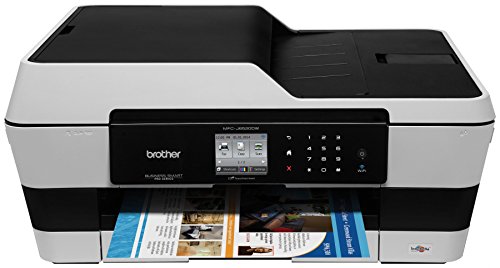
Brother Printer MFC-J6520DW Wireless Color Printer with Scanner, Copier and Fax, Amazon Dash Replenishment Ready
Product Description
Brother Printer MFC-J6520DW Wireless Color Printer with Scanner, Copier and Fax, Amazon Dash Replenishment Ready
- Never run out of ink with this Amazon Dash Replenishment enabled printer
- Low cost printing with Super High Yield (XXL) replacement ink cartridges, approx. 2400 pages (black) and 1,200 pages (color)
- Up to 250 sheet paper tray for high volume printing. Also has single sheet bypass tray
- Wireless printing from your mobile device via Air Print, Brother iPrint & Scan, Google Cloud Print and Wi-Fi Direct (interface)
<div class="aplus"> <h4>Brother Business Smart Pro-Series MFC-J6520DW</h4> <p>The MFC-J6520DW helps increase business productivity with fastest in class print speeds<sup>1</sup>, low cost duplex (2-sided) printing, 11" x 17" print/copy/scan/fax, up to 250-sheet paper capacity, and a suite of innovative cloud apps<sup>2</sup>.</p> <div class="leftImage" style="width: 315px"> <img src="https://images-na.ssl-images-amazon.com/images/G/01/aplus/detail-page/B00EPY0JAI-frontsample_opt._CB361968676_.jpg" alt="MFC-J6520DW front sample" width="300" height="161"> <div class="imageCaption">Accept no compromise. The MFC-J6520DW delivers the Ultimate Combination of business features.</div> </div> <div class="rightImage" style="width: 315px"> <img src="https://images-na.ssl-images-amazon.com/images/G/01/aplus/detail-page/B00EPY0JAI-ADF_opt._CB361968679_.jpg" alt="MFC-J6520DW automatic document feeder" width="300" height="198"> <div class="imageCaption">Save time by loading up to 35 sheets into the automatic document feeder.</div> </div> <div class="leftImage" style="width: 315px"> <img src="https://images-na.ssl-images-amazon.com/images/G/01/aplus/detail-page/B00EPY0JAI-scan_optA._CB361966708_.jpg" alt="MFC-J6520DW scanner" width="300" height="275"> <div class="imageCaption">11" x 17" scan glass handles ledger size documents with ease.</div> </div> <div class="rightImage" style="width: 315px"> <img src="https://images-na.ssl-images-amazon.com/images/G/01/aplus/detail-page/B00EPY0JAI_2.7_opt._CB361968683_.jpg" alt="MFC-J6520DW 2.7-in. TouchScreen Display" width="281" height="208"> <div class="imageCaption">2.7" TouchScreen Display makes navigating machine functionality a snap.</div> </div> <div class="leftImage" style="width: 315px"> <img src="https://images-na.ssl-images-amazon.com/images/G/01/aplus/detail-page/B00EPY0JAI_mobile_printing_opt._CB361968676_.jpg" alt="MFC-J6520DW print from smartphone or tablet" width="199" height="109"> <div class="imageCaption">Multiple options to print from almost any smartphone or tablet.</div> </div> <div class="rightImage" style="width: 315px"> <img src="https://images-na.ssl-images-amazon.com/images/G/01/aplus/detail-page/B00EPY0JAI_OutlineScan_opt._CB361968677_.jpg" alt="MFC-J6520DW Outline and Scan" width="300" height="200"> <div class="imageCaption">Outline & Scan is just one of the innovative cloud apps installed on the MFC-J6520DW.</div> </div> <div class="leftImage" style="width: 315px"> <img src="https://images-na.ssl-images-amazon.com/images/G/01/aplus/detail-page/B00EPY0JAI-_landscape_opt._CB361968683_.jpg" alt="MFC-J6520DW Landscape Print Technology" width="300" height="187"> <div class="imageCaption">Innovative Landscape Print Technology helps reduce the overall footprint of the MFC-J6520DW.</div> </div> <p>Businesses looking for a hard-working color inkjet all-in-one shouldn't have to make compromises. That's why Brother is proud to offer the MFC-J6520DW, part of our Business Smart Pro Series. It provides the Ultimate Combination for business: a high-end, business-quality feature set, completely intuitive operation, and increased productivity. The MFC-J6520DW also provides low-cost printing, thanks to the availability of Super High Yield Replacement Ink Cartridges<sup>3</sup> that print approximately 2,400 black pages and 1,200 color pages.</p> <h5>Fastest in class print speed means you won't waste time waiting for your documents to print</h5> <p>The MFC-J6520DW boasts fastest in class print speed<sup>1</sup>, so you'll get your documents when you need them at up to 35 ppm color or 27 ppm black<sup>4</sup>. Plus you'll enjoy the added convenience of duplex (2-sided) ledger printing, as well as 11" x 17" copy/scan/fax.</p> <h5>Full 11" x 17" capability is an ideal feature for businesses that work with larger documents</h5> <p>The MFC-J6520DW prints, copies, scans and faxes ledger size documents with ease. Whether you're using the machine's 11" x 17" scan glass, printing from the dual paper trays, or copying, scanning or faxing from the up to 35 sheet automatic document feeder, you'll appreciate just how simple it is to produce and share oversized documents.</p> <h5>Brother makes setting up and using the MFC-J6520DW quick and easy</h5> <p>When you remove your MFC-J6520DW from the box, you'll discover that connecting to a wireless network couldn't be easier, thanks to the wireless assistant that completely walks you through set up. It's so simple - you don't need a USB cable, and you won't even need to know your wireless network password. Share the machine with others on a network using 802.11 b/g/n or wired Ethernet networking, or connect to a single computer using a USB cable3 via Hi-Speed USB port. Using the machine is equally easy. The simplified control panel on the 2.7" TouchScreen Display makes it simple and intuitive to navigate menus, change settings, and create custom shortcuts for frequently used settings, and the accompanying TouchPanel only displays the keys you need.</p> <h5>Print wirelessly from your mobile device using, Airprint, Wi-Fi Direct and more</h5> <p>The MFC-J6520DW gives you a full menu of choices for connecting to Apple Android, Kindle Fire, Windows Phone, or Blackberry mobile devices. It supports wireless printing from your mobile device via5: AirPrint, Google Cloud Print, Brother iPrint & Scan, Cortado Workplace and Wi-Fi Direct, that allows you to print wirelessly from PC or mobile devices without the need for a router.</p> <h5>Brother Cloud Apps and Web Connect interface add a new dimension of functionality to your inkjet all-in-one</h5> <p>The MFC-J6520DW comes with a suite of pre-installed, innovative Brother Cloud Apps2 that you access directly from the machine's TouchScreen Display. You'll be amazed by the functionality of these all-new exclusive document management and sharing apps. The Brother Cloud Apps suite is expandable, and Brother is developing new apps that will become available for download as they are finished. The initial line-up of apps includes:</p> <ul> <li><b>Outline & Copy:</b> This app lets you make a physical copy of only selected portions of an existing hard copy document.</li> <li><b>Outline & Scan:</b> This app enables you to select parts of a physical document and scan just those parts into a digital file on a transparent background.</li> <li><b>Outline & Remove:</b> This app lets you remove selected portions of a hard copy document, then produces a physical copy of the remaining information.</li> <li><b>NoteScan:</b> This app prints a note-taking template from the cloud, in your choice of 1, 2, 4, or 8 pages on a single sheet of letter-sized paper. Once the sheet is filled with notes, scan it using NoteScan and the pages will be automatically separated and converted into a series of JPEGs for easy storage or sharing.</li> <li><b>Brother Creative Center Templates:</b> Print commonly-used business documents like calendars, notetaking forms, signage, as well as fun seasonal documents directly from your TouchScreen Display.</li> </ul> <p>You can also access popular web services directly from your internet-connected MFC-J6520DW from the TouchScreen Display using the Web Connect6 interface. Upload to or download from specific web services without using a computer. Access Facebook, Picasa Web Albums, Flickr, Evernote, Google Drive, Box, Skydrive and Dropbox. </p> <h5>Exclusive Landscape Print Technology is Brother innovation with our customers in mind</h5> <p>While developing the MFC-J6520DW, Brother sought to create a product that would help eliminate the need for compromising on features or design. This led us to introduce our innovative Landscape Print Technology, which stores and feeds paper into the machine in landscape orientation. This unique, space-saving technology allows Brother to deliver the Ultimate Combination of features for business in a machine with a sleek design in a smaller footprint.</p> <h5>At your side</h5> <p>At Brother, our goal is to provide you with printers and all-in-ones that you can depend on to consistently deliver high performance, reliability, and value for your business.</p> <h5>What's in the Box</h5> <ul> <li>MFCJ6520DW</li> <li>(4) Cartridges LC103BK/C/M/Y Starter Ink Cartridges</li> <li>CD-Rom - Assembly for Windows and Mac</li> <li>User's Manual</li> <li>Quick Setup Guide</li> <li>Telephone Line Cord</li> </ul> <div class="break"></div> <table class="data" width="100%"> <caption>Brother Professional Series</caption> <tr> <th style="width: 25%;"></th> <th style="width: 25%; text-align: center;">MFC-J6520DW<br>(Currently Viewing)</th> <th style="width: 25%; text-align: center;">MFC-J6720DW</th> <th style="width: 25%; text-align: center;">MFC-J6920DW</th> </tr> <tr> <td><b>Max Print Speed</b></td> <td style="text-align: center;">Up to 12/10ppm (ISO/IEC 24734)</td> <td style="text-align: center;">Up to 12/10ppm (ISO/IEC 24734)</td> <td style="text-align: center;">Up to 12/10ppm (ISO/IEC 24734)</td> </tr> <tr> <td><b>Other Features</b></td> <td style="text-align: center;">Mobile Device Printing<sup>5</sup>, WiFi Direct, Brother Cloud Apps, 11" x 17" Scan Glass</td> <td style="text-align: center;">Mobile Device Printing<sup>5</sup>, WiFi Direct, Brother Cloud Apps, 11" x 17" Scan Glass</td> <td style="text-align: center;">NFC Capable<sup>7</sup>, Mobile Device Printing<sup>5</sup>, WiFi Direct Printing<sup>5</sup>, Brother Cloud Apps, 11" x 17" Scan Glass</td> </tr> <tr> <td><b>Duplex Printing</b></td> <td style="text-align: center;">Yes</td> <td style="text-align: center;">Yes</td> <td style="text-align: center;">Yes</td> </tr> <tr> <td><b>Media Card/Pict Bridge</b></td> <td style="text-align: center;">Yes/Yes</td> <td style="text-align: center;">Yes/Yes</td> <td style="text-align: center;">Yes/Yes</td> </tr> <tr> <td><b>Networking</b></td> <td style="text-align: center;">Ethernet & Wireless (b/g/n)</td> <td style="text-align: center;">Ethernet & Wireless (b/g/n)</td> <td style="text-align: center;">Ethernet & Wireless (b/g/n)</td> </tr> <tr> <td><b>LCD</b></td> <td style="text-align: center;">3.3" Color TouchScreen</td> <td style="text-align: center;">3.3" Color TouchScreen</td> <td style="text-align: center;">3.3" Color TouchScreen</td> </tr> <tr> <td><b>Paper Capacity (max.)</b></td> <td style="text-align: center;">250</td> <td style="text-align: center;">500</td> <td style="text-align: center;">500</td> </tr> </table> <div class="break"></div> <p><small>1. Based on competitive in-class inkjet models with an estimated street price under $300. Competitive data gathered from manufacturer websites and third party industry sources as of February 2013.<br>2. Requires internet connection.<br>3. Additional purchase required.<br>4. PPM speed is based on printing in fast mode. Excludes time to complete first page and will vary depending on a variety of factors. ISO print speed based on ISO/IEC 24734.<br>5. Requires a connection to a wireless network.<br>6. Approximate page yields in accordance with ISO/IEC 24711.<br>7. See brother-usa.com/nfc for a list of compatible mobile devices.</small></p> <div class="break"></div> </div>
Technical Specifications
You might also like

Brother Genuine High Yield Black Ink Cartridge, LC103BK, Replacement Black Ink, Page Yield Up To 600 Pages, Amazon Dash Replenishment Cartridge, LC103

Brother Genuine LC1053PKS Super High Yield XXL Ink Cartridges
Brother Genuine High Yield Color Ink Cartridge, LC1033PKS, Replacement Color Ink Three Pack, Includes 1 Cartridge Each of Cyan, Magenta & Yellow, Page Yield Up To 600 Pages/Cartridge, LC103

Brother LC-103 High Yield Ink Cartridge Set Colors Only (CMY)

Brother MFCJ6920DW Wireless Multifunction Inkjet Printer with Scanner, Copier and Fax, Amazon Dash Replenishment Enabled
SUPER HIGH YIELD INK CARTRIDGE - BLACK

HP Printer Paper, Multipurpose20, 11 x 17, Ledger, 20lb, 96 Bright, 500 Sheets / 1 Ream (172001R) Made In The USA

Brother Genuine LC105Y Super High Yield XXL Yellow Ink Cartridges

Brother Printer LC103C High Yield Cartridge Ink, Cyan
JARBO Compatible Ink Cartridge Replacement for Brother LC103 High Yield, 4 Color, (12 Black, 4 Cyan, 4 Magenta, 4 Yellow), for Brother MFC J870DW J450DW J470DW J650DW J4410DW J4510DW J4710DW J6720