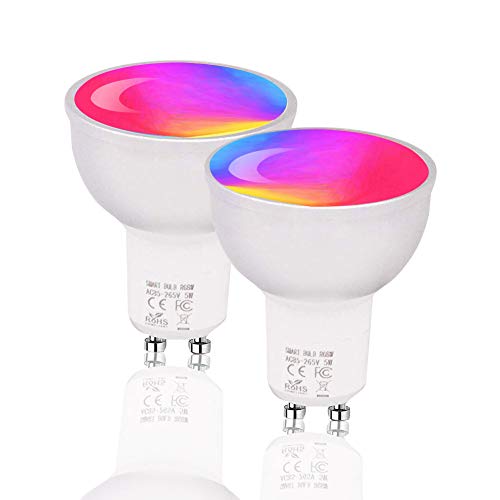
BoazSmart WiFi Smart GU10 Light Bulb,WiFi LED Spotlight Bulb Alexa and Google Home Voice Control,Smart Phone Remote Control Lamp TuyaSmart APP Light,Dimmable Bulb RGBW Color Changing 5W
Product Description
BoazSmart WiFi Smart GU10 Light Bulb,WiFi LED Spotlight Bulb Alexa and Google Home Voice Control,Smart Phone Remote Control Lamp TuyaSmart APP Light,Dimmable Bulb RGBW Color Changing 5W
- [Voice Control] - Connect wifi smart GU10 light bulb to Amazon Echo and Google Assistant (When you sit on the couch and have tea, You can tell Alexa "Alexa, set table lamp light to warm yellow" or"Alexa, set table lamp light to 70%")
- [APP Remote Control] - Still worried about the stairs in the dark? Open Tuya smart APP and turn on the BOAZ remote control smart GU10 light bulb of the staircase. Once you return to your bedroom, turn off the bulb again without worrying about wasting electricity
- [Dimmable + RGBW] - 2700-6500k dimmable range,with 16 million colors and a variety of fixed modes, you can complete the party atmosphere in just 1 second. You can even combine multiple dimmable LED BR30 E26 light bulb to set different colors.[Note]:This bulb is RGBW,W is cool white,warm white is mixed with RGBW.
- [Group Control] - Groups the LED smart GU10 light bulb that need to be controlled at the same time, and no longer need to set each bulb, which is convenient and fast
- [Good Quality:] - BOAZ intelligent GU10 light bulb certification: CE ROHS FCC, BOAZ smart GU10 light bulb average 50000 hours life expectancy, 2 years warranty.【Note : Only connect to 2.4G network】
<b>How to Use?</b><br> Step 1: Please download "Smart Life" and create an account.<br> Step 2: Please turn on and off with the button on the wall 3 times, the bulb will blink.<br> Step 3: Please open Smart Life APP , choose Lighting Devices> Confirmed in flash <br>lamp> Choose your router wifi, enter password> Wait a few minutes for connection> <br>Change the name of your light bulb> Done.<br> Step 4: Make sure your Amazon Alexa or Google Home is connected to the router wifi please.<br> Step 5: Search for "Smart Life" in "Skill" app on Amazon Alexa or Google Home and <br>enter the name and password of "Smart Life"<br> Step 6: Once Amazon Alexa has completed the discovery of your bulb, you can remotely <br>control your bulb by voice. " Alexa, turn on the bulb "<br><br> <b>Schedule On/Off</b><br> Help you get alseep at night/wake you up in the morning.<br><br> <b>Share Smart Bulb Control</b><br> You can share control of smart light with your family and friends by adding your family's phone number in the app<br><br> <b>Scene Control In APP</b><br> You can turn on or off by setting temperature, weather, sunset sunrise, air quality control lights in the APP.<br><br> <b>No Hub Required</b><br> Built-in Wi-Fi modules, connect to your secured 2.4 GHz Wi-Fi network. No hub and no extra cost needed, installation <br>becomes easy and convenient.<br><br> <b>Specifications</b><br> Input Voltage: AC85-265V<br> Power: 5W<br> Luminous Flux: 540-600LM<br> Wireless Type: Wi-Fi 2.4GHz<br> Dimmable: YES<br> Color: RGBW<br> Color Temperature: 2700-6500K<br> Light Interface: GU10<br> Certification: CE, ROHS, FCC<br><br> <b>Product contains</b><br> 2 x Smart GU10 Light Bulb<br> 1 user manual<br><br> <b>Our Service</b><br> If there is a problem with the product, please check the detailed page or contact the customer service.<br> If you have any questions, please contact usï¼
Technical Specifications
You might also like

LE LampUX GU10 WiFi Smart Light Bulbs Compatible with Alexa Google Home IFTTT, Tunable White Warm to Daylight, App Control Dimmable GU10 LED Track Light Bulb 50W Halogen Equiv, No Hub Required, 2 Pack

Philips Hue 2-Pack White Ambiance GU10 Dimmable LED Smart Spot Light (Compatible with Amazon Alexa Apple HomeKit and Google Assistant)

FEIT Electric Smart WiFi Enhance LED BR30 Flood/Spot Bulb, Works with Alexa and Google Assistant (BR30/RGBW/CA/AG)
Yangcsl GU10 LED Bulbs, Color Changing Spot Light Bulb with Remote, RGB + Daylight White, 45° Beam Angle and Memory, 3W Mood Ambiance Lighting (6 Pack)
Smart WiFi LED Light Bulb A19 2700K 800Lm Gosund, Multi-color, Dimmable, No Hub Required, APP Remote Control Home Night lamp, Work with Alexa & Google Assistant (2 Pack)
Smart WiFi Light Bulb, LED RGB Color Changing, Compatible with Alexa and Google Home Assistant, No Hub Required, A19 E26 Multicolor LUMIMAN 2 Pack
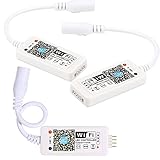
Goldwin Smart WiFi Controller,LED Strip,LED Pannel Light,LED Lamps,RGB Color Changing Wireless Remote Control from Anywhere with Timer,Music Mode Compatible with Voice Command Control Device(3)

JACKYLED GU24 to E26 E27 Adapter 10-pack Heat Resistant Up to 200℃ Fire Resistant Converts GU24 Pin Base Fixture to E26 E27 Standard Screw-in Socket

LED WiFi Smart Light Bulb, E26 WiFi Light Bulb Works with Amazon Alexa Google Home and IFTTT, RGBCW Color Changing, Cool White and Warm White Dimmable, No Hub Required, A19 60W Equivalent (2 Pack)

MELPO GU10 LED Dimmable Spotlight, 45-Degree Color Changing Light Bulb with Remote Control, RGB & Warm White (Pack of 4)