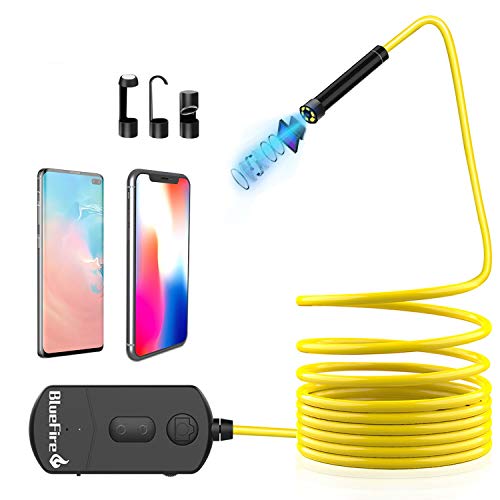
BlueFire 5MP HD WiFi Borescope 1944P Semi-Rigid Wireless Endoscope IP68 Waterproof Inspection Camera Snake Camera for Android and iOS Smartphones iPhone Samsung iPad Tablet (11.5FT)
Product Description
BlueFire 5MP HD WiFi Borescope 1944P Semi-Rigid Wireless Endoscope IP68 Waterproof Inspection Camera Snake Camera for Android and iOS Smartphones iPhone Samsung iPad Tablet (11.5FT)
- 【5 Megapixel HD Resolution】 Comes with 5 megapixels CMOS HD camera 3 adjustable resolution(Resolution: 1280x720 1920x1080 2592x1944) and 6 adjustable LED lights this WiFi borescope can help you capture clear pictures and high quality video at a focal length of 5-15cm.
- 【IP68 Waterproof】This camera and cable is IP68 waterproof you can use it in wet and dark pipes or underwater. (Note: the Wi-Fi box is not waterproof although the camera is IP68 waterproof we recommend you to use it underwater no longer than 10 minutes.)
- 【Zoomable Focus Feature】You can zoom in or zoom out the picture or video to inspect some dark areas more clearly and accurately you just need to press the “+” or “-” button to adjust it which has 3 enlarged and narrow modes.
- 【Semi-Rigid Cable】Semi-Rigid cable enables the endoscope to maintain shape which you can control the direction of endoscope easily bend or straight up the cable to access confined spaces or narrow dark places for nondestructive testing such as pipe mechanical equipment car maintenance carbon deposition cylinder engine and other devices.
- 【Easy to Operate】 This Wi-Fi borescope has its own Wi-Fi Signal it can support both Android smartphones(Above Android 4.4) and iPhone IOS system(Above IOS 6.0). There is no need to connect your own home WiFi all you need to do is just to download and install the "Mo-View" app on your phone and connect to its own Wi-Fi.
<b>Specifications: </b></br> Diameter: 8.5mm</br> Charging Adapter: 5V/2A</br> Working Time: 1-2 hours</br> LED Light: 6 pcs Adjustable</br> Pixel: 5.0 Megapixels CMOS</br> Working voltage: DC 5V/2A</br> Best Focal Distance: 5cm-15cm</br> Horizontal View Angle: 60 degree</br> Charging Time: 3-4 hours for fully charged</br> Support System: Android / IOS (Above IOS6)</br> Waterproof Grade: IP68 (lens and cable only)</br> Power Capacity: 2200mAh built-in Li-Ion battery</br> Camera Resolution: 2592x1944 1920x1080 1280x720</br> Transmission distance: 15 meters (without any obstacles)</br> <p> <b>Package: </b></br> 1 x Endoscope</br> 1 x USB to Micro USB Charging Cable</br> 1 x Side Mirror</br> 1 x Hook</br> 1 x Magnet</br> 1 x Manual</br> <p> <b>How to use? </b></br> 1.Download the APP "Mo-View" from Google Play Store or App Store. (If the APP "Mo-View" doesn't work on your phone please download another app "HD WIFI" to try again the password is also 12345678)</br> 2.Turn on the "ON/OFF" button the red power LED and the blue WiFi signal indicator will light up.</br> 3.Connect WiFi in your Phone Setting Click on the "Wi-Fi" or "WLAN". Find the default WiFi name "Jetion_xxxxxxxx" and join in. The default password is 12345678.</br> 4.After the WiFi "Jetion_xxxxxxxx" is connected successfully click the App icon you can operate the camera now.</br> <p> <b>Note:</b></br> Don't connect your own home WiFi.</br> Don't connect the WiFi in the APP.</br>
Technical Specifications
You might also like
BlueFire Upgraded 1080P HD Wireless Ear Otoscope Digital WiFi Ear Scope IP68 Waterproof Ear Inspection Camera Ear Cleaning Endoscope with 6 Adjustable LED Lights for IOS and Android Smartphones,Tablet
—

DEPSTECH Original Endoscope Borescope Carrying Case Bag for Depstech WiFi & USB Endoscopes with Cable Less Than 10 Meter, but Compatible with Other Brands: Goodan, Shekar, Pancellent, Fantronic
—

Electrical Residential Rough-In Quick-Card Based on the 2017 NEC and 2015 IRC
—
BlueDriver LSB2 Bluetooth Pro OBDII Scan Tool for iPhone & Android
—
Electrical Multimeter Test Leads Set with Alligator Clips Test Hook Test Probes Lead Professional Kit 1000V 10A CAT.II
—

Klein Tools 32561 Screwdriver / Nut Driver, 6-in-1 Stubby Screwdriver with Multi-Bits: 2 Phillips, 2 Flat Heads, 2 Nut Drivers
—

FLIR ONE Gen 3 - iOS - Thermal Camera for Smart Phones - with MSX Image Enhancement Technology
—

Walabot DIY Plus - Advanced Wall Scanner, Stud Finder - for Android Smartphones - DY2PBCGL01
—

100 Silver Plastic Cups 9 Oz Clear Plastic Cups Old Fashioned Tumblers Disposable Cups recyclable Wine glasses Silver Rimmed Cups Fancy Wedding decoration Cups Elegant Silver Rimmed plastic Party Cups
—
TENDOMI WiFi Smart Air Purifier with True HEPA, Fan Air Purifiers for Home, Bedroom, Office, Dual-Fan Quiet Air Cleaner for Pet, Dust, Allergies, Timer&Schedule, 6-Color Night Light, 12 Timer
—