
Apsung Key Finder, 4 Pack Wireless Anti-Lost Tracker, Anything Finder Wallet Bags Pet, Nut 3 Mini Locator App Control Smartphones.

Product Description
Apsung Key Finder, 4 Pack Wireless Anti-Lost Tracker, Anything Finder Wallet Bags Pet, Nut 3 Mini Locator App Control Smartphones.
- SMART FINDER -- Nut Find 3 makes it easy to find your misplaced items when you're in Wireless range, just tap a button and your key finder will ring loudly, even on silent.
- USER-FRIENDLY APP -- Access the tracking "Nut" app via your tablet or smart phone and instantly track car keys by following the map disconnection point
- FAMILY SHARING -- Find and share items with anyone. Can't find the television remote? Track and ring the key finder device from multiple phones and Nut accounts.
- LOST & FOUND NETWORK -- Millions of people from the network helps users find items outside Wireless range. If another user walks by your item, your item will updated with its last known location.
- ENVIRONMENTALLY FRIENDLY -- Super-thin and lightweight to make the key tracker easily fits into your wallet, key ring. 1 Year standby, normal use for 6-8 months, replaceable battery.
<b>Apsung Intelligent Wireless Anti-lost Tracking Tag Alarm Patch</b> <br><br><b>Compatibility: </b> <br>Compatible with IOS 8.0 and above and Android 4.3 and above <br><br><b>Importance: </b> <br>Log in using Facebook, Twitter, Google, or an Email account. <br>If you at home, in the office, or not traveling, use the "Find it" mode. <br>If you are outside or traveling use the "Anti-Lost" mode and it will remind you when you are 20-30 Meters away. <br><br><b>Instruction:How to works</b> <br>1. Download the "Nut" app from APP Store or Google Play Store, or scan QR code in the instruction to download the app. <br>2. Turn on Bluetooth, make sure your bluetooth on the phone is on. <br>3. Sign up: Start Nut app and press the sign up button. <br>4. Pair the nut: Close to your mobile phone and press the button for 5 seconds. <br>5. Bound your item with Nut. <br><br><b>What's in the Box:</b><br>4 x Apsung Key Finder ( White + Green + Grey + Pink ) <br> <br><b>FAQ:</b> <br><b>Q: Why can i still not connect with the key finder at the first time after i download the "Nut" APP?</b> <br>A:</b> Long press the key finder for 3 seconds until it ring and flashes to active the key finder, so that you can connect it. <br><br><b>Q: How do i use the key finder to find the smartphone?</b> <br>A:</b> Please press the key finder two times,then the smartphone will ringing. <br><br><b>Q: How to turn off the key finder?</b> <br>A:</b> Please long press the key finder for 3 seconds or turn off from your smartphone. <br><br><b>Q: Why it can not connect with another smartphone after i used?</b> </b> <br>A:</b> Find the setting of your old smartphone's app, then delete the old connection. <br><br><b>Apsung Warranty:</b> <br>30 days money back & 12 months warranty, Easy-to-reach Support.
Technical Specifications
You might also like
Mini Bluetooth Earbud Charging Case One Piece True Wireless in-Ear Earphone 20H Playing Time Headphone Invisible Noise Canceling Headset Mic Smartphone, Android
Smart Key Finder Anti-Lost Tag – Luxsure Cell Phone Wallet Bags Pet Tracker Nut 3 Mini Locator with App Control for iPhone/iPod / iPad/iOS Android Devices (2 in 1)
YANDOG Hot Mini Smart Finder Bluetooth Tag GPS Tracker Key Wallet Kids Pet Dog Cat Child Bag Phone Locator Anti Lost Alarm Sensor.Best Key Finder,Smart Finder Bluetooth Tracking
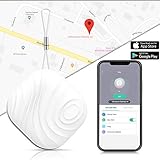
Smart Key Finder Anti-Lost Tag – Luxsure Cell Phone Wallet Bags Pet Tracker Mini Locator Control Compatible for iPhone/iPod / iPad/iOS / Android (White)

Sendida Toilet Plunger Unclogger - Toilet Clog Remover, Drain Cleaner, Bathroom Toilet Dredge Pipe Clogged Siphon Toilet

Roxenda Speed Cube, 3x3x3 Pyramid Speed Cube Triangle Puzzle Magic Cube Enhanced Edition - Turns Quicker More Precisely Than Original

Mandoline Slicer - MultiPurpose For Vegetable, Fruit, Cheese, Ham, Sausage - With 5 Premium Quality Stainless Steel Blades, Food Container, Guided Cover, Safety Hand Guard Plus Peeler
Bluetooth Speakers- Portable 3 in 1 Wireless Stereo Speaker HD Audio, 3 Modes LED Light, Micro SD Card Slot Best Camping, Hiking Outdoor

Hovast CMBB Phone Holder Universal Dashboard 360°Rotation Windscreen Suction Cup Non-Slip Car Mount Cradle Dash Strong Sticky Gel Pad