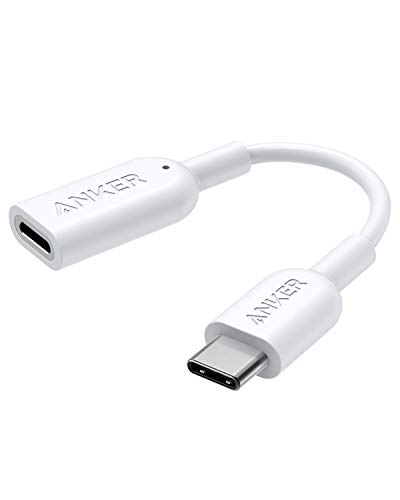
Anker USB-C to Lightning Audio Adapter (Audio Only, Does Not Support Charging) (White)
Product Description
Anker USB-C to Lightning Audio Adapter (Audio Only, Does Not Support Charging) (White)
- The Anker Advantage: Join the 55 million+ powered by our leading technology.
- Apple MFi Certified: Works flawlessly to connect Lightning headphones with USB-C Compatible Devices.
- Simplified Listening: Use one pair of Lightning headphones for your iPhone, iPad Pro, Mac, or Windows 10 computer.
- Lossless Audio: Full digital 48KHz/24-bit transmission.
- Full Audio Functionality: Retains earphone mic and remote functions while connected to your USB-C devices. (Does not support charging).
<b>Model Number:</b>A8178<br><br> <b>Works with all MFi-certified Lightning headphones (including active noise canceling ones) such as:</b><br> - Apple EarPods with Lightning Connector<br> - Beats urBeats3 with Lightning connector<br> - Apogee Sennheiser AMBEO Smart Headset, including binaural recording<br> - Audeze iSINE LX, LCDi4, iSINE20, iSINE10, SINE, and EL-8 Titanium<br> - Pioneer Rayz, Rayz Plus, Rally<br> - Radius HP-NEL21, HP-NEL31, HC-M100L, and HP-NHL21<br><br> <b>Note</b><br> Not compatible with Windows 8 or earlier.<br> Not a charging adapter.<br> May need one-time audio device setup on Macs<br> - Connect adapter to Mac.<br> - Connect Lightning earphone to adapter<br> - Choose Apple menu > System Preferences, then click Sound.<br> - Choose the Output tab and select "Lightning Audio Adapter"<br> - Choose the Input tab and select "Lightning Audio Adapter"<br>
Technical Specifications
You might also like

ARKTEK USB-C Adapter i OS Lighting Cable (Female) to USB Type C (Male) - Charging Adapter for Galaxy S10 Note 10 Pixel 3 and More (Sivler)

USB-C Adapter with Keychain - iOS Cable Female to USB Type C Male,Data Sync and Charging Adapter for Galaxy Note 9 Pixel 3 (USB-C, Silver)
HyperDrive USBC Hub Adapter 6-in-1 Dongle with USB C PD Charging, 4K HDMI, USB 3.0, 3.5mm Headphone Jack, SD, Micro SD - Compatible with iPad Pro 2018 (Space Gray)

SpinFit CP155 – Patented Silicone Eartips for Replacement (2 Pairs) (5.5 mm Nozzle Dia.) (Large, Black & Blue)

USB C Splitter, Dual Audio and Charger Adapter, USB C Adapter Headphone Jack, 2-in-1 Adapter Compatible with Pixel 2/2 XL/3/3 XL, Galaxy Note 10/10+, Huawei, iPad Pro 2018 and More-White

The Muse Case - 2018 iPad Pro 12.9 inch - Very Protective But Thin + Convenient Magnetic Stand + Sleep/Wake Cover by ZUGU CASE (Navy Blue 2018 12.9 Gen 3)