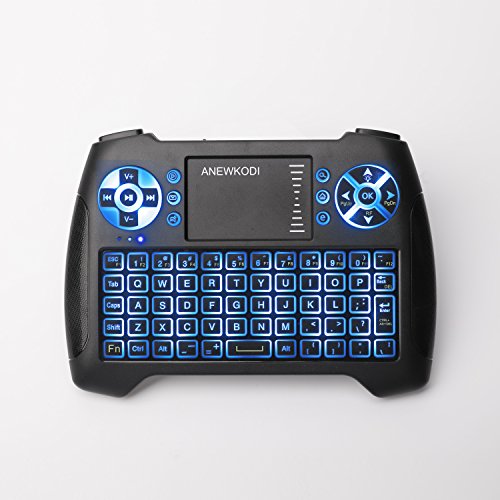
ANEWKODI Mini Keyboard with Touchpad Mouse and Multimedia Keys, USB Backlit Wireless Keyboard 2.4Ghz Remote Control Best for Smart TV, PC, Android TV Box, PS4, IPTV, Xbox, Support Windows 10

Product Description
ANEWKODI Mini Keyboard with Touchpad Mouse and Multimedia Keys, USB Backlit Wireless Keyboard 2.4Ghz Remote Control Best for Smart TV, PC, Android TV Box, PS4, IPTV, Xbox, Support Windows 10
- 3 in 1 Function: Mini Wireless Keyboard + Mouse + Touchpad. You can remote your device with 360-degree, chatting Skype or email with friends with lying on the sofa.
- Short-cut Key: There are 8 multimedia function keys such as on/off switch, mail box, mute, mouse left, searching, browser home page and mouse right, which can save your time and improve your working efficiency.
- Operation Distance: The range of wireless is up to 10m, with stable signal, it will not disconnect with a long distance from device or something shelter in front of you.
- Auto Sleep and Wake: If there is a long period of inactivity, the keyboard will automatically go into a sleep mode, you can wake it up by pressing any key or touchpad.
- Awesome After-sale Service: Our company attaches great importance to customer service. If you have any problems when using, just contact us now. We will always offer you our best service.
<b>How to use:</b><br><br>1. Open the cover at the bottom of the keyboard, take the Nano USB receiver of the keyboard out and plug into the USB port of your computer. Then please turn on the on/off switch of your keyboard to "on" position and your computer will recognize your keyboard automatically and work.<br>2. After connecting the USB with the device, press "Fn + UP" to activate the backlit.<br>3. After finishing using it, push the switch to the off position. Please plug the USB receiver out from your connecting devices and then insert back in the keyboard.<br><br><b>Kindly Note:</b><br><br>1. Nano Receiver: Mini USB receiver inside of the keyboard, convenient for carrying, when no use it, put it back to the back of keyboard to avoid losing.<br>2. The mini usb receiver just support usb 2.0<br>3. T16 wireless mini keyboard have backlit function, please press "Fn + UP" to open or close the backlit.<br><br><b>Technical Parameters:</b><br><br>1. Measurements(L*W*H): 5.9*4.2*0.7in<br>2. Weight: 5.11oz<br>3. Operational Range: up to 82ft<br>4. Transmit Power: +4 db Max<br>5. Operation Voltage: 3.3V<br>6. Operation Current: <5mA<br>7. Charging Current: <300mA<br>8. Sleep Current: <1mA<br><br><b>Require System:</b><br><br>1. HID compatible device<br>2. Terminal with USB port<br>3. Windows 2000<br>4. Windows XP<br>5. Windows Vista, Windows CE,Windows 7, Windows 8, Windows 10<br>6. Linux<br>7. Android OS(with standard USB interface)<br><br><b>Package Including:</b><br><br>1 * T16 Wireless Gaming Keyboard<br>1 * 2.4G Wireless USB Receiver<br>1 * USB Charging Data Cable<br>1 * User Manual
Technical Specifications
You might also like

FurroLandia Hemp Hip & Joint Supplement for Dogs - 170 Soft Chews - Made in USA - Glucosamine for Dogs - Chondroitin - MSM - Turmeric - Organic Hemp Seed Oil - Natural Pain Relief & Mobility

Butane Lighter Refillable Lighter Flexible Long Neck Lighter Adjustable Jet Flame Torch Lighter for Grill BBQ Gas Fireplace Fire(Butane Fuel Not Included), Gold

Renogy Portable Charger 10000mAh Power Bank, World's Smallest and Lightest External Battery Pack with Dual USB Ports, Mobile Charger Power Pack for iPhone, iPad, Samsung Galaxy

Water Baby Water Sprinkler Pad for Kids, Upgraded 68' Summer Outdoor Water Toys Wading Pool Splash Play Mat for Toddlers Baby, Outside Water Play Mat for 1-12 Years Old Children Boys Girls
Android 9.0 TV Box,Pendoo TX6 Android TV Box 4GB DDR3 32GB EMMC Dual WiFi 2.4G+5G BT5.0 Quad Core 3D 4K Ultra HD H.265 USB3.0 Android TV Box

Gaming Keyboard, TedGem Keyboard Wired Keyboard USB Keyboard Wired Gaming Keyboard All-Metal Panel Spill-Resistant Keyboard with LED Backlit for PC/Laptop / PS4 / Xbox One
Relohas Mini Spy Hidden Camera, 1080P Spy Camera Wireless Hidden WiFi Upgraded Night Vision Spy Cam Live Streaming, Portable Nanny Cam with Motion Detection for Indoor/ Outdoor (with Cell Phone APP)